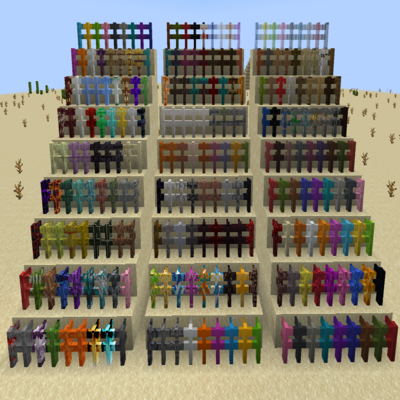
More Beautiful Fences & Gates
Java mod listed for Minecraft 1.18–1.21. Downloads from the MC Java Mods app on Android.
This mod adds around 240 new Fences & Gates and extracts textures from their respective vanilla Minecraft block
I don't know my version or loader
This mod adds around 240 new Fences and 240 new Gates.
IMPORTANT !
From Forge 1.19.4 the mod require Blackwolf Library to work !

From Fabric 1.19.4 the mod require Blackwolf Library - Fabric to work !

The mod extracts textures from their respective vanilla Minecraft block. So they can be overriden with resource packs as usual.
Compatible with all resource packs.
It's compatible with: Just Enough Items (JEI)
To create these new fences or gates you must first create the Fence Frame or Gate Frame. Below the recipe. You can use any fence or gate from the vanilla game for the recipe
You can now use the Frames with a block whose texture you want. Below are some examples.
Some Fences or Gates emit light like their respective blocks.
FABRIC VERSION: From 1.19.2
- All Fences

- All Gates

- Examples of Fence Frame Recipe and Gate Frame Recipe


Some Crafting Example
- Magma Block Fence

- Obsidian Cry Gate

- Diamond Block Fence

- Light Blue Stained Glass Gate

Strange Fence and Gate (no texture)
Is a special fence or Gate and you need particular crafting, you can use Just Enough Items (JEI) to see it.

BisectHosting offers quick, simple and high quality server hosting with over a dozen locations available across the world, ensuring low latency. After your purchase, the server is already configured and ready to use. With their 24/7 support and fast-response time, no issues shall stand in your way!
Use the promo code BLACKWOLF to get a 25% discount off your first month when buying any of their gaming servers.
https://bisecthosting.com/blackwolf
Feel free to use this mod on your modpack
- Edition: Minecraft Java
- File type: .jar
- Minecraft versions listed: 1.21.11, 1.21.10, 1.21.8
- How to install: Install the matching mod loader (Forge, Fabric or NeoForge) for your Minecraft version. → Download the .jar. → Put it in the .minecraft/mods folder and launch that loader profile.
- Where to get it: Opens on CurseForge — not every file is mirrored on our own servers.
Install steps are the general flow for this file type — How to install Minecraft Java mods & modpacks walks through it step by step.
- Ships as MoreFences-1.20.4-neoforge-1.2.5.jar — drop this file into the mods folder
- Download size: 1.7 MB
- Download link checked 24 Sept 2026 — working
These come from our own check of the pack file, not from the source page.