OldF3
Java mod listed for Minecraft 1.18–1.19. Downloads from the MC Java Mods app on Android.
I don't know my version or loader
The mod is currently on pause as I need to find the USB I used to backup my data to continue development, it SHOULD work on new versions as it is so simple.
NOTE: The "chunk updates" meter ONLY works WITHOUT sodium! Sodium is compatible with 1.0.1-compatfix and newer!
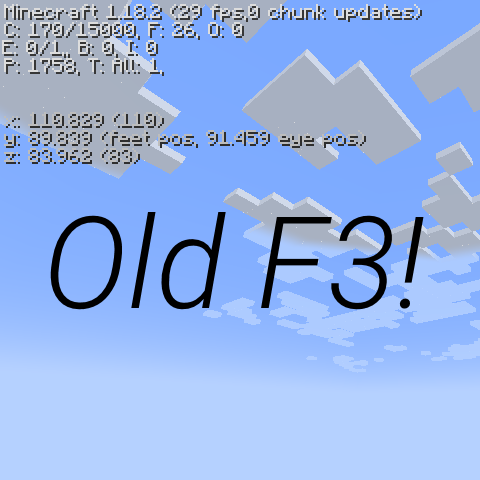
OldF3 is a mod that restores the look of the old F3 menu that was changed in 1.8. This mod is purely aesthetic and more compact than the normal F3 menu.Here is a comparison of this mod and the 1.5.2 F3 menu


This mod goes best with mods like Nostalgic Tweaks!
You are free to use this mod in a modpack if you want.
You can do anything with the mod as long as you give credit
- Edition: Minecraft Java
- File type: .jar
- Minecraft versions listed: 1.19.3, 1.19.2, 1.19.1
- How to install: Install the matching mod loader (Forge, Fabric or NeoForge) for your Minecraft version. → Download the .jar. → Put it in the .minecraft/mods folder and launch that loader profile.
- Where to get it: Opens on CurseForge — not every file is mirrored on our own servers.
Install steps are the general flow for this file type — How to install Minecraft Java mods & modpacks walks through it step by step.
- Ships as oldf3-1.18.2-1.0.2.jar — drop this file into the mods folder
- Download size: 8 KB
- Download link checked 5 Nov 2026 — working
These come from our own check of the pack file, not from the source page.