FTB Quests: Localization keys
Java mod listed for Minecraft 1.18. Downloads from the MC Java Mods app on Android.
⬇ Download on CurseForgeThe author built this one for Minecraft 1.18.2 on Forge. On other versions it may install and then do nothing.

■ This mod does not do the translation for you.
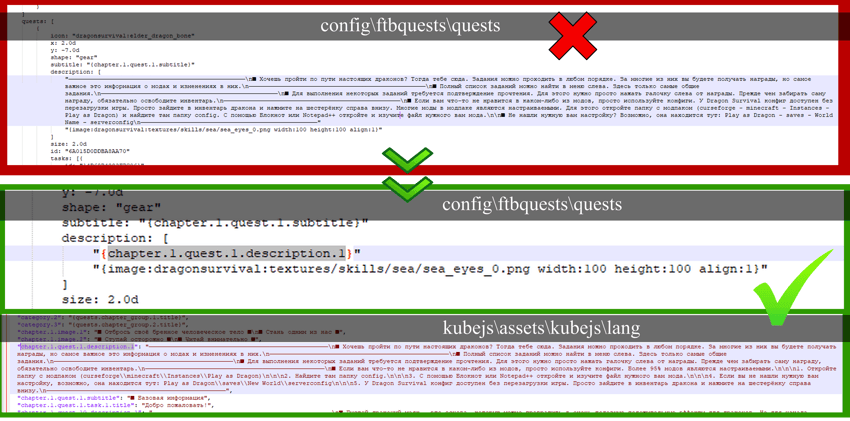
■ Localization keys are the basis for simple and easy translations of any modpack. If you wrote the text of your FTB quests directly inside the quests (config\ftbquests\quests) instead of putting them in a separate file for kubejs (kubejs\assets\kubejs\lang), you may encounter a problem. You will have to manually write each key and transfer the text of each quest to a separate file (as written here). This is extremely tedious and complicated. I ran into this myself, but thanks to Horeak you don't have to do it manually anymore. The mod itself will generate all the keys for you.
■ How to create localization keys:
- Forge 1.40.60.
- Install FTB Quests and KubeJS for 1.18.2
- Add this mod to the mod folder
- Run your modpack with fully written quests
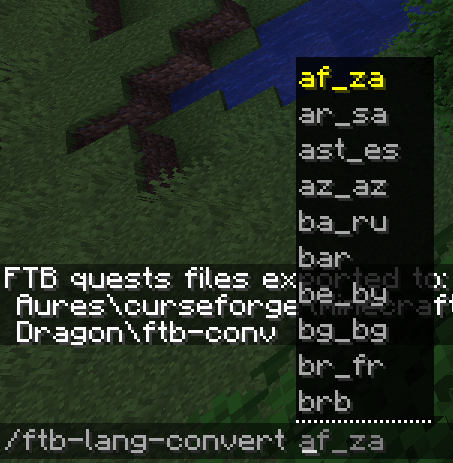
- Write in chat: /ftb-lang-convert <modpack language> (/ftb-lang-convert ru_ru). Modpack language affects only file name.
- All files will be in the folder <gamedir>\ftb-conv\
- Move the generated files to the appropriate folders (kubejs\assets\kubejs\lang and config\ftbquests\quests).
- That's all. If you want to add new quests to the already generated keys, don't do it. All subsequent quests and their localization keys will have to be written manually. This mod should only be used when you have finished writing all the text for your quests.
- After generating the language you can delete the mod.
■ Very important:
- This mod will NOT be updated again under any circumstances. It was created once for the Play as dragon modpack, but any other modpack creator can use it too. Source code here.
- Avatar by naanahstnil.
- If you want to use images for modpack, it is better to create them after the generation of localization. Mod does not work well with images in the center of the text. Use images only at the beginning and end.
- Some characters in the text may not work well with kubejs. If you get the phrase "Format error" at the top of your text, write the text again and try not to use any symbols. It doesn't affect anything.
- A backup copy of your quests will be created in the ftb-conv folder. Just in case.
- This mod does not do the translation modpacks for you. Localization keys only.
- Edition: Minecraft Java
- File type: .jar
- Minecraft version listed: 1.18.2
- How to install: Install the matching mod loader (Forge, Fabric or NeoForge) for your Minecraft version. → Download the .jar. → Put it in the .minecraft/mods folder and launch that loader profile.
- Where to get it: Opens on CurseForge — not every file is mirrored on our own servers.
Install steps are the general flow for this file type — How to install Minecraft Java mods & modpacks walks through it step by step.
- Ships as FTB_Quest_Lang_Gen.jar — drop this file into the mods folder
- Download size: 7 KB
- Download link checked 15 Oct 2026 — working
These come from our own check of the pack file, not from the source page.