Better Discord Integration
This mod combines your Discord with your Minecraft server.
This is a server-side mod and therefore doesn't need to be on the client.
Is fully configurable!
Setup
First, put the mod in your server mod folder and start your server so the config file generates.
In your bot section, you need to activate this option.
Then fill in the bot setup info in the config file.

Finally, restart your server, and enjoy!
Config
# Configuration file
##########################################################################################################
# bot setup
#--------------------------------------------------------------------------------------------------------#
# The Most Important Info Of The Bot
##########################################################################################################
"bot setup" {
# What Is Playing The Bot? [default: Minecraft]
S:Activity=Minecraft
# The Channel Where Messages Are Exchanged [default: 123456789]
S:"Channel ID"=123456789
# Token Of The Bot [default: TOKEN]
S:Token=TOKEN
}
##########################################################################################################
# messages
#--------------------------------------------------------------------------------------------------------#
# The Messages Of The Bot
##########################################################################################################
messages {
# The Format Of How The Message From Discord Is Going To Be Display In Minecraft [default: Discord <User>: <Message>]
S:"Discord Chat Message"=Discord <User>: <Message>
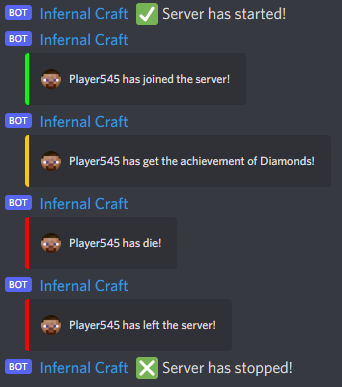
# The Message Display When Player Join The Server [default: <Player> has joined the server!]
S:"Join Message"=<Player> has joined the server!
# The Message Display When Player Leave The Server [default: <Player> has left the server!]
S:"Leave Message"=<Player> has left the server!
# The Format Of How The Message From Minecraft Is Going To Be Display In Discord [default: <Player>: <Message>]
S:"Minecraft Chat Message"=<Player>: <Message>
# The Message Display When Player Get And Achievement [default: <Player> has get the achievement of <Achievement>]
S:"Player Achievement Message"=<Player> has get the achievement of <Achievement>
# The Message Display When Player Die [default: <Player> has die!]
S:"Player Dead Message"=<Player> has die!
# The Message Display When Server Started [default: :white_check_mark: Server has started!]
S:"Server Started Message"=:white_check_mark: Server has started!
# The Message Display When Server Stopped [default: :negative_squared_cross_mark: Server has stopped!]
S:"Server Stopped Message"=:negative_squared_cross_mark: Server has stopped!
}
Any questions or issues pls write to my Discord PoliZZZ#0812
Quick facts
- Edition: Minecraft Java
- File type: .jar
- How to install: Install the matching mod loader (Forge, Fabric or NeoForge) for your Minecraft version. → Download the .jar. → Put it in the .minecraft/mods folder and launch that loader profile.
- Where to get it: Opens on CurseForge — not every file is mirrored on our own servers.
Install steps are the general flow for this file type — How to install Minecraft Java mods & modpacks walks through it step by step.
Verified by MCModsHub
- Ships as Better Discord Integration 1.1.jar — drop this file into the mods folder
- Download size: 12.7 MB
- Download link checked 25 Sept 2026 — working
These come from our own check of the pack file, not from the source page.