ChatContentModifier
Java mod listed for Minecraft 1.19–1.21. Downloads from the MC Java Mods app on Android.
I don't know my version or loader
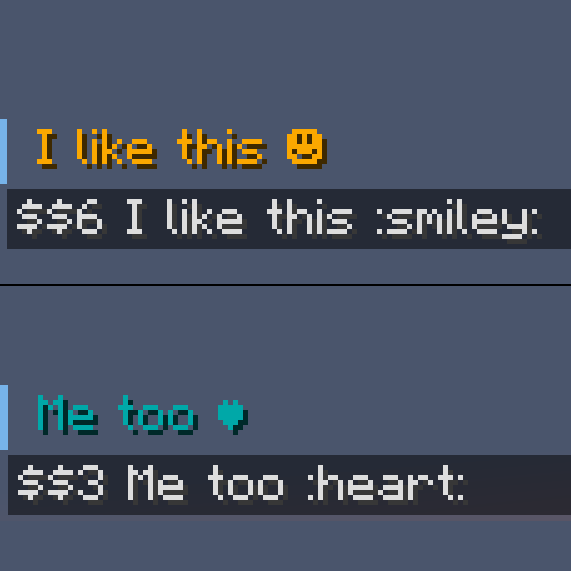
This mod allows servers to modify the content of the chat sent by players by using Minecraft's Chat Preview feature, which was introduced in 1.19. Currently, this mod supports fully customizable chat content replacement, which also supports regular expressions. Chat content replacement is useful for a variety of features:
- Replace special words with unicode characters, like `:smiley:` by ☺
- Automatically replace commonly misspelled words with their correct variant, like `theyre` by `they're`
- Replace certain symbols with a § symbol (which, normally, cannot be typed or sent into the chat by players) to allow players to make use of color codes when chatting, like `$$` by `§`
More information can be found in the mod's configuration file, which is located in the `world/serverconfig` folder.
This is a Forge mod, a Fabric port may happen in the future (if there is demand).
This mod is serverside only (meaning that it only needs to be installed on the server to work).
- Edition: Minecraft Java
- File type: .jar
- Minecraft versions listed: 1.21.8, 1.21.10, 1.21.11
- How to install: Install the matching mod loader (Forge, Fabric or NeoForge) for your Minecraft version. → Download the .jar. → Put it in the .minecraft/mods folder and launch that loader profile.
- Where to get it: Opens on CurseForge — not every file is mirrored on our own servers.
Install steps are the general flow for this file type — How to install Minecraft Java mods & modpacks walks through it step by step.
- Ships as ChatContentModifier-1.20-1.0.2.jar — drop this file into the mods folder
- Download size: 10 KB
- Download link checked 15 Oct 2026 — working
These come from our own check of the pack file, not from the source page.