
Craft & Cup - Football
Craft & Cup turns your Minecraft Bedrock world into a living football universe. Start your own club, sign players, train a squad, and battle your way from…
⬇ Download on CurseForge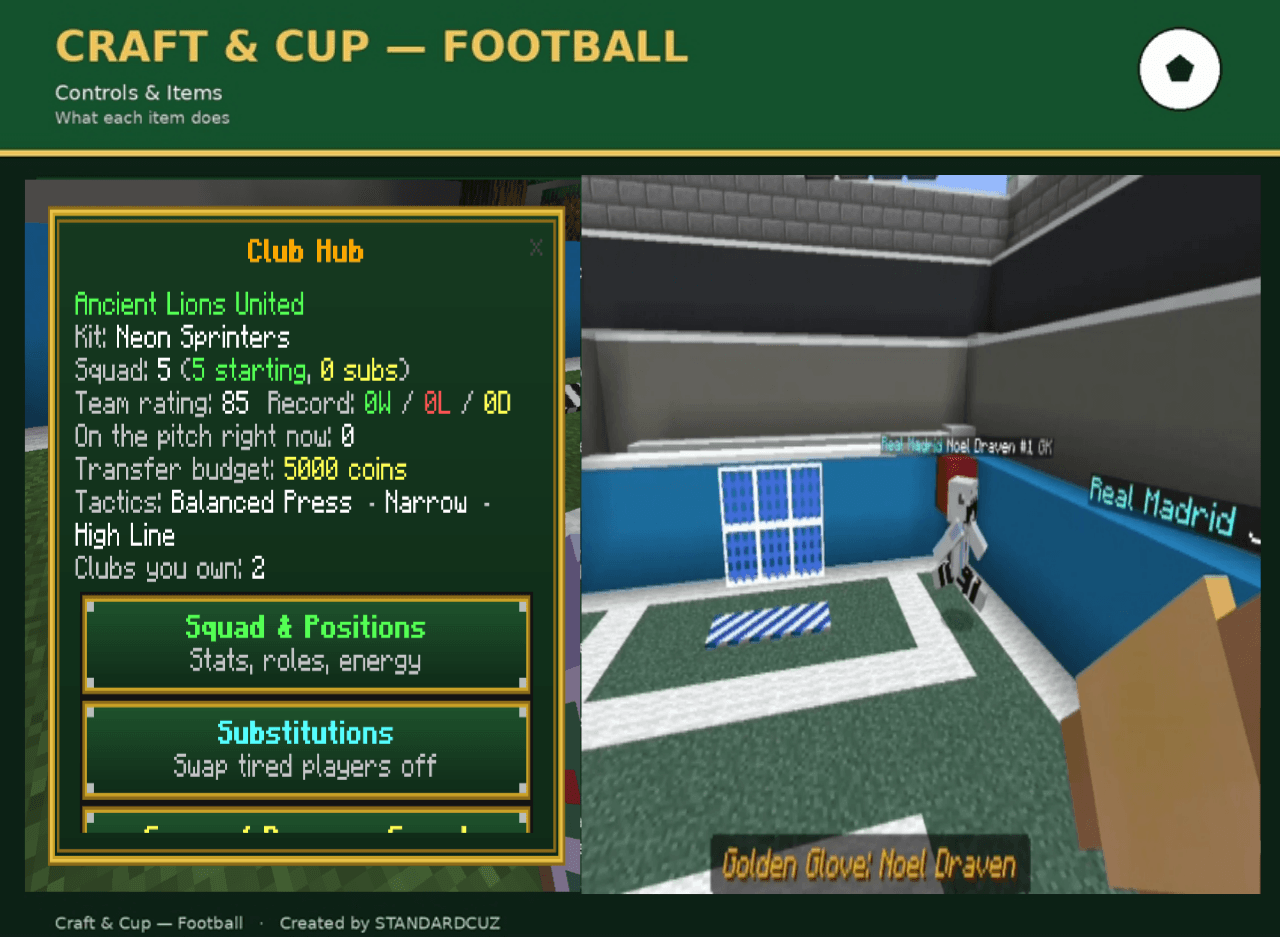
# Craft & Cup — Football
**Build a football dynasty, block by block.**
Craft & Cup turns your Minecraft Bedrock world into a living football universe. Found your own club, sign players, train and manage a squad, build a stadium from scratch, and battle your way from a backyard kickabout to lifting the World Cup — all run through a single item, with no commands required.
Whether you want to be a hands-on manager calling the shots from the sideline, or lace up and play every match yourself, Craft & Cup gives you a full football career inside Minecraft: living AI footballers with real stats, a referee who actually enforces the rules, a Transfer Market, a Youth Academy, sponsorships, a 622-name Hall of Fame, and six different trophies to chase.
---
## Why players love it
- ⚽ **Real ball physics** — the ball bounces, rolls, and takes friction off the ground and walls. Shoot, pass, and dribble it yourself, or watch your AI squad do it with genuine tactical awareness.
- 🤖 **Smart AI football** — challenge up to 100 AI-controlled clubs, or play against friends. Squads hold true shape (keeper, defenders, midfield, forwards) and follow the Tactics & Formation you set for pressing, width, and depth — no two opponents play quite the same way.
- 🟨🟥 **A referee who really officiates** — a referee spawns at kick-off, follows the ball, calls fouls, hands out yellow and red cards, and warns for offside-style runs. Fouls, handballs, and reckless tackles all have real consequences.
- 📋 **Live match feed** — an on-screen sidebar tracks goals, scorers, fouls, cards, and full time as they happen, backed by whistle, card, and tackle sound effects.
- 🏟️ **Build your own stadium** — one Stadium Marker item lays down pitch markings, goals, keeper lines, hoardings, tiered stands, floodlights, and corner flags in seconds.
- 👕 **30 unique kits & 38 player skins** — from the Scarlet Blaze and Midnight Wolves to World Cup specials like World Gold and Arctic Ice — fully customizable club identity.
- 🧑🤝🧑 **Living, persistent footballers** — recruit free agents wandering the world with a Football Application, or trade through the Transfer Market. Every player has their own speed, precision, and strategy ratings, a position, a shirt number, a contract, and stamina that runs down over a match.
- 🏆 **Season & Cup competition** — every club you manage is automatically entered into a bracketed Season Cup, complete with standings, playoffs, and penalty shootouts. Stage a full numbered **World Cup** for huge prize money and a unique World Cup trophy.
- 🥇 **Six distinct, hand-drawn trophies** — Season Cup, World Cup, Golden Ball, Golden Boot, Golden Glove, and Best Young Player.
- 📈 **A full club to manage** — Scout Network, Youth Academy, backroom staff, sponsorship deals, matchday gate money, stadium upgrades, and daily team talks to restore squad energy.
- 📜 **622-name searchable Hall of Fame** and complete season history, tracking every past champion and record.
- 🌍 **Fully localized** — menus and referee callouts translated into over 30 languages.
- 🎨 **Custom green & gold UI** — every menu uses a themed Club Hub interface, without touching or overriding any vanilla Minecraft textures.
---
## Getting started — your first 10 minutes
**1. Get your Club Hub.**
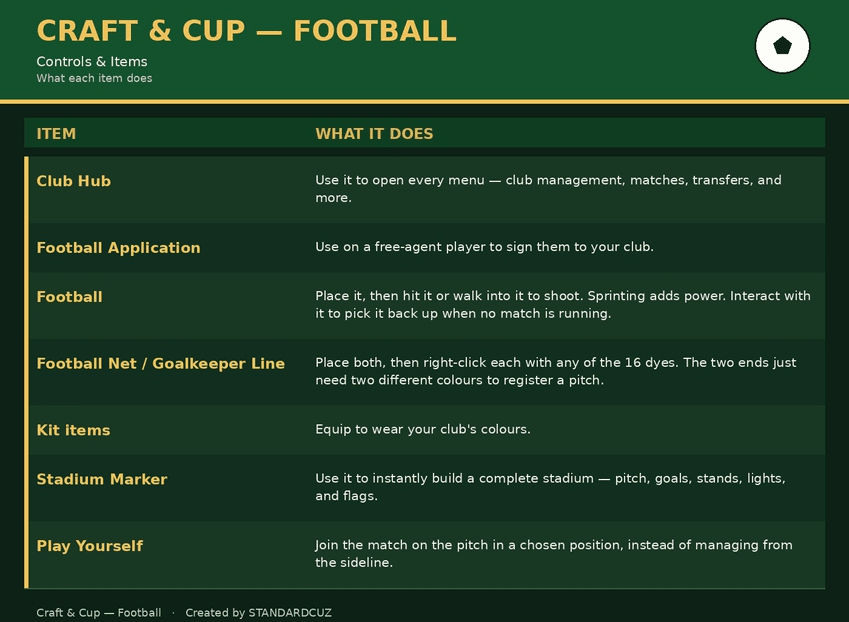
Craft or find the **Club Hub** item. This is your entire control panel — every menu in the addon opens from here. Keep it in your hotbar.
**2. Create your club.**
Open the Club Hub → **Club Identity**. Name your club and pick one of the 30 kits to wear as your colours.
**3. Sign your first players.**
Spawn a **Football Player** (via spawn egg) or find a free agent wandering near a village. Craft a **Football Application** and use it on them to sign them to your club — they'll be given your kit, a shirt number, and randomized speed/precision/strategy ratings.
**4. Build a pitch.**
Craft a **Stadium Marker** and place it down. It automatically generates a full pitch — markings, goals, keeper lines, stands, floodlights, and corner flags — ready to play on. (You can also place a **Football Net** and **Goalkeeper Line** by hand — just dye each end a *different* colour using any of the 16 vanilla dyes to mark the two ends of the pitch.)
**5. Set your squad.**
Open **Squad & Positions** in the Club Hub to assign your signed players to Goalkeeper, Defender, Midfielder, or Forward. Set your **Tactics & Formation** — pressing, width, and depth — to shape how your team plays.
**6. Find an opponent.**
Open **Find Opponents**, pick an AI club, and issue a challenge to kick off — or use **Spawn / Despawn Squad** to bring your team onto the pitch for a friendly.
**7. Kick off.**
A referee spawns automatically. Hit or walk into the ball to shoot — sprinting adds power. Use **Play Yourself** if you'd rather step onto the pitch and play a position alongside your squad instead of managing from the sideline.
**8. Aim for the World Cup.**
Once you're comfortable, open **World Cup** in the Club Hub to stage a full numbered tournament for major transfer funds and the World Cup trophy — or let the automatic **Season Cup** bracket carry your club through a full season.
---
## How to play — full instructions
# Controls & items
### Match rules
- Matches run for the duration you set in **Match Settings**.
- Scoring in the opposing end counts for your club; the live score is tracked in the Club Hub.
- A referee spawns at kick-off, follows the ball, and enforces the laws of the game.
- **Fouls:** hitting an opposing player draws a whistle and a free kick.
- **3 fouls = yellow card** (a booking, plus a slowness penalty).
- **6 fouls = red card** — AI players are sent off; human players get heavy slowness.
- Running well beyond the ball earns an offside-style warning and the referee waves you back onside.
- Goals only count when the ball *newly* enters the net — a ball already sitting in the goal won't re-score.
- A ball that goes out of the field of play is returned to the centre spot and play restarts from there.
- AI players play by the rules too — booked players stop diving into tackles, and nobody challenges recklessly inside their own box (penalty risk).
- Squads hold a real shape: keeper, defenders, midfield, and forwards keep their lanes rather than all chasing the ball.
- Each club sets its own **Tactics & Formation** — pressing, width, and depth — so opponents genuinely play differently from one another.
- Every player-controlled club is automatically entered into the Season Cup bracket.
- A battle always uses the nearest stadium to the host club — if there's no stadium nearby, the challenge is cancelled until one is built.
- Tired players lose pace during a match — bring on **Substitutions** to keep your squad fresh.
### Reading the match feed
During a match, a **Match Feed** sidebar appears on screen, logging events newest-first:
- ⚽ Goals, with the scorer named
- Fouls, and who they were committed on
- Yellow and red cards
- Offside-style warnings, plus kick-off and full-time notices
A running tally at the top tracks total fouls, yellow cards, and red cards for the match. Referee callouts also flash across your action bar, backed by whistle, card, and tackle sound effects. You can toggle the sidebar on or off from the in-game How To Play menu — it only appears within 50 blocks of a live match.
### Club features, menu by menu
- **Squad & Positions** — manage every signed player's ratings, role, and energy.
- **Tactics & Formation** — set your club's pressing, width, and depth.
- **Transfer Market** — buy, sell, and release players, manage contracts and budgets.
- **Club Extras** — sponsorship deals, daily matchday gate money, stadium upgrades (seating, floodlights, medical bay, academy), a Youth Academy that produces home-grown players, and a free daily team talk to restore squad energy.
- **Join Another Club** — become the manager of an existing club, or sign on as one of its players without taking it over. AI clubs always hand over a squad that's already fully staffed.
- **Season & Cup** — brackets, standings, playoffs, and penalty shootouts.
- **Leaderboards** — top scorers, assist providers, and clean sheets.
- **Awards & Trophies** — end-of-season honours across all six trophy categories.
- **Skin & Kit Preview** — check the look of every player and kit before you commit.
- **Season History** — browse past tables, champions, and records.
- **Battle Requests** — field challenges from up to 100 AI clubs.
- **Hall of Fame** — a searchable record of 622 legendary names.
---
## Troubleshooting
- **No referee showing up?** The referee only spawns while a match is actively running.
- **No feed sidebar?** Toggle it on from the How To Play menu, or start a match — it needs to be within 50 blocks.
- **No custom sounds?** Make sure the Craft & Cup resource pack is enabled and positioned above other packs.
- **Players look like default Steve skins?** The resource pack isn't applied — re-enable it in your world settings.
- **Menus won't open?** Close your inventory or chat window first, then use the Club Hub again.
- **Can't start a match?** You need a stadium within range of the host club — place a Stadium Marker or a hand-built net + goalkeeper line pair first.
Every one of these tips — plus the full match rules, controls guide, and feature list above — is also built right into the addon itself, under **Club Hub → How To Play & Info
**, so new players always have help on hand without leaving the game.
---
*Craft & Cup — Football. Created by STANDARDCUZ.*
- Edition: Minecraft Bedrock
- File type: .mcpack or .mcaddon
- Minecraft versions listed: 26.20, 26.30
- How to install: Download the .mcpack or .mcaddon file. → Open it — Minecraft imports it. → In your world: Behavior Packs → Available → Activate, then the same under Resource Packs.
- Where to get it: Opens on CurseForge — not every file is mirrored on our own servers.
Install steps are the general flow for this file type — How to install Minecraft Bedrock addons & mods walks through it step by step.
- Pack type: .mcaddon — behaviour and resource pack in one file
- Manifest requires Minecraft 1.21.80 or newer
- Complete pack — everything it depends on is inside the file
- Download size: 899 KB
- Download link checked 25 Sept 2026 — working
These come from our own check of the pack file, not from the source page.