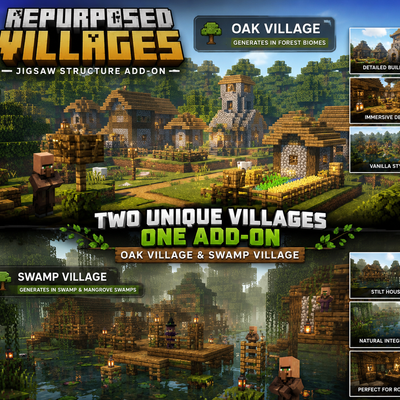
Repurposed Villages
The author built this one for Minecraft 26.40. On other versions it may install and then do nothing.
Adds two new custom village types to Minecraft, bringing more variety and life to your worlds!
🌳 Oak Villages
Discover new Oak Villages hidden throughout forest biomes. These villages feature custom oak-themed buildings, houses, streets, decorations, and village layouts designed to fit naturally into the surrounding forest.
🌿 Swamp Villages
Explore unique Swamp Villages built for swamp and mangrove swamp environments. Discover custom buildings, pathways, decorations, and village structures designed to blend into the wet and muddy landscape.
✨ Features
- Two new custom village types
- Oak Villages for forest biomes
- Swamp Villages for swamp environments
- Custom houses and town centers
- Custom streets and decorations
- Custom village layouts
- Jigsaw-based village generation
- Villagers and village components
- Designed to work alongside vanilla villages
- Adds variety without replacing the original village system
Explore the world, discover new settlements, and experience Minecraft villages in completely new environments!
📥 Installation
- Download the Oak Village or Swamp Village
.mcpackfile. - Open the downloaded file with Minecraft Bedrock Edition.
- Minecraft will automatically import the pack.
- Create a new world or edit an existing world.
- Activate the imported pack in the world settings.
- Create or load the world and explore the appropriate biome.
- The custom village will generate naturally when the required biome and generation conditions are met.
Note: For the best results, test the add-on in a new world, since world generation changes may not appear in already-generated chunks.
- Edition: Minecraft Bedrock
- File type: .mcpack or .mcaddon
- Minecraft version listed: 26.40
- How to install: Download the .mcpack or .mcaddon file. → Open it — Minecraft imports it. → In your world: Behavior Packs → Available → Activate, then the same under Resource Packs.
- Where to get it: Opens on CurseForge — not every file is mirrored on our own servers.
Install steps are the general flow for this file type — How to install Minecraft Bedrock addons & mods walks through it step by step.
- Pack type: .mcpack — a single pack
- Manifest requires Minecraft 1.21.20 or newer
- Complete pack — everything it depends on is inside the file
- Download size: 69 KB
- Download link checked 25 Sept 2026 — working
These come from our own check of the pack file, not from the source page.