Shibaplush
Java mod listed for Minecraft 1.16. Download on the author's site.
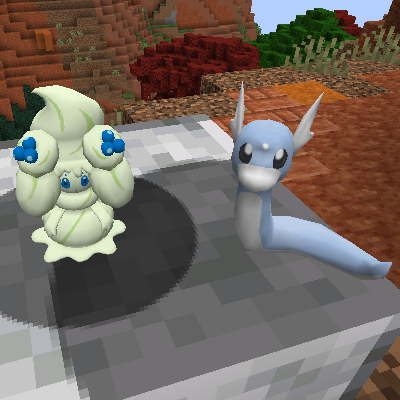
⬇ Download on CurseForgeShbaplush is a mod that adds in the ability to add plushies to your Pixelmon server!
Plushies are given via command (commonly through /plushiegiverandom) and then can be placed by right clicking them on the ground. Plushies can be picked up with shift-right click while having an empty hand.
Getting started:
- After the first time you setup run /plushiedefaultgenerate - this is a disk intensive command so be sure to do it when no players are online. Once done restart the server and plushies will be available via the ./plushiegive and ./plushiegiverandom command
Commands:
/plushiereload - Reloads from config, useful if you make changes to the files on disk and want it to update without a reboot
/plushiedefaultgenerate- Generates a plushie for each Pokemon, their forms, and shiny of each form. This command is disk intensive, use with caution or run from your test server and copy the plushies config folder over
/plushiefromstatue <plushiename>- Use this command and right click a Pixelmon statue to create a plushie with the given name.
/plushiecreate <plushiename> <pokemon spec> - Creates a template for the specified pokemon spec in the config. This plushie can then be given to people with the plushiegive command. Spec also includes ability for: - CustomTexture:easter - AnimationIndex:20 - AnimationType:fly - isAnimated
/plushiegive <player> <plushiename> - Player is optional (gives to self if not specified) gives the player the given plushie you created.
/plushiegiverandom <player> - Gives the player a random plushie!
Permissions:
- shibaplush.command.plushiecreate
- shibaplush.command.plushiedefaultgenerate
- shibaplush.command.plushiefromstatue
- shibaplush.command.plushiegive
- shibaplush.command.plueshiegiverandom
- shibaplush.command.plushiereload
- Edition: Minecraft Java
- File type: .jar
- Minecraft versions listed: 1.16, 1.16.5
- How to install: Install the matching mod loader (Forge, Fabric or NeoForge) for your Minecraft version. → Download the .jar. → Put it in the .minecraft/mods folder and launch that loader profile.
- Where to get it: Opens on CurseForge — not every file is mirrored on our own servers.
Install steps are the general flow for this file type — How to install Minecraft Java mods & modpacks walks through it step by step.
Shibaplush is a free Minecraft Java mod. Compatible with Minecraft 1.16, 1.16.5. Downloaded 2,136 times (via CurseForge). Download it and open it directly in the game.