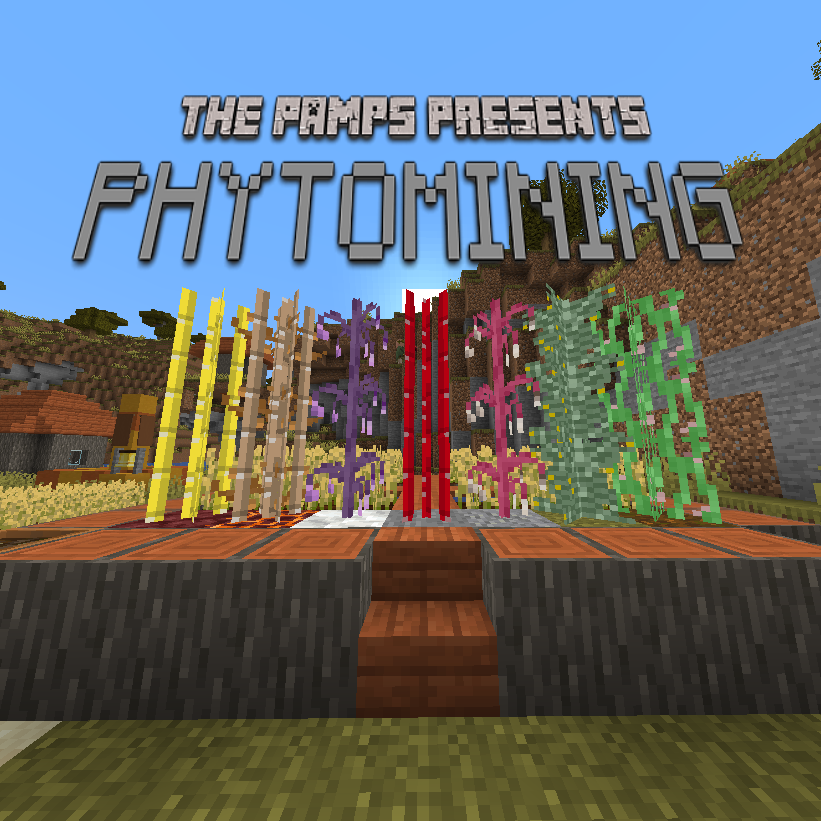
Pamps Phytomining
Java mod listed for Minecraft 1.18. Downloads from the MC Java Mods app on Android.
⬇ Download on CurseForgeThe author built this one for Minecraft 1.18.2 on Forge. On other versions it may install and then do nothing.
Has full support for Botany Pots
This mod is inspired by the proccess of phytomining, in which certain plants can extract metals from the soil and act as an organic ore for processing.
Long story short, this mod adds ore crops.
NEW BLOCK:
Nutrient Rich Soil: Will occasionally bonemeal whatever crop is growing above it. It also can support all the ore crops.
CURRENT PLANTS:
Rust-Root: Used to produce iron
Gold Brush: Used to produce gold
Copperwort: Used to produce copper
Quartz Vine: Produces nether quartz
Amethyst Vine: Produces amethyst
Blaze Shoots: Used to produce blaze powder
Glow Shoot: Used to produce glowstone
Redstone Shoot: Used to produce redstone
Dragon Vine: Used to produce dragon's breath
Also added the ability to craft glow lichen from vines and glowstone.
OBTAINING THE PLANTS:
Naturally Occuring Plants:
Rust-Root: Grows on podzol in jungle and taiga biomes.
Gold Brush: Grows in savanna biomes.
Quartz Vine: Grows on Netherrack in the Nether.
Copperwort: Grows in deserts, badlands and stony peaks and beaches.
Mutated Strains:
Some plants can be modified by playing them in a brewing stand and "brewing" them with a new material.
Amethyst Vine: Combine Quartz Vine and an Amethyst Shard in a brewing stand.
Blaze Shoots: Combine a Blaze Rod with Amethyst Vine in a brewing stand.
Glow Shoot: Combine Blaze Shoots with Glowstone Dust in a brewing stand.
Redstone Shoot: Combine Glow Shoot with Redstone Dust in a brewing stand.
Trading:
Wandering traders will on occassion, sell some of the available plants, in fact the only way to obtain Dragon Vine is from a wandering trader.
Rust-Root: 5 Emeralds
Gold Brush: 5 Emeralds
Copperwort: 5 Emeralds
Quartz Vine: 8 Emeralds
Dragon Vine: 8 Emeralds
- Edition: Minecraft Java
- File type: .jar
- Minecraft version listed: 1.18.2
- How to install: Install the matching mod loader (Forge, Fabric or NeoForge) for your Minecraft version. → Download the .jar. → Put it in the .minecraft/mods folder and launch that loader profile.
- Where to get it: Opens on CurseForge — not every file is mirrored on our own servers.
Install steps are the general flow for this file type — How to install Minecraft Java mods & modpacks walks through it step by step.
- Ships as [FORGE] Phytomining 1.0.8.jar — drop this file into the mods folder
- Download size: 102 KB
- Download link checked 16 Oct 2026 — working
These come from our own check of the pack file, not from the source page.