Death Log
Bedrock add-on listed for Minecraft 1.20–26.x (behavior pack only). File opened and checked on 14 Oct 2026; installs from the MC Bedrock Mods app on Android.
⬇ Download on CurseForge
Death Log - Instant Respawn Coordinate Tracker
Ever died deep in a cave, a fortress, or miles away from home and completely lost track of where your items dropped? Death Log solves that instantly without cluttering your gameplay or requiring complicated setups!
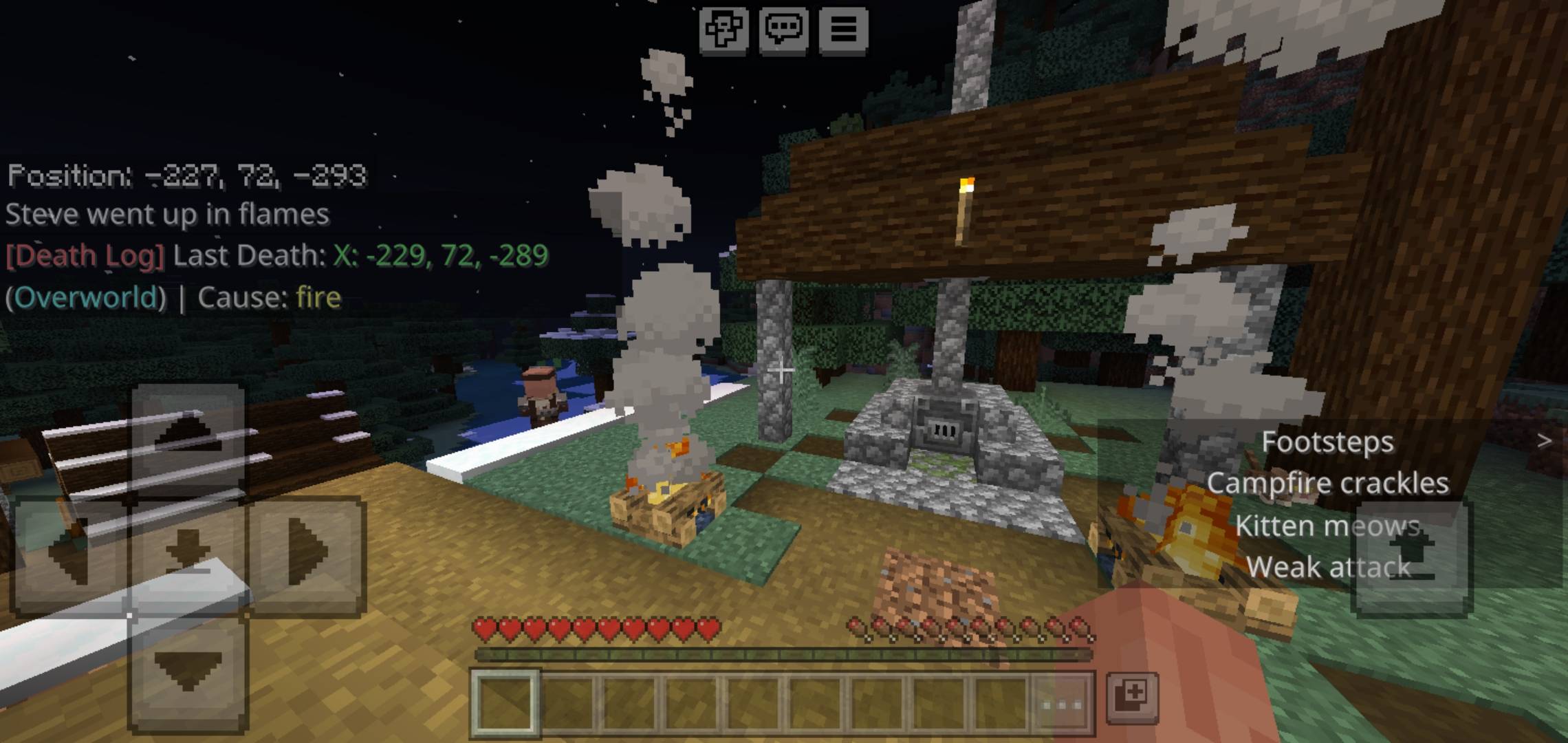
Built with lightweight, optimized Script API logic, Death Log automatically captures your exact death details the moment you die and prints a clear summary straight to your chat as soon as you respawn.
✨ Features
📍 Exact Coordinates: Logs your precise X, Y, Z location at the exact moment of death.
🌌 Dimension Awareness: Clearly specifies whether you died in the Overworld, Nether, or The End.
⚡ Instant Respawn Summary: Keeps chat clean while you are alive, then instantly delivers your log right when you hit the Respawn button.
🚀 Zero-Lag & Lightweight: Uses native Bedrock event handling—no command blocks, no scoreboard loops, and no performance drops on mobile or low-spec devices.
🎮 Multiplayer Compatible: Works seamlessly on local worlds, LAN setups, and dedicated Bedrock servers for all connected players.
🛠️ How to Use
Activate both the Behavior Pack and Resource Pack on your world settings.
Make sure Beta APIs (or Script API) is toggled ON in your world's Experiments tab.
Play normally! When you respawn after a death, check your chat window for your last recorded location.
📋 Example Chat Output
[Death Log] Last recorded position for PlayerName: X: -342, Y: 14, Z: 1105 (Nether)
📩 Feedback & Support
Got feedback, ideas, or bugs to report? Drop a comment on the project page! If you enjoy the addon, leave a star or download to support future updates.
- Edition: Minecraft Bedrock
- File type: .mcpack or .mcaddon
- Minecraft versions listed: 1.20.80, 26.40
- How to install: Download the .mcpack or .mcaddon file. → Open it — Minecraft imports it. → In your world: Behavior Packs → Available → Activate, then the same under Resource Packs.
- Where to get it: Opens on CurseForge — not every file is mirrored on our own servers.
Install steps are the general flow for this file type — How to install Minecraft Bedrock addons & mods walks through it step by step.
- Pack type: .mcaddon — behaviour and resource pack in one file
- Manifest requires Minecraft 1.20.80 or newer
- Complete pack — everything it depends on is inside the file
- Download size: 488 KB
- Download link checked 26 Sept 2026 — working
These come from our own check of the pack file, not from the source page.