
ModsJava
Lazy AE2 Patch
Minecraft Java mod. Downloads from the MC Java Mods app on Android.
⬇ Download on CurseForgeLazy AE2 Patch
Bug fixes and quality of life improvements for Lazy AE2
Features
ME Level Maintainer
- Fix ME Level Maintainer GUI flickering and displaying wrong values
- Draggable JEI ghost items in ME Level Maintainer
Modular Assembler
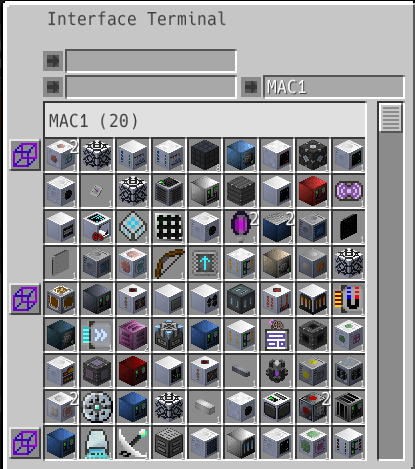
- Interface Terminal integration
- Mass Assembler Pattern Providers are now listed in the Interface Terminal
- Patterns can be viewed, inserted, and removed directly from the Interface Terminal without opening the Mass Assembler GUI
- Cutting Knife renaming
- Right-clicking any part of a Mass Assembler with a Cutting Knife opens the renamer GUI
- Custom names are reflected as group names in the Interface Terminal
How to use
- Required for both client and server
- If you cannot add the mod to the server, version 1.0.0 will work with the client only, but no JEI integration
Dependencies
- Lazy AE2
- MixinBooter
- AE2 Unofficial Extended Life (Lazy AE2 Patch 1.1.0~ Required instead of AE2)
Quick facts
- Edition: Minecraft Java
- File type: .jar
- How to install: Install the matching mod loader (Forge, Fabric or NeoForge) for your Minecraft version. → Download the .jar. → Put it in the .minecraft/mods folder and launch that loader profile.
- Where to get it: Opens on CurseForge — not every file is mirrored on our own servers.
Install steps are the general flow for this file type — How to install Minecraft Java mods & modpacks walks through it step by step.
File checked by MCModsHub
- Ships as lazy-ae2-patch-1.2.2.jar — drop this file into the mods folder
- Download size: 32 KB
- Download link checked 7 Nov 2026 — working
These come from our own check of the pack file, not from the source page.