Prettyfull World: Blocks and Colors - Forge
Java mod listed for Minecraft 1.19. Downloads from the MC Java Mods app on Android.
I don't know my version or loader
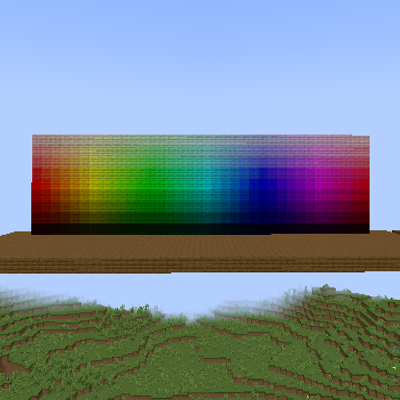
This mod add a lot of new 648 color varients for blocks
To do a block, you will need a pot

And conbine with the Dye Base Paste

Put the Pot, Dye Base Paste and the dyes

And put the dye with any planks

To change the block shade, put the block in the Stone Cuter

-Hue-
Red
Orange Red
Orange
Soft Orange
Hot Yellow
Yellow
Soft Lime
Lime
Soft Green
Neon
Green
Leaf Green
Grass Green
Royal Green
Teal
Cyan
Aqua Cyan
Soft Cyan
Soft Blue
Sky Blue
Sea Blue
Azure
Water Blue
Royal Blue
Blue
Indigo
Blue Violet
Violet
Purple
Amethyst
Pink Violet
Magenta
Pink
Hot Pink
Fuchsia
Rose
-Shade-
Whitish
Light Pastel
Pastel
Luster
Normal
Dusky
Deep
Shade
Dark
Light Foxy
Foxy
Shade Foxy
Dark Foxy
Light Sandy
Dark Sandy
Light Grayish
Grayish
Dark Grayish
- Edition: Minecraft Java
- File type: .jar
- Minecraft versions listed: 1.19.4, 1.19.2
- How to install: Install the matching mod loader (Forge, Fabric or NeoForge) for your Minecraft version. → Download the .jar. → Put it in the .minecraft/mods folder and launch that loader profile.
- Where to get it: Opens on CurseForge — not every file is mirrored on our own servers.
Install steps are the general flow for this file type — How to install Minecraft Java mods & modpacks walks through it step by step.
- Ships as PrettyfullWorldBlocks-1.19.2-1.1.0-Forge.jar — drop this file into the mods folder
- Download size: 2.6 MB
- Download link checked 7 Nov 2026 — working
These come from our own check of the pack file, not from the source page.