
Bagus Mob
Java mod listed for Minecraft 1.20–1.21. Downloads from the MC Java Mods app on Android.
I don't know my version or loader

Bagus Mob
(This mod include wasabi mod's mobs! if you want old one. use wasabi mod!)
Summary
This mod is add various mobs such as Illager... but not only!
Compat mobs planning too!
Include mob
Ninjar
This mob from my old mod wasabi mod
This illager not only the melee, sometime avoid attack and teleport like ninja!
Ninjar drop the ninja armor(This armor cannot notice from mob... unless you too near from them)
dampens Vibrations when ninjar is invisible
ninjar sneaking and invisible while target is not found!
Tengu
This mob from my old mod wasabi mod
This illager flying for you!
and when he attack you will push away!
But when he hit on projectile. fall on ground!
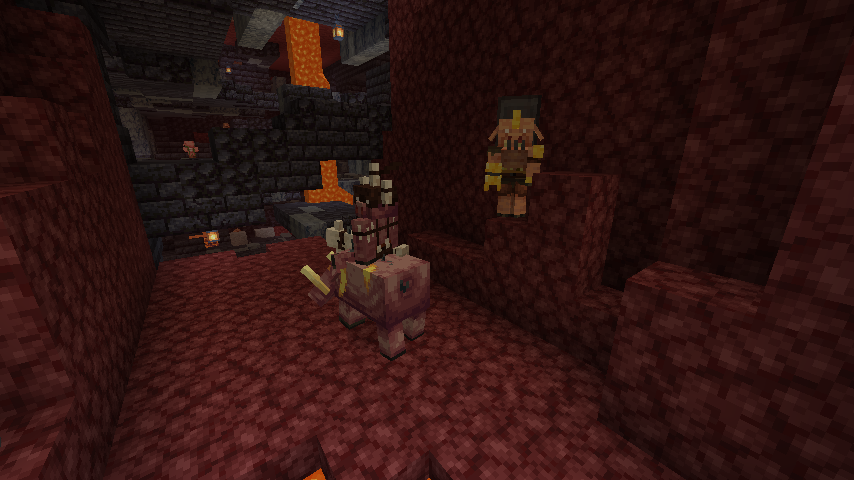
Rude Hog(from Hunter's Return)
This piglin is Respects piglins for hunting long ago(such as minecraft Legend's "beast".... or he only respect his hunt not him self)
They mainly hunt and have a strong sense of leadership over piglins.
He resents the old events of his ancestors, and he shows no mercy to anyone who disparages his comrades or his weapons.
They spawn in bastion and sometime nether wastes with hunter boar
Burner Hog
He admires the equipment of the leaders from a long time ago(He is not admire the old leader it self), and is mainly the leader of the bastion.
When he found the player. He shoot the fire ball
They spawn in bastion
Illager Castle
Generate in Cherry Grove biome
Let's find out what secret hiding...
Credit
thanks TruffleHistorian for making structure!
Azzy help animation for tengu Falling animation and new mobs. and Mcfella help Viler Vex!
- Edition: Minecraft Java
- File type: .jar
- Minecraft versions listed: 1.21.1, 1.21, 1.20.1
- How to install: Install the matching mod loader (Forge, Fabric or NeoForge) for your Minecraft version. → Download the .jar. → Put it in the .minecraft/mods folder and launch that loader profile.
- Where to get it: Opens on CurseForge — not every file is mirrored on our own servers.
Install steps are the general flow for this file type — How to install Minecraft Java mods & modpacks walks through it step by step.
- Ships as BagusMob-1.20.1-1.1.0.jar — drop this file into the mods folder
- Download size: 161 KB
- Download link checked 26 Sept 2026 — working
These come from our own check of the pack file, not from the source page.