
EEJS
Java mod listed for Minecraft 1.19. Downloads from the MC Java Mods app on Android.
⬇ Download on CurseForgeThe author built this one for Minecraft 1.19.2 on Forge. On other versions it may install and then do nothing.
EEJS
Create custom processed types for Emendatus Enigmatica with KubeJS!
How to use
First you need textures for your parts that can be placed in `kubejs/assets/eejs/textures/items/templates/<processedtype>/<n>.png`.
These textures can have multiple layers like every other Emendatus Enigmatica processed type.
Then in a KubeJS startup script you can use the new `EmendatusEvents.partRegistry` event to create a new processed type like below:
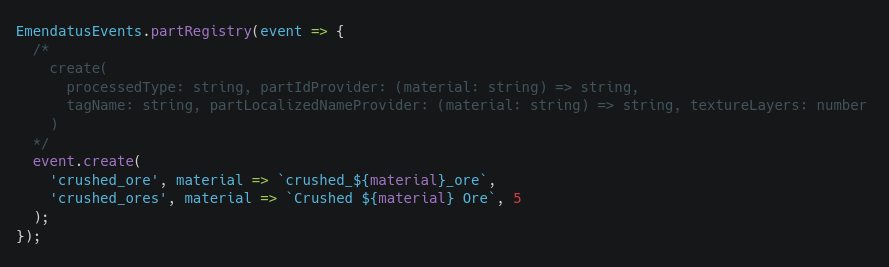
After you've created the processed type you can just add it to your Emendatus Enigmatica materials' processed types list.
- Edition: Minecraft Java
- File type: .jar
- Minecraft version listed: 1.19.2
- How to install: Install the matching mod loader (Forge, Fabric or NeoForge) for your Minecraft version. → Download the .jar. → Put it in the .minecraft/mods folder and launch that loader profile.
- Where to get it: Opens on CurseForge — not every file is mirrored on our own servers.
Install steps are the general flow for this file type — How to install Minecraft Java mods & modpacks walks through it step by step.
- Ships as eejs-1.0.0.jar — drop this file into the mods folder
- Download size: 20 KB
- Download link checked 7 Nov 2026 — working
These come from our own check of the pack file, not from the source page.