
Regex Search
Java mod listed for Minecraft 1.20. Downloads from the MC Java Mods app on Android.
I don't know my version or loader




Regex Search
Search for items in the world. You can search by name, mod, id, tags and tooltips.
Highlights matching items in the world so you can easily find them.
Features
Different search modes
- Regex: Search using regular expressions
- Extended: Search using extended notation, see below
- Literal: Search with normal text
Highlight items
- Items matching your query gets highlighted
- Can be seen through walls
- Show what kind of container the item lies in
Search options
- Search in blocks, entities, or both
- Match or ignore letter case
How to use
Open search screen using Y (configurable)
Press enter to search
Clear search field to remove highlights
Use up/down arrows for search history
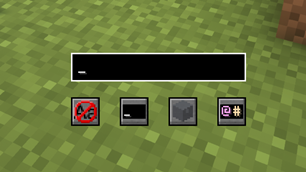
Here you can select
- Whether to match or ignore letter case
- If your last search will be remembered
- Search in blocks, entities, or both
- Select search mode
Extended notation
Extended notation allows you to specify which attribute to match by using different prefixes.
@modMatches all items from the modmod*idMatches all items whose item id containsid$tagMatches the item's tags#tooltipMatches the item's tooltipnameMatches the item's name-negateMatches everything that does not matchnegate^wordMatches items whose attribute starts withwordword$Matches items whose attribute ends withword
Examples
@minecraft
Matches everything from minecraft. Also matches items from minecraft2 not_minecraft etc.
*^redstone
Matches items whose id starts with redstone
-#a
Matches all items whose tooltip does not contain the letter a
^sword$
Matches only items whose name is exactly sword
Server-side config
int rangeSearch range in all directionsint recursionLimitHow many levels of nesting to search, -1 for no limitint maxInventoriesMax number of containers to return, -1 for no limitint maxSearchResultsTotal number of items to return, -1 for no limitint maxSearchResultsPerInventory-1 for no limit
- Edition: Minecraft Java
- File type: .jar
- Minecraft version listed: 1.20.1
- How to install: Install the matching mod loader (Forge, Fabric or NeoForge) for your Minecraft version. → Download the .jar. → Put it in the .minecraft/mods folder and launch that loader profile.
- Where to get it: Opens on CurseForge — not every file is mirrored on our own servers.
Install steps are the general flow for this file type — How to install Minecraft Java mods & modpacks walks through it step by step.
- Ships as re_search-0.1.0.jar — drop this file into the mods folder
- Download size: 46 KB
- Download link checked 17 Oct 2026 — working
These come from our own check of the pack file, not from the source page.