Home›Java›Mods›Improved Sign Editing
Improved Sign Editing
ModsJava

Improved Sign Editing

Java mod listed for Minecraft 1.19–1.21. Downloads from the MC Java Mods app on Android.

by Serilum · on CurseForge

Which build do you need?

This mod ships a separate file for every mod loader and every version of the game. Pick both, then download — the wrong build installs fine and then does nothing in the game.

Mod loader

Minecraft version

⬇ Download for 1.21.11 · Fabric⬇ Download for 1.21.10 · Fabric⬇ Download for 1.21.9 · Fabric⬇ Download for 1.21.8 · Fabric⬇ Download for 1.21.7 · Fabric⬇ Download for 1.21.6 · Fabric⬇ Download for 1.21.5 · Fabric⬇ Download for 1.21.4 · Fabric⬇ Download for 1.21.3 · Fabric⬇ Download for 1.21.2 · Fabric⬇ Download for 1.21–1.21.1 · Fabric⬇ Download for 1.20.6 · Fabric⬇ Download for 1.20.5 · Fabric⬇ Download for 1.20.4 · Fabric⬇ Download for 1.20.2 · Fabric⬇ Download for 1.21.11 · NeoForge⬇ Download for 1.21.10 · NeoForge⬇ Download for 1.21.9 · NeoForge⬇ Download for 1.21.8 · NeoForge⬇ Download for 1.21.7 · NeoForge⬇ Download for 1.21.6 · NeoForge⬇ Download for 1.21.5 · NeoForge⬇ Download for 1.21.4 · NeoForge⬇ Download for 1.21.3 · NeoForge⬇ Download for 1.21.2 · NeoForge⬇ Download for 1.21–1.21.1 · NeoForge⬇ Download for 1.20.6 · NeoForge⬇ Download for 1.20.5 · NeoForge⬇ Download for 1.20.4 · NeoForge⬇ Download for 1.21.11 · Quilt⬇ Download for 1.21.10 · Quilt⬇ Download for 1.21.9 · Quilt⬇ Download for 1.21.8 · Quilt⬇ Download for 1.21.7 · Quilt⬇ Download for 1.21.6 · Quilt⬇ Download for 1.21.5 · Quilt⬇ Download for 1.21.4 · Quilt⬇ Download for 1.21.3 · Quilt⬇ Download for 1.21.2 · Quilt⬇ Download for 1.21–1.21.1 · Quilt⬇ Download for 1.20.6 · Quilt⬇ Download for 1.20.5 · Quilt⬇ Download for 1.20.4 · Quilt⬇ Download for 1.21.11 · Forge⬇ Download for 1.21.10 · Forge⬇ Download for 1.21.9 · Forge⬇ Download for 1.21.8 · Forge⬇ Download for 1.21.7 · Forge⬇ Download for 1.21.6 · Forge⬇ Download for 1.21.5 · Forge⬇ Download for 1.21.4 · Forge⬇ Download for 1.21.3 · Forge⬇ Download for 1.21–1.21.1 · Forge⬇ Download for 1.20.6 · Forge⬇ Download for 1.20.4 · Forge⬇ Download for 1.20.2 · Forge
I don't know my version or loader
Open the Minecraft launcher and look at the profile you play on — it names both, like fabric-loader-1.21.4. The version also shows in the bottom-right corner of the game's main menu.
No loader in the profile name? Then it's plain Minecraft, and these mods won't run — you need Fabric or NeoForge installed first.

A Serilum Mod. Made with love. Lots of active mods for Fabric, Forge and Neo!

CurseForge Modrinth Patreon YouTube


About the mod

Improved Sign Editing is a client-side mod which adds some QoL changes to the process of writing text on signs in-game. Whenever text is typed on a sign, and the next word doesn't fit, it automatically shifts to the next line. No need for guessing whether the next part fits. Also works the other way around, when using backspace, it goes back to the previous line. Functionality can be toggled in the config or in-game via the button.


Dependencies

Requires Collective
Included in The Vanilla ExperienceIncluded in Serilum's Client Bundle
Environment: Client


Configurable

Configuration guide

   All available config options:

enableImprovedEditing  default true
A global toggle whether the improved editing functionality should be enabled.

showImprovedEditingButton  default true
Whether the Improved/Normal Editing button should be visible on the sign edit screen.


Showcase

When typing the text on a sign, it automatically shifts to the next line when the current word doesn't fit:

Improved Sign Editing — Minecraft Java mod, screenshot 1

 
Similarly, when using backspace, it goes to the previous line:

Improved Sign Editing — Minecraft Java mod, screenshot 2

 
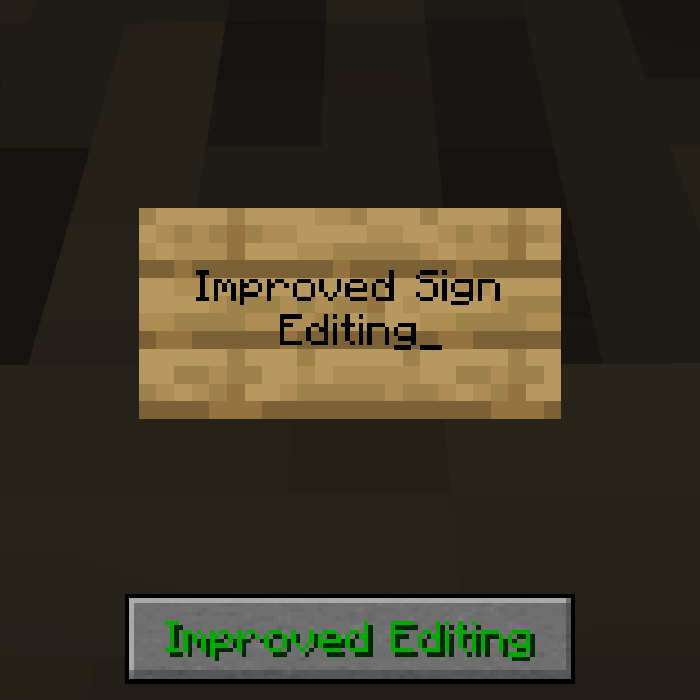
There is a button on the screen to enable/disable the improved editing for finer control. Can be disabled in the config:

Improved Sign Editing — Minecraft Java mod, screenshot 3


Notes and links

You may freely use this mod in any modpack, as long as the download remains hosted within the CurseForge or Modrinth ecosystem.

Serilum.com contains an overview and more information on all mods available.

Comments are disabled as I'm unable to keep track of them across so many separate mod pages.
For issues, ideas, suggestions or anything else there is the Github repo. Thanks!


Quick facts

Install steps are the general flow for this file type — How to install Minecraft Java mods & modpacks walks through it step by step.

File checked by MCModsHub

These come from our own check of the pack file, not from the source page.

Explore more