
Everything Descriptions
Java mod listed for Minecraft 1.18–1.20. Downloads from the MC Java Mods app on Android.
I don't know my version or loader



📖 About:
Inspired by Enchantment Lore from the same developer, Everything Descriptions adds the ability to add a description to... Everything! Blocks, items, and even mobs! Simply press [i] when looking at or holding them, and you'll get a nifty little description come up written by our lovely Discord community!
Designed with the baseline intent to act as a small guide to make players utilise some of Minecraft's more obscure mechanics, Everything Descriptions is set up in such a way that one can add descriptions to any mob, block or item via addition in a lang resource pack!
✅ Features:
- Framework that makes it possible to add a description to everything in the game!
- Currently supports held items, highlighted blocks, and looked at mobs
- Useful descriptions come pre-bundled with the mod
- Add custom descriptions via resource packs!
- Useful for beginners and especially mod and modpack developers
- Perfect to create tutorials for your mod or modpack
- Currently supported on Forge 1.20, 1.19, and 1.18
🔧 Configuration:
- Hotkey to open descriptions can be set in the Keybinds in-game
- Descriptions can be added or changed using resource packs
❓ How to add descriptions:
Simply put... Throw a line like the following into your lang file of choice (It doesn't matter which one:)
"everydesc.[modid]:[block/item/mob]": "Description!"
... And the mod will add an info page on it for anybody to read! If you want your page to have a special background, add a line like the following matching the description line:
"everydesc.[modid]:[block/item/mob].bg": "[modid]/[name].png"
... And you're Gucci!
🖼️ Preview:
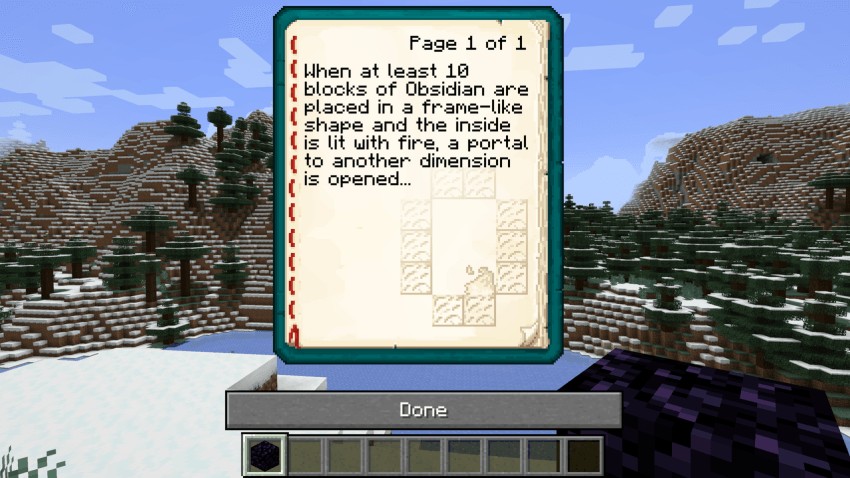
Description for Obsidian with custom background:
Video showcase/explanation:
🧾 Changelog:
1.0 - Jan 18, 2024:
Initial release for 1.18 & 1.19
1.0.1 - Mar 29, 2025:
Initial release for 1.20-1.20.4

- Edition: Minecraft Java
- File type: .jar
- Minecraft versions listed: 1.19.2, 1.18.2, 1.20.2
- How to install: Install the matching mod loader (Forge, Fabric or NeoForge) for your Minecraft version. → Download the .jar. → Put it in the .minecraft/mods folder and launch that loader profile.
- Where to get it: Opens on CurseForge — not every file is mirrored on our own servers.
Install steps are the general flow for this file type — How to install Minecraft Java mods & modpacks walks through it step by step.
- Ships as everydesc-1.19.2-1.0.1.jar — drop this file into the mods folder
- Download size: 83 KB
- Download link checked 26 Sept 2026 — working
These come from our own check of the pack file, not from the source page.