Create: BlueprintVoid
Java mod listed for Minecraft 1.20. Downloads from the MC Java Mods app on Android.
Similar to structure void in vanilla mc. When a schematic with blueprint void is printed, the block in accordance won't be replaced regardless of selected…
⬇ Download on CurseForgeThe author built this one for Minecraft 1.20.1 on Forge. On other versions it may install and then do nothing.
蓝图空位
Create:Blueprint Void
简介
Brief
类似于原版的结构空位方块,当使用蓝图大炮打印包含该方块的结构时,无论如何设置蓝图大炮的填充模式,最终打印出来的结构中的蓝图空位对应位置的方块都不会被替换
Similar to structure void in vanilla mc. When a schematic with blueprint void is printed, the block in accordance won't be replaced regardless of selected replace mode.
保存结构时,结构中的结构空位将会被替换为蓝图空位方块(可配置)
When a structure is saved, the structure void in the schematic will be replaced by blueprint void. (Optional, configure it in [save]/serverconfig/bpvoid-server.toml)
方块属性
Block Properties
没有碰撞箱,不可以被火把等方块依附,使用方块右键将直接被替换,当其被活塞等推动时会直接被破坏
No Collision, can't be attached by torch etc., will be replaced when right-clicked holding a block, will be destroyed when pushed by a piston.
其他信息
Misc Infos
蓝图空位方块可以通过一个蓝图与笔和脚手架合成(无序合成),放置该方块不会消耗自身
It can be crafted by a schematic and quill with a scaffolding (shapeless), it won't shrink on placed.
该 Mod 也修复了 Create 中蓝图渲染的深度冲突( z-fighting )问题
The mod also fixed the z-fighting problem in schematic render.
演示效果
Demonstrations

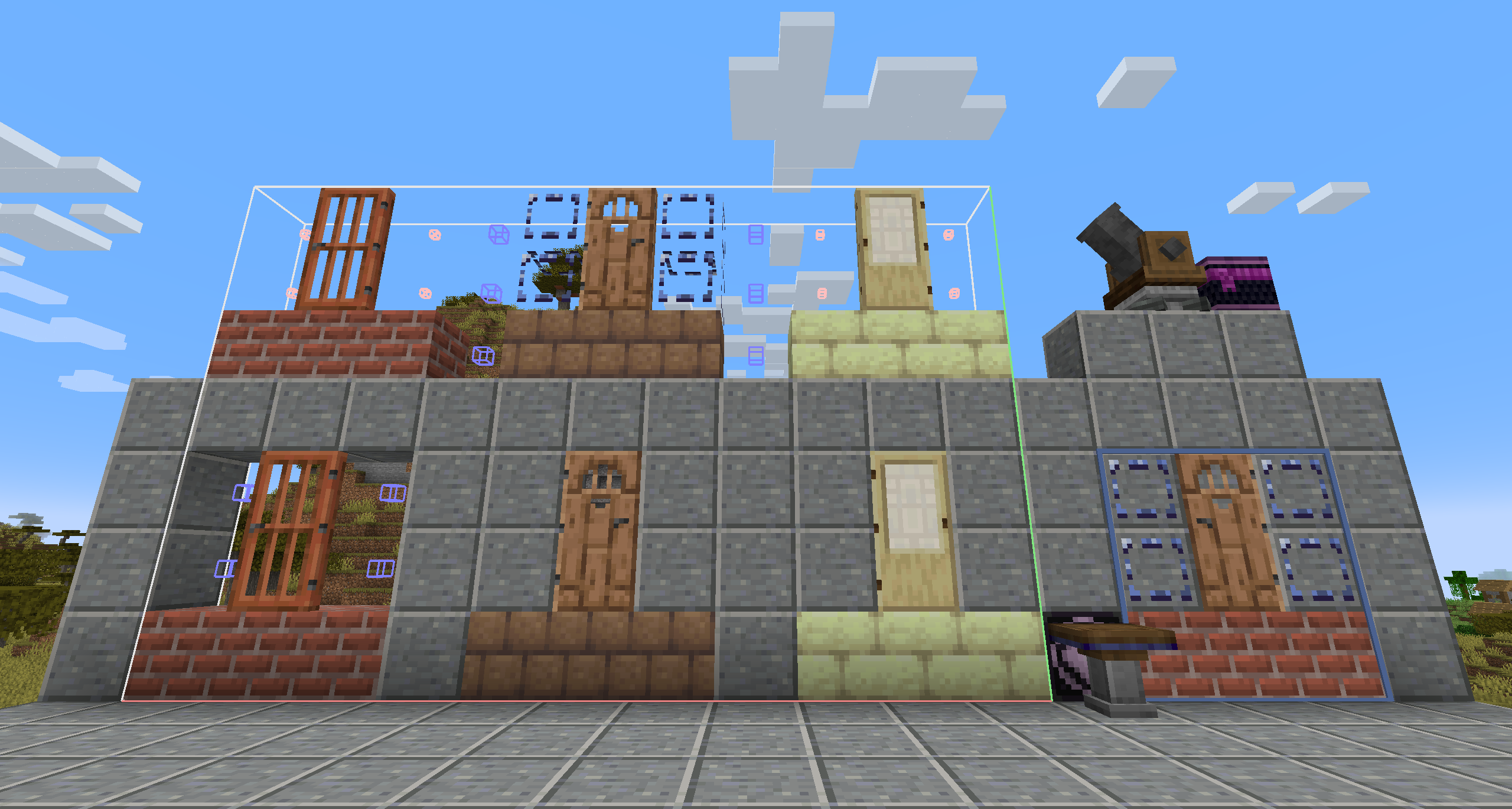
图片上半部分为保存的结构,下半部分为使用蓝图大炮打印出的结果
The uppers are the structures to save, while the lower are the printed results.
从左到右分别为:
- Create 原版结构中使用结构方块打印效果
- 使用蓝图空位的打印效果
- 安装本 Mod 后结构方块的打印效果 (白色小方块位置为结构方块,蓝色方块位置为空气方块)
From left to right:
- vanilla Create result
- blueprint void printed
- replaced structure void (Small white cubes are structure void blocks, blue cubes are air blocks)
最右侧为放置蓝图时的预览效果,可以看到不再有深度冲突问题
Demonstrated on the right-bottom are the schematic render effect, no z-fighting anymore.
- Edition: Minecraft Java
- File type: .jar
- Minecraft version listed: 1.20.1
- How to install: Install the matching mod loader (Forge, Fabric or NeoForge) for your Minecraft version. → Download the .jar. → Put it in the .minecraft/mods folder and launch that loader profile.
- Where to get it: Opens on CurseForge — not every file is mirrored on our own servers.
Install steps are the general flow for this file type — How to install Minecraft Java mods & modpacks walks through it step by step.
- Ships as bpvoid-1.0.1.jar — drop this file into the mods folder
- Download size: 579 KB
- Download link checked 26 Sept 2026 — working
These come from our own check of the pack file, not from the source page.