Boredom's ~ ReShaped Eating Animations
THIS PROJECT HAS BEEN MOVED -> Huge Thanks to theone_ss (their pack provided all the file infrastructure and code needed to make this pack) Also "Big…
⬇ Download on CurseForgeThe author built this one for Minecraft 1.20.4 on Fabric. On other versions it may install and then do nothing.
THIS PROJECT HAS BEEN MOVED -> https://legacy.curseforge.com/minecraft/texture-packs/boredoms-reshaped-eating-animations-resource-pack
Huge Thanks to theone_ss (their pack provided all the file infrastructure and code needed to make this pack)
Also "Big thanks for helping me with the code: spusik_, PinkGoosik and DoctorNight1 \ (•◡•) /" (theone_ss prject page)
Check out their project Eating Animations for vanilla textures -> https://www.curseforge.com/minecraft/mc-mods/eating-animation-fabric
This is the third resource pack/first mod of Boredom's (some2thing).
- This pack is meant to add animations for all food items in Boredom's ~ ReShaped Items and Effects.
- All animation frames are in a 16x16 format.
- Some animation frames use colors not present in orignal item.
- Requires Fabric API
--------------------------------------------------------------------------------------------------------------------------------------
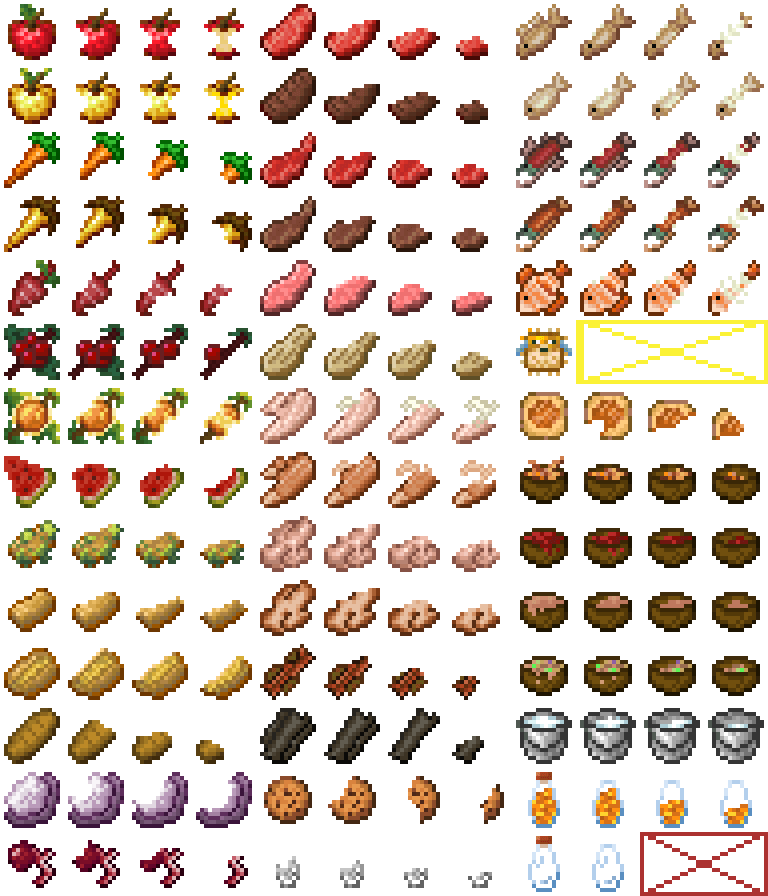
Here's the animation sheet if your interested (scaled 4x):
(the pufferfish animation is not shown in this sheet but it is included)
Extra Info:
- Discord Username: avoidingboredom
- If you don't like a certain texture or whatever you can simply remove it (or take the texture to modify or just look at it or something), instructions on how to do so are below.
1. Download the .jar file on this projects file page
- Go to downloads on your pc and rename the .jar file to .zip
- Right-click on the .zip file and click "extract all"
4. Open the new unzipped folder and double Click through these folders "assets"->"eatinganimationid" -> "textures" ->"item"
5. And now you can replace animation frames for any item if you'd like
- I can make the pack compatible with older versions if requested or you can do it yourself by replacing the pack.mcmeta to make it compatible with your desired version.
- Some updates might redo textures if you would rather have the old textures you can contact me on discord to custom make you a pack (or just ask me how to do it yourself) or download the pack version with the old version of the item and move the png to the version you desire it to be in.
- I sometimes do polls for which new texture to include in updates on this server if you'd like to participate https://discord.gg/XcJb7a9Feq
- Edition: Minecraft Java
- File type: .jar
- Minecraft version listed: 1.20.4
- How to install: Install the matching mod loader (Forge, Fabric or NeoForge) for your Minecraft version. → Download the .jar. → Put it in the .minecraft/mods folder and launch that loader profile.
- Where to get it: Opens on CurseForge — not every file is mirrored on our own servers.
Install steps are the general flow for this file type — How to install Minecraft Java mods & modpacks walks through it step by step.
- Ships as Boredom's ~ ReShaped Eating Animations.jar — drop this file into the mods folder
- Download size: 837 KB
- Download link checked 27 Sept 2026 — working
These come from our own check of the pack file, not from the source page.