
ModsJava
wckdDCLink
Java mod listed for Minecraft 26.x. Downloads from the MC Java Mods app on Android.
⬇ Download on Modrinth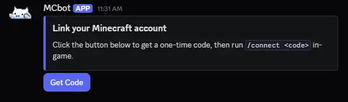

wckdDCLink
Bridge your Minecraft chat to Discord and viceversa!
Features
- Discord > Minecraft Linking
- Minecraft > Discord Linking via Required Linking
- Link Embeds
- Discord Roles Sync
- Data Migration from DiscordSRV
- MiniMessage Support
- Join/Leave Message
- Join/Leave suppression if not linked
Preview
Link Embed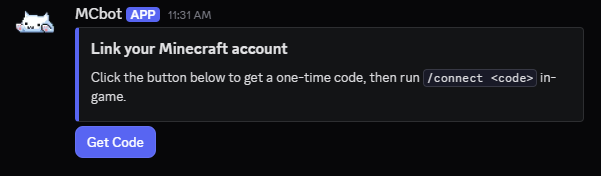

Files
Config Version 2# Bot token; from https://discord.com/developers/applications -> your app -> Bot -> Reset Token
# You must restart your server after changing this option
BotToken: ""
# The Discord server (guild) ID this bot operates in
GuildId: ""
# Channel routing for every message type this plugin can post.
# syntax is Channels: {"type": "numerical channel ID from Discord", "another type": "another channel ID"}
#
# Every message type below will go to "global" unless that specific type has its own
# entry defined. Leave a type's entry out entirely (or blank) to have it fall back to "global".
#
# Types:
# global - chat bridge, and the fallback for every other type below
# join - join messages
# leave - quit messages
# awards - advancement messages
# deaths - death messages
# watchdog - lag/hang alerts
# server - server start/stop announcements
# link - staff-only: where link/unlink confirmations post, for admin visibility
# into who's linked to whom. NOT where /link can be used - see
# LinkRequestChannelId further down for that.
#
# Run "/dclink reload" after changing this option to apply
Channels: {"global": ""}
# Console channel numerical ID (NOT name), leave blank to disable the console channel entirely.
# Deliberately NOT part of the Channels map above or command-executable from Discord - see
# the Security section in README.md for why.
ConsoleChannelId: ""
# ─────────────────────────────────────────────────────────────────────────
# Chat bridge
#
# ChatBridgeEnabled: whether to bridge chat at all
# ChatBridgeMinecraftToDiscordFormat: {player} {message} - only used when
# ChatBridgeUseWebhook is false (bot posts a formatted line instead)
# ChatBridgeDiscordToMinecraftFormat: {name} {message} - MiniMessage or legacy
# (&a) both work, auto-detected
# ChatBridgeUseWebhook: have chat messages post AS the player.
# Requires MESSAGE CONTENT INTENT enabled for this bot in the Discord Developer
# Portal (Bot -> Privileged Gateway Intents), or the bot will fail to start.
# ─────────────────────────────────────────────────────────────────────────
ChatBridgeEnabled: true
ChatBridgeMinecraftToDiscordFormat: "**{player}**: {message}"
ChatBridgeDiscordToMinecraftFormat: "<blue>[Discord]</blue> <white>{name}</white><gray>: </gray><white>{message}</white>"
ChatBridgeUseWebhook: false
# ─────────────────────────────────────────────────────────────────────────
# Join/leave/advancement/death embeds
#
# {Join,Leave,Death,Advancement}EmbedColor: hex, no "#", used only when
# AnnouncementsUseEmbeds is true.
# ─────────────────────────────────────────────────────────────────────────
AnnouncementsUseEmbeds: true
JoinEmbedColor: "57F287"
LeaveEmbedColor: "ED4245"
DeathEmbedColor: "992D22"
AdvancementEmbedColor: "FEE75C"
# ─────────────────────────────────────────────────────────────────────────
# Join/leave messages
#
# JoinQuitEnabled: whether to post join/leave messages at all
# JoinFormat / QuitFormat: {player}
# ─────────────────────────────────────────────────────────────────────────
JoinQuitEnabled: true
JoinFormat: "**{player}** joined the server"
QuitFormat: "**{player}** left the server"
# ─────────────────────────────────────────────────────────────────────────
# Advancement (awards) messages
# ─────────────────────────────────────────────────────────────────────────
AdvancementsEnabled: true
AdvancementFormat: "**{player}** has made the advancement **{advancement}**"
# ─────────────────────────────────────────────────────────────────────────
# Death messages
#
# DeathFormat: {player} / {deathMessage} - deathMessage is the full vanilla
# death line ("Player was slain by Zombie"), so {player} is usually redundant
# unless you want to bold/mention them separately from the vanilla text.
# ─────────────────────────────────────────────────────────────────────────
DeathsEnabled: true
DeathFormat: "\u2620\ufe0f {deathMessage}"
# ─────────────────────────────────────────────────────────────────────────
# Server start/stop announcements
# ─────────────────────────────────────────────────────────────────────────
ServerStartStopEnabled: true
ServerStartMessage: "🟢 Server has started."
ServerStopMessage: "🔴 Server is shutting down."
# ─────────────────────────────────────────────────────────────────────────
# Server watchdog
#
# Monitors the time since your server's last game tick.
#
# WatchdogEnabled: whether the watchdog is enabled at all
# WatchdogTimeoutSeconds: seconds since the last tick before alerting (minimum 10)
# WatchdogMessageCount: how many times the alert repeats, in case you really
# want to make sure you catch it
# ─────────────────────────────────────────────────────────────────────────
WatchdogEnabled: true
WatchdogTimeoutSeconds: 30
WatchdogMessageCount: 3
# ─────────────────────────────────────────────────────────────────────────
# Console mirror
#
# ConsoleEnabled: whether the console mirror is on at all
# ConsoleMinLevel: INFO, WARN, or ERROR (Log4j level names) - only log records
# at/above this level get mirrored
# ConsoleFlushIntervalSeconds: how often buffered lines get sent as a batch
# ─────────────────────────────────────────────────────────────────────────
ConsoleEnabled: true
ConsoleMinLevel: "WARN"
ConsoleFlushIntervalSeconds: 5
# ─────────────────────────────────────────────────────────────────────────
# Account linking
#
# LinkedFormat / UnlinkedFormat: {player} / {discordId} - posted to the
# "link" channel in the Channels map above (staff-only visibility log)
# LinkRequestChannelId: where /link and the "Get Code" button can be used.
# Leave blank to allow /link from any channel. This is a SEPARATE
# channel from the "link" entry in the Channels map above - that one is
# a staff-only log of who's linked to whom, this one is where players
# actually go to request a code.
# CodeLength / CodeExpiryMinutes / CooldownSeconds: how link codes behave
# ButtonId: component ID for the "Get Code" button posted by /postlinkembed
# EmbedColor / EmbedThumbnailUrl / EmbedImageUrl: styling for that embed
# ─────────────────────────────────────────────────────────────────────────
LinkEventsEnabled: true
LinkedFormat: "\u2705 **{player}** linked to <@{discordId}>"
UnlinkedFormat: "\u274c **{player}** unlinked their Discord account"
LinkRequestChannelId: ""
CodeLength: 6
CodeExpiryMinutes: 15
CooldownSeconds: 30
ButtonId: "dclink_getcode"
EmbedColor: "5865F2"
EmbedThumbnailUrl: ""
EmbedImageUrl: ""
AutoDeleteEnabled: true
AutoDeleteButtonReplySeconds: 15
ConnectAttemptLimiterEnabled: true
ConnectAttemptLimiterMaxAttempts: 5
ConnectAttemptLimiterWindowSeconds: 60
ConnectAttemptLimiterLockoutSeconds: 60
# Hide join/quit messages IN-GAME for players who haven't linked yet.
SuppressJoinQuitUntilLinked: false
# ─────────────────────────────────────────────────────────────────────────
# Booster detection
#
# Detection/placeholder only right now Requires SERVER MEMBERS INTENT
# enabled for this bot in the Discord Developer Portal.
# ─────────────────────────────────────────────────────────────────────────
BoosterDetectionEnabled: true
# ─────────────────────────────────────────────────────────────────────────
# Role sync
#
# RoleSyncEnabled: whether role sync is on at all
# RoleSyncIntervalMinutes: how often to re-apply Minecraft groups -> Discord
# roles as a safety net, on top of the real-time sync that happens on
# every change
# RoleSyncGroupToRole: luckperms_group_name: "discord_role_id" pairs
# ─────────────────────────────────────────────────────────────────────────
RoleSyncEnabled: false
RoleSyncIntervalMinutes: 10
RoleSyncGroupToRole:
# admin: "123456789012345678"
# donator: "123456789012345679"
# ─────────────────────────────────────────────────────────────────────────
# Nickname sync (Minecraft -> Discord only)
#
# Sets a linked player's Discord nickname to match their Minecraft name.
# Per-player opt-out via the "wckddclink.nicknamesync" permission
# (granted by default).
#
# NicknameSyncEnabled: whether nickname sync is on at all
# NicknameSyncCycleMinutes: minutes between re-applying nicknames for all
# online linked players, on top of the real-time sync that happens on
# link and on join
# NicknameSyncFormat: the nickname format (keep it under 32 characters -
# Discord's own limit - it gets truncated if you go over)
# %displayname% - player's display name
# %username% - player's username
# PlaceholderAPI placeholders are also supported
# ─────────────────────────────────────────────────────────────────────────
NicknameSyncEnabled: false
NicknameSyncCycleMinutes: 3
NicknameSyncFormat: "%username%"
# ─────────────────────────────────────────────────────────────────────────
# Ban sync
#
# Mirrors bans between Minecraft and Discord for linked accounts. Each
# direction is independently toggled. Requires GUILD_MODERATION intent
# (not privileged, added automatically) for the Discord -> Minecraft
# direction.
#
# BanSyncMinecraftToDiscord: ban a linked player's Discord account when
# they get banned on the Minecraft server
# BanSyncDiscordToMinecraft: ban a linked player on the Minecraft server
# when their Discord account gets banned
# BanSyncDiscordToMinecraftReason: the ban reason shown on the Minecraft
# side when a Discord ban is mirrored over
# ─────────────────────────────────────────────────────────────────────────
BanSyncMinecraftToDiscord: false
BanSyncDiscordToMinecraft: false
BanSyncDiscordToMinecraftReason: "&cYou have been banned until further notice because you were banned on our Discord server."
# ─────────────────────────────────────────────────────────────────────────
# Require linked account to play
#
# IMPORTANT: because our linking flow normally starts in Discord (/link
# there, then /connect in-game), a player denied here could never run
# /connect. So an unlinked player gets a FRESH code generated right in
# their kick message instead - no in-game step needed - and completes
# linking by sending that code straight to the bot in a DM. Requires
# DIRECT_MESSAGES + MESSAGE_CONTENT intents (added automatically when
# this is enabled) - MESSAGE_CONTENT is privileged, enable it in the
# Discord Developer Portal if it isn't already (needed for ChatBridge too).
#
# LinkingGateEnabled: whether the gate is on at all
# LinkingGateRequiredRoleId: a Discord role ID a linked account must also
# hold to be let in (Twitch-sub-style). Leave blank to only require
# being linked, no role check.
# LinkingGateBypassNames: Minecraft usernames that always get in regardless
# LinkingGateWhitelistedPlayersBypass: whether being on the server's
# vanilla whitelist is enough to skip this check entirely
# LinkingGateNotLinkedMessage / NotSubscriberMessage / StartingMessage: kick
# messages. Not-linked supports {BOT} (bot name), {CODE} (their fresh
# verification code), {INVITE} (LinkingGateInviteLink below)
# LinkingGateInviteLink: your Discord server's invite link, shown in the
# not-linked kick message
# ─────────────────────────────────────────────────────────────────────────
LinkingGateEnabled: false
LinkingGateRequiredRoleId: ""
LinkingGateBypassNames: []
LinkingGateWhitelistedPlayersBypass: true
LinkingGateNotLinkedMessage: "&7You must link your &9Discord&7 account to play.\n\n&7Send a DM to &b{BOT}&7 containing just &b{CODE}&7 to link your account.\n\n&7Discord Invite \u00bb &b{INVITE}"
LinkingGateNotSubscriberMessage: "&cYou're linked, but you don't have the required Discord role to play yet."
LinkingGateStartingMessage: "&cStill connecting to Discord to check your link status - try again in a minute."
LinkingGateInviteLink: ""
Discord:
  Cooldown: "You're requesting codes too fast - please wait a bit and try again."
  AlreadyLinked: "This Discord account is already linked to a Minecraft account."
  CodeMessage: "Your code is **{code}**. In-game, run `/connect {code}` within {expiry} minutes."
  WrongChannel: "Please use {channel} to request a link code."
  EmbedTitle: "Link your Minecraft account"
  EmbedDescriptionWithButton: "Click the button below to get a one-time code, then run `/connect <code>` in-game."
  ButtonLabel: "Get Code"
  LinkedConfirmation: "You're now linked to **{player}**! Chat bridge and role sync (if enabled) are active for this account."

Minecraft:
  PlayersOnly: "&cOnly players can use this command."
  ConnectUsage: "&cUsage: /connect <code>"
  ConnectLockedOut: "&cToo many failed attempts. Try again in {seconds}s."
  InvalidOrExpiredCode: "&cThat code is invalid or has expired. Request a new one in Discord."
  AlreadyLinked: "&cYou're already linked to a Discord account."
  LinkSuccess: "&aYour account is now linked to Discord!"
  RdclUsage: "&cUsage: /dclink reload"
  RdclReloaded: "&aDCLink configuration reloaded."
  PostEmbedUsage: "&cUsage: /postlinkembed [channelId] (or set LinkChannelId in config.yml)"
  PostedWithButton: "&aPosted the link embed."
  ChannelNotFound: "&cThat channel wasn't found - check the ID and that the bot can see it."
  PostEmbedError: "&cFailed to post the embed - check the console for details."
Commands
- postlinkembed - posts an embed onto the designated channel
- connect - used inside the game, lets players link their accounts
- link - used in discord, gives the player the code needed for linking
- wdclink reload - reloads the plugin after config changes are done (Default: OP)
- wdclink migrate - used for migrating DiscordSRV data to WCDL (Default: OP)
- wdclink unlink - unlinks players (Default: OP)
- wdclink whois - gets the players linked discord ID and name (Default: OP)
- wdclink syncroles - forcibly sync players roles (Default: OP)
- wdclink boosters - gives out a list of players who boosted discord (Default: OP)
Permissions
- wdclink.admin - Access to admin commands (Default: OP)
- wdclink.nicknamesync - whether to sync a players names or not (Default)
Placeholders (Placeholder API)
- %wdclink_linked% - If Player is Linked or not (yes|no)
- %wdclink_did% - Player Discord ID
- %wdclink_dname% - Player Discord Username
- %wdclink_dtag% - Player Discord Display Name
- %wdclink_davatar% - Discord Avatar URL
- %wdclink_booster% - If Player is a Booster or not (yes|no)
Ongoing Features
- boosters (WIP, currently gives placeholders for admins to use for other plugins)
Quick facts
- Edition: Minecraft Java
- File type: .jar
- Minecraft version listed: 26.2
- How to install: Install the matching mod loader (Forge, Fabric or NeoForge) for your Minecraft version. → Download the .jar. → Put it in the .minecraft/mods folder and launch that loader profile.
- Where to get it: Opens on Modrinth — not every file is mirrored on our own servers.
Install steps are the general flow for this file type — How to install Minecraft Java mods & modpacks walks through it step by step.
File checked by MCModsHub
- Ships as wckdDCLink.jar — drop this file into the mods folder
- Download size: 29.3 MB
- Download link checked 27 Sept 2026 — working
These come from our own check of the pack file, not from the source page.