Missing Mods Warning
Java mod listed for Minecraft 1.20–1.21. Downloads from the MC Java Mods app on Android.
I don't know my version or loader
This mod adds a warning screen when attempting to load a world with missing mods, tells what mods are missing and provides an option to go back to the main menu or proceed loading.
Forge used to provide a similar feature on pre-1.13 versions, but has since been removed.
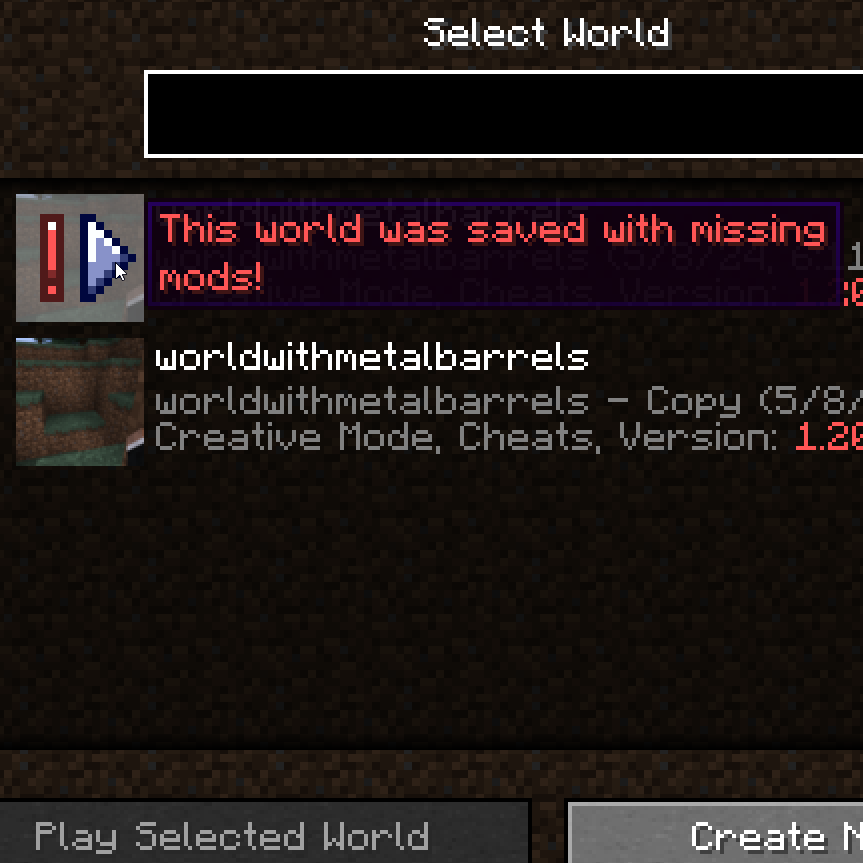
An icon and tooltip is also added to the affected worlds in the selection screen
Useful for debugging mods without accidentally ruining a world. Clientside only
New tooltip

Warning screen


Need a custom mod for a reasonable fee? Just want to chat? Have a complex issue needing additional discussion? Join the Discord:

Want to help support this mod and others? Donate to my Patreon in the link below

- Edition: Minecraft Java
- File type: .jar
- Minecraft versions listed: 1.21.1, 1.20.1
- How to install: Install the matching mod loader (Forge, Fabric or NeoForge) for your Minecraft version. → Download the .jar. → Put it in the .minecraft/mods folder and launch that loader profile.
- Where to get it: Opens on CurseForge — not every file is mirrored on our own servers.
Install steps are the general flow for this file type — How to install Minecraft Java mods & modpacks walks through it step by step.
- Ships as MissingModsWarning-forge-1.20.1-0.jar — drop this file into the mods folder
- Download size: 30 KB
- Download link checked 27 Sept 2026 — working
These come from our own check of the pack file, not from the source page.