Simply Blacksmithing & Mining
Minecraft Java mod. Downloads from the MC Java Mods app on Android.
The mod is very simple, there are 5 minerals superior to diamond, with their own tools and armor for a difficult world
⬇ Download on CurseForge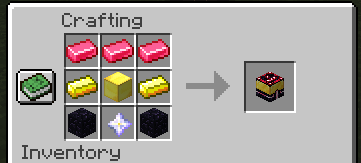
The mod has a special forge called ''Special-Smith'' that will only be used for the creation of the tools/armor of the 5 ores at the moment
¿ How can I get the ''Special-smith'' ?

¿ How to use the ''Special-smith'' ?
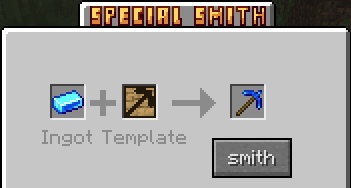
You have to put the ingot of the material and the tool/armor template you want, and finally press the ''smith'' button
¿How templates are crafted?
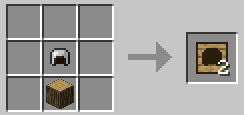
You have to put a log of any kind, and finally the tool/armor you prefer (it has to be made of iron)
¿What are the minerals like?
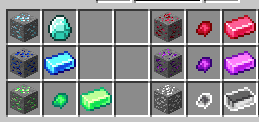
When you have the diamond pickaxe you can start with the Bluesteel (blue ore)
After the bluesteel you have to move on to, Greensteel -> Carmesteel -> Amatasteel -> Witesteel
When you start with Greensteel you will notice that when you melt it in the furnace you will get fragments, which makes it more difficult to farm the material.
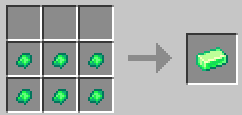
The crafting of the Greensteel/Carmesteel/Amatsteel are the same, but the last material Witesteel, is this one.
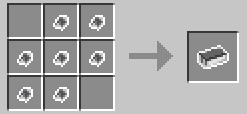
This is all about the mod, it's simply a netherite style blacksmithing table but for the 1.12.2 and for hard mods.
This entire mod was created by Mcreator.
- Edition: Minecraft Java
- File type: .jar
- How to install: Install the matching mod loader (Forge, Fabric or NeoForge) for your Minecraft version. → Download the .jar. → Put it in the .minecraft/mods folder and launch that loader profile.
- Where to get it: Opens on CurseForge — not every file is mirrored on our own servers.
Install steps are the general flow for this file type — How to install Minecraft Java mods & modpacks walks through it step by step.
- Ships as SimplyBlacksmithingAndMining(1.12.2)02v.jar — drop this file into the mods folder
- Download size: 428 KB
- Download link checked 28 Sept 2026 — working
These come from our own check of the pack file, not from the source page.