
AutoClicky
Java mod listed for Minecraft 1.16–1.21. Downloads from the MC Java Mods app on Android.
The best auto-clicker mod for PvP that has auto-jumping feature for critical hits. Supports both old and new PvP, has a lot of fine tuning. There is…
I don't know my version or loader
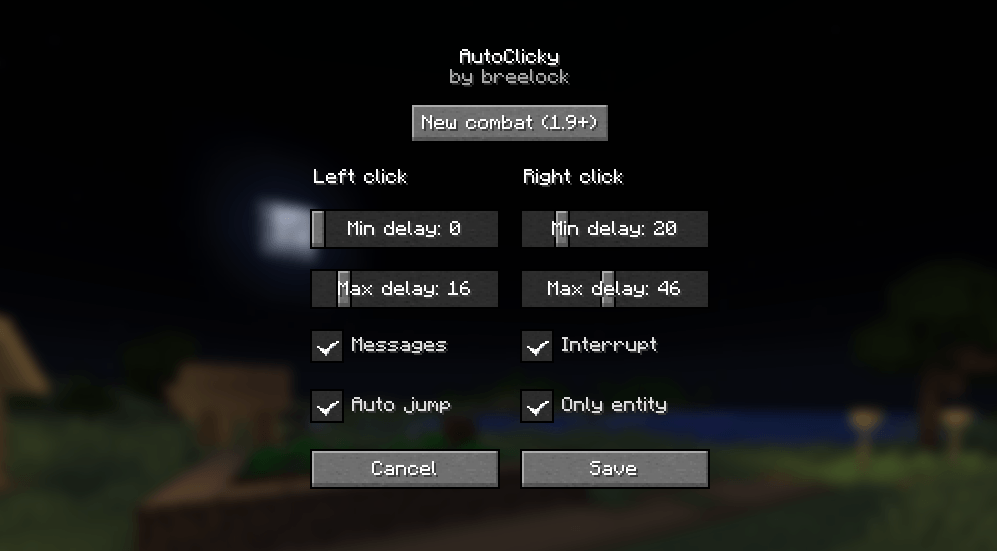
AutoClicky (Fabric)
Best in-game minecraft autoclicker (click on this preview photo to see video demonstration)

Features
- In new combat system mode, Autoclicky will click exactly on the timing when the weapon's cooldown is over to do a lot of damage
- To switch between 1.8 and 1.9+ PvP systems, simply click the
New combat (1.9+)orOld combat (1.8)button at the top - Left and right mouse button autoclicker
- A clever auto jump that jumps before hitting and always deals critical damage
- Only entities allow you to click only when the player targets the entity. If you disable this feature, the autoclicker will work before you disable it
- You can change the delay between presses, and you can also set it to a randomized delay
- The logic of the keystrokes is the same as if you were actually pressing the keys.
- Multi-language support: English, Russian, Ukrainian
How to use
- Open the settings with
N - Use
Rto toggle the left mouse button autoclicker - Use
Vto toggle the right mouse button autoclicker - Use
Hto switch between the new or old combat system - You can change all of these keys in the minecraft control settings
Disclaimer
I (mod author) do not take any responsibility for your banned accounts on public servers. If you want to use AutoClicky on public servers, you take all responsibility on yourself. The mod is recommended to use in single player game
Additionally
Since the mod is young, there may be a lot of bugs in it. If you find a bug or want to suggest an idea (for example: make a port of the mod to another version of the game), feel free to post on GitHub issues for bugs and GitHub discussions for suggestions or questions. It's very important to me!
Download
Dependencies
- Edition: Minecraft Java
- File type: .jar
- Minecraft versions listed: 1.21, 1.20.5, 1.20.6
- How to install: Install the matching mod loader (Forge, Fabric or NeoForge) for your Minecraft version. → Download the .jar. → Put it in the .minecraft/mods folder and launch that loader profile.
- Where to get it: Opens on CurseForge — not every file is mirrored on our own servers.
Install steps are the general flow for this file type — How to install Minecraft Java mods & modpacks walks through it step by step.
- Ships as autoclicky-1.2.1+mc1.20.5-1.21.1.jar — drop this file into the mods folder
- Download size: 56 KB
- Download link checked 27 Sept 2026 — working
These come from our own check of the pack file, not from the source page.