
Find It
Java mod listed for Minecraft 1.21. Downloads from the MC Java Mods app on Android.
I don't know my version or loader
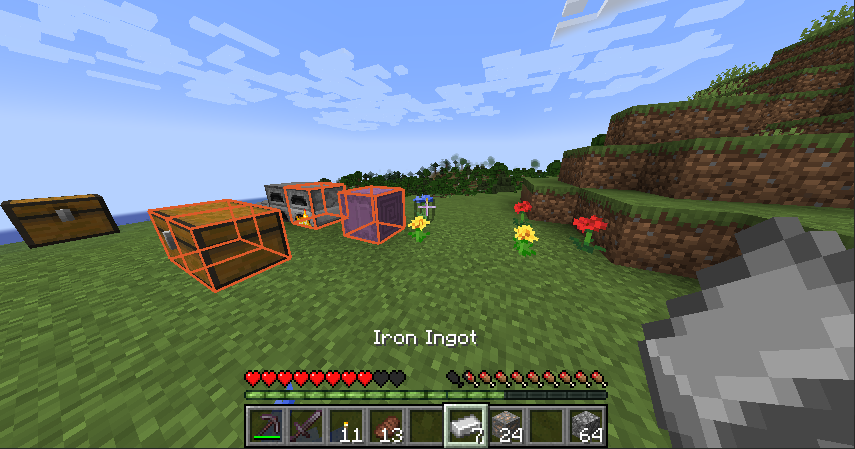

Find It
Find It allows you to find items you want in nearby inventories around you. Simply press 'Y' (Default keybind) on any item in your inventory (or JEI or similar) and look around for all the highlighted storage around you!
Note: It doesn't look at chest where loot has not been generated (For example dungeons and such). This is in line with how the Spectator works.
Config
Client sided config that allows you to change the colour of the highlight as well as how long it will appear for. Accessible via your usual config files or changable in game using commands.
Colour
Changes the colour of the highlight.
/findit color red green blue where the red, green and blue values are between 0 and 255.
Timer:
Changes the time the higlight is shown for.
/findit timer time where time is the amount of ticks the highlight is displayed for, between 10 and 300.
- Edition: Minecraft Java
- File type: .jar
- Minecraft versions listed: 1.21.5, 1.21.1, 1.21
- How to install: Install the matching mod loader (Forge, Fabric or NeoForge) for your Minecraft version. → Download the .jar. → Put it in the .minecraft/mods folder and launch that loader profile.
- Where to get it: Opens on CurseForge — not every file is mirrored on our own servers.
Install steps are the general flow for this file type — How to install Minecraft Java mods & modpacks walks through it step by step.
- Ships as findit-1.21.5-1.1.jar — drop this file into the mods folder
- Download size: 33 KB
- Download link checked 18 Oct 2026 — working
These come from our own check of the pack file, not from the source page.