
Lexikon
Java mod listed for Minecraft 1.19–1.21. Downloads from the MC Java Mods app on Android.
I don't know my version or loader
 This mod acts as an in-game spell checker, highlighting errors and suggesting corrections as you type in Minecraft chat
Features
- Highlight the errors
- Live correction
- Give suggestions of corrections
- Left click to see the rule
Languages
- English (US/UK)
- French
- Spanish
- German
- Italian
- Dutch
- Portuguese
- Catalan
How to use it
Simply use the in-game chat, and Lexikon will start to highlight the error to correct it. You can click on the suggestions you want or use the arrows keys
Demo
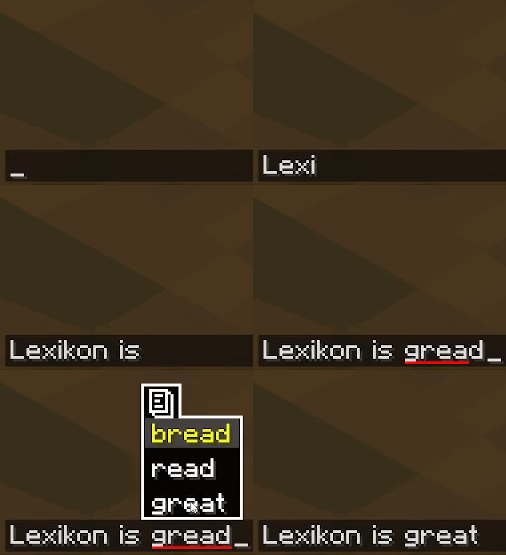
Support Lexikon

Are you interested in supporting me and the development of Lexikon ? If so, I suggest trying out BisectHosting. As a new customer, use the Oiha to receive a 25% discount on your first month of a gaming server. With 24/7 support and rapid response times
- Edition: Minecraft Java
- File type: .jar
- Minecraft versions listed: 1.21.8, 1.21.7, 1.21.6
- How to install: Install the matching mod loader (Forge, Fabric or NeoForge) for your Minecraft version. → Download the .jar. → Put it in the .minecraft/mods folder and launch that loader profile.
- Where to get it: Opens on CurseForge — not every file is mirrored on our own servers.
Install steps are the general flow for this file type — How to install Minecraft Java mods & modpacks walks through it step by step.
- Ships as Lexikon-1.1.1-1.21.8.jar — drop this file into the mods folder
- Download size: 135.5 MB
- Download link checked 27 Sept 2026 — working
These come from our own check of the pack file, not from the source page.