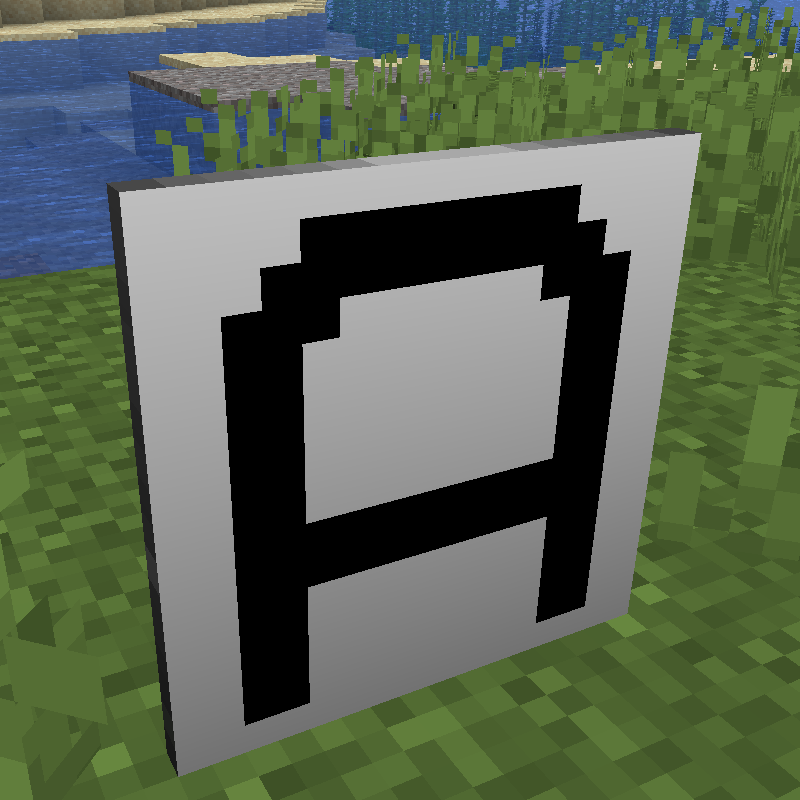
Large Iron Sign
Java mod listed for Minecraft 1.20–1.21. Downloads from the MC Java Mods app on Android.
I don't know my version or loader
This is a mod for Minecraft that adds a sign that displays a single large character. The character can be any capital letter, numeric digit, or one of 40 other symbols.


The sign can be coloured, both the text and the background separately.

An optional trim can be added to the sign.

Dependencies
|
Minecraft |
Java |
Fabric Loader |
Fabric API |
|---|---|---|---|
|
1.20.1 |
17 |
0.16.5 |
0.92.2+1.20.1 |
|
1.20.2 |
17 |
0.16.5 |
0.91.6+1.20.2 |
|
1.20.3 |
17 |
0.16.5 |
0.91.1+1.20.3 |
|
1.20.4 |
17 |
0.16.5 |
0.97.2+1.20.4 |
|
1.20.6 |
21 |
0.16.5 |
0.100.8+1.20.6 |
|
1.21.1 |
21 |
0.16.5 |
0.105.0+1.21.1 |
|
1.21.3 |
21 |
0.16.9 |
0.109.0+1.21.3 |
How to Use undefined
To make signs, use an iron block in a stonecutter. This will produce 16 signs.

Place the sign, then right-click it and select the character it should display. You can also enable/disable the trim here.

To change the text colour, hold a dye in your main hand and right-click the sign.
To change the background colour, hold a dye in your off hand and right-click the sign.
If you have a dye in both hands, you can set both the text and background colour at the same time.

Credits
Textures based on font: https://www.dafont.com/vcr-osd-mono.font
Changelog
1.0.4 - 18 May 2025
Fixed particle sprites not being visible.
1.0.3 - 17 May 2025
Fixed item appearance in item frames and when on ground.
1.0.2 - 08 March 2025
Fixed opening set symbol screen on discrete server.
1.0.1 - 23 November 2024
Fixed small textures breaking mipmap levels.
1.0.0 - 06 October 2024
Initial Version.
- Edition: Minecraft Java
- File type: .jar
- Minecraft versions listed: 1.21.11, 1.21.10, 1.21.8
- How to install: Install the matching mod loader (Forge, Fabric or NeoForge) for your Minecraft version. → Download the .jar. → Put it in the .minecraft/mods folder and launch that loader profile.
- Where to get it: Opens on CurseForge — not every file is mirrored on our own servers.
Install steps are the general flow for this file type — How to install Minecraft Java mods & modpacks walks through it step by step.
- Ships as largeironsign-mc1.21.11-1.0.4.jar — drop this file into the mods folder
- Download size: 210 KB
- Download link checked 28 Sept 2026 — working
These come from our own check of the pack file, not from the source page.