Claim My Land
Java mod listed for Minecraft 1.20–1.21. Downloads from the MC Java Mods app on Android.
I don't know my version or loader
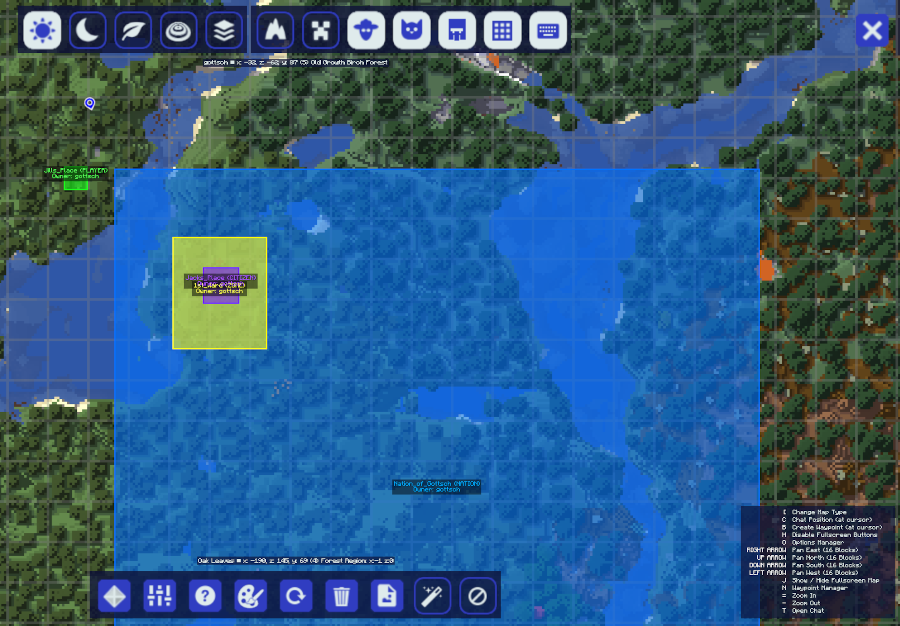
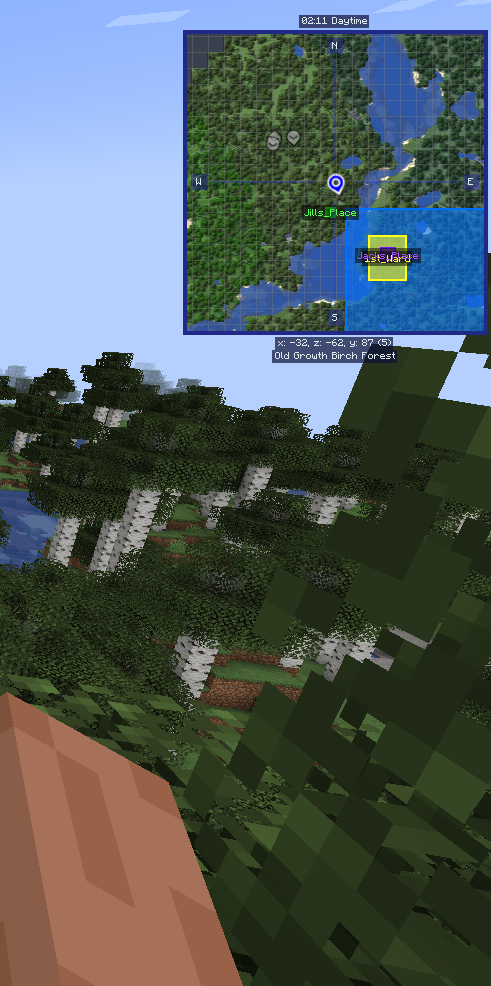
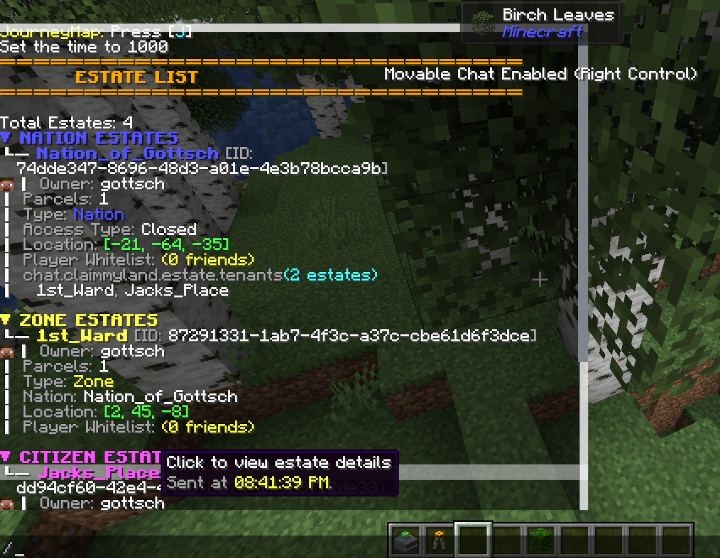

Claim land your way — no chunk grid, no compromises. Define any shape and size, organize your territory into Nations and Zones, and protect it all with a full protection and whitelist system.
Claim My Land is a land-claiming mod for Minecraft 1.20.1 (Forge) that gives players complete control over their territory. Unlike chunk-based claiming mods, CML lets you define any rectangular area — place it exactly where you want, sized exactly how you want.
undefined✨ Features
- Free-form parcel sizing — claim any rectangular area, not locked to chunk boundaries
- Nation / Zone / Citizen hierarchy — organize territory with a tiered ownership model
- Deed-based claiming — find deeds in dungeon loot or receive them from server ops
- Visual border rendering — in-world wireframe borders with per-type color coding (green, blue, yellow, purple)
- JourneyMap integration — parcels appear as polygon overlays on the full-screen and minimap
- Full protection system — block, item, entity, and tag-based whitelists at the estate level
- Interactive chat UI — clickable icon buttons in chat for rename, demolish, whitelist management
- Parcel entry title — title/subtitle display on-screen when entering a parcel
- Rolling JSON backup system — automatic periodic saves with configurable retention
- Server-friendly — dimension-aware, configurable CML ops list, lightweight spatial indexing
📸 Screenshots
Screenshots coming soon — items showcase, border rendering, JourneyMap overlay, chat UI, parcel entry title.
undefined📦 Requirements
- GottschCore 2.6.0+ (required)
\*\*Recommended:\*\*
- JourneyMap — parcel polygon overlays on your map
- Chat Plus — scrollable chat for long command output (see compatibility note below)
⚠️ Chat Plus Compatibility
Chat Plus users: You must set "movableChatEnabled": false in your Chat Plus config (config/chatplus.json). Movable chat mode intercepts click events before CML can process them, which prevents the interactive chat icon buttons from working.
How It Works
Claiming Land
- Obtain a Deed (from loot chests or a server operator)
- Right-click the ground to place a Foundation Stone preview
- Check the border colors — green means clear, red means conflict
- Right-click the Foundation Stone with the deed to confirm your claim
- Your land is now protected!
The Hierarchy
CML supports four parcel types:
| Type | Color | Purpose |
|---|---|---|
| Player | Green | Personal land claim |
| Nation | Blue | Large territory that can contain Zones and Citizens |
| Zone | Yellow | Subdivision within a Nation |
| Citizen | Purple | Individual plot within a Nation, assigned to a player |
Protection
Claimed parcels block unauthorized block breaking, block placement, item use, farmland trampling, chorus fruit teleportation, hostile mob spawning, and more. Owners manage access through seven whitelist types: player, block, item, block tag, item tag, entity, and entity tag.
📖 Documentation
Full documentation — getting started guide, commands reference, protection system details, configuration options, and more — is available on the \*\*\[GitHub Wiki\](https://github.com/gottsch/gottsch-minecraft-Claim-My-Land/wiki)\*\*.
Also available on \[Modrinth\](https://modrinth.com/mod/claim-my-land) · Source on \[GitHub\](https://github.com/gottsch/gottsch-minecraft-Claim-My-Land) · By the author of \[Treasure2\](https://www.curseforge.com/minecraft/mc-mods/treasure2)
- Edition: Minecraft Java
- File type: .jar
- Minecraft versions listed: 1.21.1, 1.20.1
- How to install: Install the matching mod loader (Forge, Fabric or NeoForge) for your Minecraft version. → Download the .jar. → Put it in the .minecraft/mods folder and launch that loader profile.
- Where to get it: Opens on CurseForge — not every file is mirrored on our own servers.
Install steps are the general flow for this file type — How to install Minecraft Java mods & modpacks walks through it step by step.
- Ships as claimmyland-1.20.1-2.5.3.jar — drop this file into the mods folder
- Download size: 828 KB
- Download link checked 27 Sept 2026 — working
These come from our own check of the pack file, not from the source page.