Haven Kitchen Sink Helper
Java mod listed for Minecraft 1.20–1.21. Downloads from the MC Java Mods app on Android.
I don't know my version or loader
Haven Kitchen Sink Helper
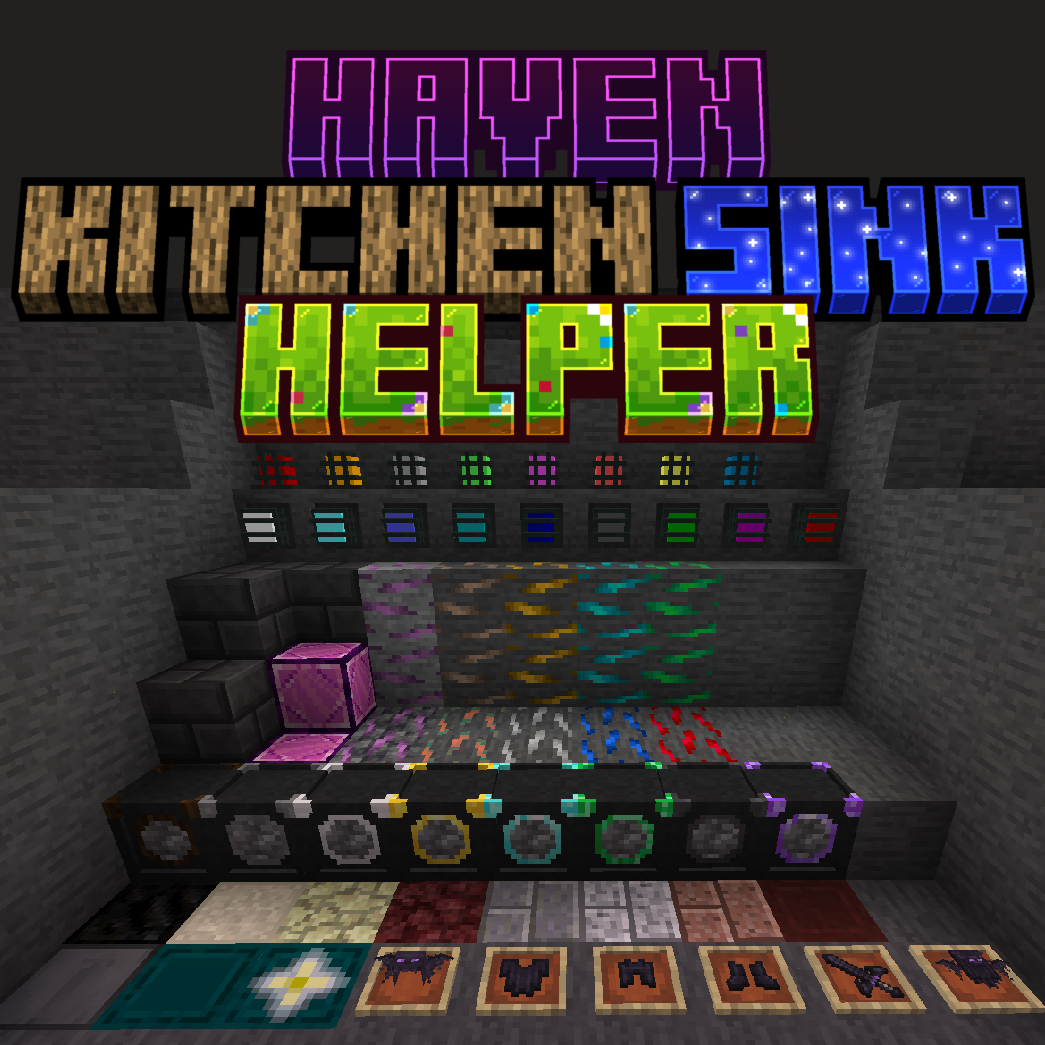
Haven Kitchen Sink Helper is a feature-rich Minecraft mod designed to simplify modpack creation. With tools, items, commands, and recipes, it provides everything modpack creators need to make the process efficient and enjoyable.
Features
- 3x3 Tools: Hammers and Excavators for faster mining and digging.
- Tree Choppers: Quickly chop down entire trees.
- Crafting Tiers: Basic, Intermediate, Advanced, Elite, and Ultimate tiers for customizable crafting.
- Underground Materials: Scorched Stone, Stone Bricks, and Cobblestone veins.
- Scorched Ores: Nugget-yielding ores found in Scorched Stone Veins.
- Havenite Ore: Found below Y Level 60 and requires a Netherite Pickaxe.
- Resource Nuggets: Includes Diamond, Emerald, Netherite, and more.
- Additional Materials: Ingots, Dusts, Mini Coal, Charcoal Blocks, and more.
- Utility Items: Magnets to attract items, Repair Talismans for item repairs, and Watering Cans for crop acceleration.
- Colorful Lamps: Available in all dye colors and toggleable with right-click.
- Durable Tools: Includes Wooden, Bone, Flint, Stone, Copper, Obsidian, Emerald, Dragon, and Havenite tools.
Commands
- /havenksh admin generatejsons alltags:
- Generates all tags from Blocks and Items in their respective JSON file in "config/havenksh/generatedjsons".
- /havenksh admin generatejsons blocks:
- Generates all blocks in the game in a JSON file in "config/havenksh/generatedjsons".
- /havenksh admin generatejsons items:
- Generates all items in the game in a JSON file in "config/havenksh/generatedjsons".
- /havenksh admin generatejsons chests blocks:
- Generates a JSON file for chest blocks when looking at a chest (or one side of a double chest) in "config/havenksh/generatedjsons".
- /havenksh admin generatejsons chests items:
- Generates a JSON file for chest items, including NBT and item count, when looking at a chest (or one side of a double chest) in "config/havenksh/generatedjsons".
- /havenksh admin generatejsons ftbquestchapter TITLE MODID:
- Generates all items and blocks from the specified mod with a title in a new chapter.
- Requires reloading with /ftbquests reload or re-entering the world to appear in-game.
- Only works in Singleplayer. The file is generated in the FTBQuests Chapter Folder.
- /havenksh admin generatejsons ftbquestrewards TITLE:
- Generates a JSON file with items, amounts, and NBT from a chest.
- Requires reloading with /ftbquests reload or re-entering the world to appear in-game.
- Only works in Singleplayer. The file is generated in the FTBQuests Rewards Folder.
- /havenksh admin generatejsons mobs:
- Generates all mobs in the game in a JSON file in "config/havenksh/generatedjsons".
- /havenksh admin generatejsons modblocks MODID:
- Generates a JSON file for all blocks from the specified mod in "config/havenksh/generatedjsons".
- /havenksh admin generatejsons moditems MODID:
- Generates a JSON file for all items from the specified mod in "config/havenksh/generatedjsons".
- /havenksh admin generatejsons tags TAGNAME items:
- Generates a JSON file for all items under the specified tag in "config/havenksh/generatedjsons".
- /havenksh admin generatejsons tags TAGNAME blocks:
- Generates a JSON file for all blocks under the specified tag in "config/havenksh/generatedjsons".
Default Configuration
#Mending Necklace
[mendingNecklace]
#The interval in ticks between each repair of the mending necklace.
#Range: 1 ~ 100000
mendingNecklaceRepairInterval = 100
#Mini Coal and Mini Charcoal
[miniFuel]
#The burn time of mini coal. (200 = 1 item)
#Range: 1 ~ 100000
miniCoalBurnTime = 200
#The burn time of mini charcoal. (200 = 1 item)
#Range: 1 ~ 100000
miniCharcoalBurnTime = 200
#Dragon Scale Drop
[dragonScaleDropChance]
#The chance for the Ender Dragon to drop a Dragon Scale.
#Range: 0 ~ 100
dragonScaleDropChance = 100
#The max random amount of Dragon Scales that can drop from the Ender Dragon.
#Range: 1 ~ 64
dragonScaleDropAmount = 4
#Watering Cans
[wateringCan]
#The cooldown in ticks for the watering can.
#Range: 1 ~ 1000
wateringCanCooldown = 10
#Hammers
[hammers]
#If enabled, the hammers only takes 1 durability instead of the amount it breaks.
hammerDurability = true
#Highlight color for the hammer
[hammers.hammer_highlight]
#The red value of the highlight color.
#Range: 0.0 ~ 1.0
hammer_highlight_red = 1.0
#The green value of the highlight color.
#Range: 0.0 ~ 1.0
hammer_highlight_green = 0.0
#The blue value of the highlight color.
#Range: 0.0 ~ 1.0
hammer_highlight_blue = 1.0
#The alpha value of the highlight color.
#Range: 0.0 ~ 1.0
hammer_highlight_alpha = 0.4
#Excavators
[excavator]
#If enabled, the excavators only takes 1 durability instead of the amount it breaks.
excavatorDurability = true
#Highlight color for the excavator
[excavator.excavator_highlight]
#The red value of the highlight color.
#Range: 0.0 ~ 1.0
excavator_highlight_red = 1.0
#The green value of the highlight color.
#Range: 0.0 ~ 1.0
excavator_highlight_green = 0.0
#The blue value of the highlight color.
#Range: 0.0 ~ 1.0
excavator_highlight_blue = 1.0
#The alpha value of the highlight color.
#Range: 0.0 ~ 1.0
excavator_highlight_alpha = 0.4
Support
Join our Discord community for updates, bug reports, and support.
- Edition: Minecraft Java
- File type: .jar
- Minecraft versions listed: 1.20.1, 1.21.1
- How to install: Install the matching mod loader (Forge, Fabric or NeoForge) for your Minecraft version. → Download the .jar. → Put it in the .minecraft/mods folder and launch that loader profile.
- Where to get it: Opens on CurseForge — not every file is mirrored on our own servers.
Install steps are the general flow for this file type — How to install Minecraft Java mods & modpacks walks through it step by step.
- Ships as HavenKitchenSinkHelper-NeoForge-1.21.1-1.0.1.jar — drop this file into the mods folder
- Download size: 1.0 MB
- Download link checked 18 Oct 2026 — working
These come from our own check of the pack file, not from the source page.