
Aegis Engine - Performance & Lag Optimizer
Find out WHAT is lagging your Bedrock world and WHERE. Adaptive entity, item and spawn optimizer that uses less CPU the moment your world struggles.
⬇ Download on CurseForgeThe author built this one for Minecraft 26.40. On other versions it may install and then do nothing.
Aegis Engine Premium
Lag diagnostics and adaptive optimization for Minecraft Bedrock
Aegis Engine helps you find the source of lag in a Bedrock world before making any changes. It tracks entity activity, dropped items, spawn rates and busy areas, then gives you a clear report so you can see what needs attention.
Many lag tools remove items or entities on a timer. That can hide the symptom while deleting things players wanted to keep. Aegis focuses on identifying the problem first. If cleanup is enabled, it works within set limits and records what it did.
What Aegis can show you
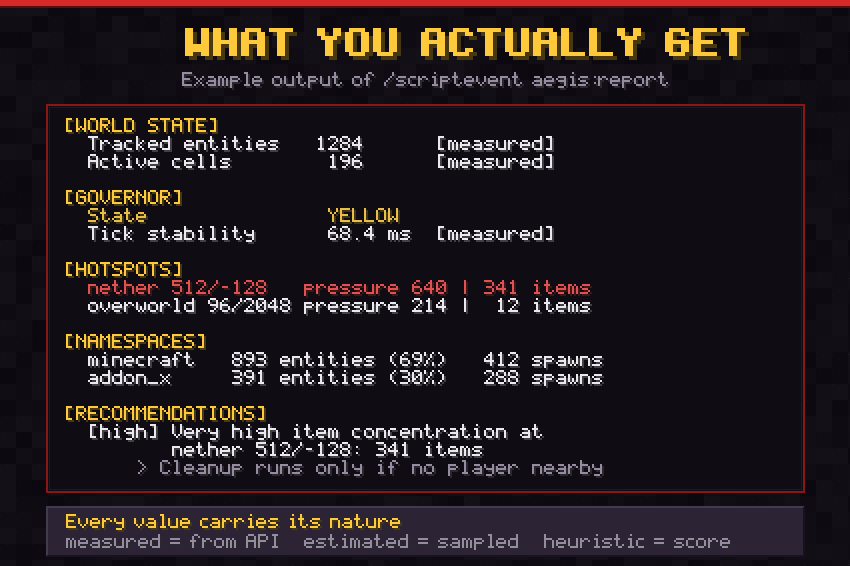
The diagnostic report identifies busy locations, entity counts, item concentrations and the namespaces responsible for spawning entities. This is useful for finding an overloaded farm, a forgotten item pile or an addon creating more entities than expected.
The report includes hotspot locations, dimension names, item and entity counts, spawn activity and practical recommendations. You get facts about what is present in the world, rather than a vague claim that something is causing lag.
Adaptive performance control
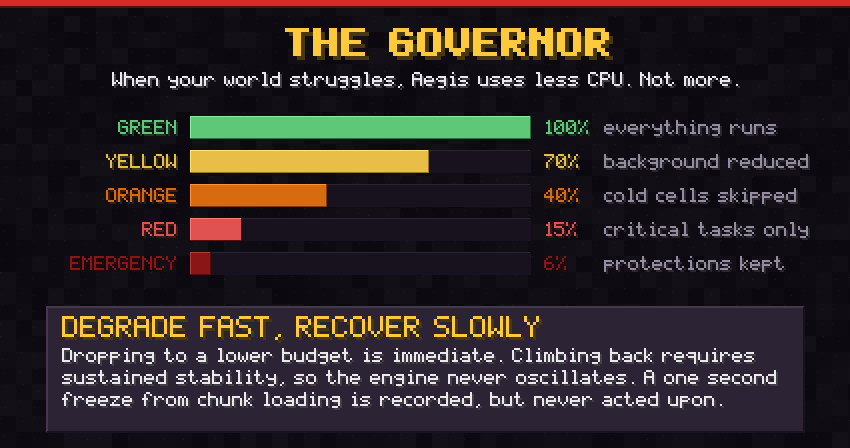
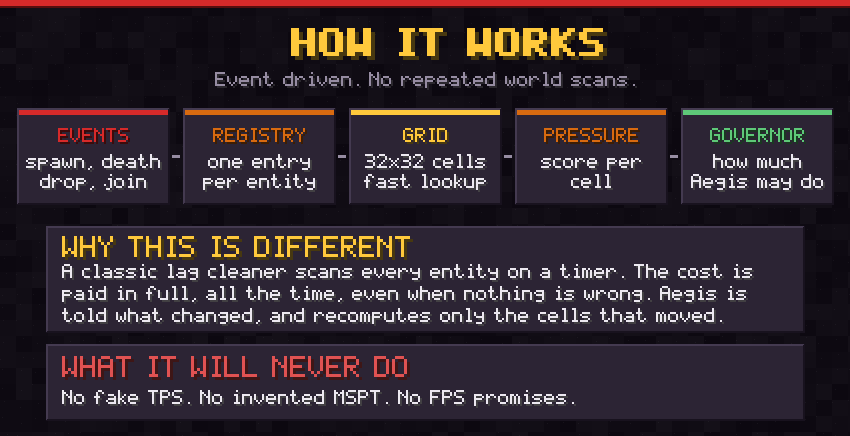
The built in Governor monitors tick stability. When the world becomes busy, Aegis reduces its own workload so it does not add pressure at the worst possible moment. Its activity can scale from full operation down to a light monitoring mode.
Careful cleanup
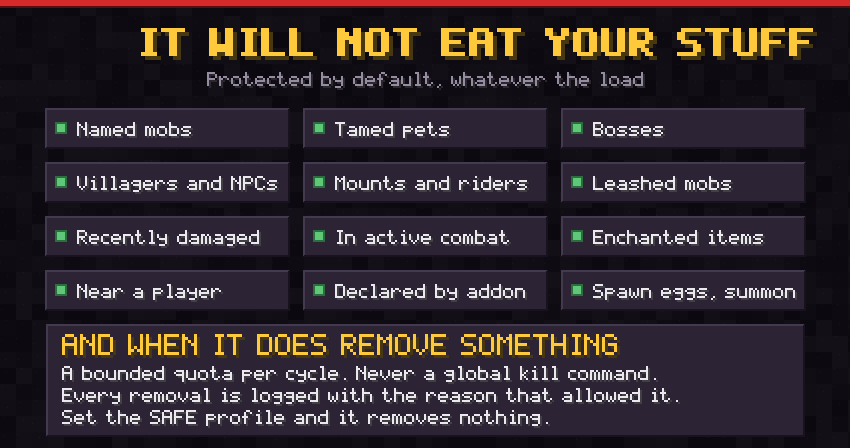
There is no global kill command. When cleanup is allowed, Aegis only removes a limited number of eligible dropped items from one busy area at a time. It avoids players and only acts on items old enough to qualify. Each removal is written to the log with the reason it was made.
Protection by default
Named mobs, tamed pets, bosses, villagers, mounts, leashed animals, recently damaged or fighting entities, and entities close to players are protected by default. Named and enchanted items are protected as well. Addon developers can declare entities that Aegis must never touch.
About FPS
A behavior pack cannot change your renderer, GPU, render distance or frame rate. Aegis does not claim to increase FPS.
Instead, it can reduce simulation work caused by excessive entities, items or projectiles. That may help a world with a genuine entity problem. If the world is already healthy, Aegis will report that there is little or nothing to optimize.
The included A B benchmark compares two runs under the same conditions. One run observes only and the other uses the selected Aegis profile. The result shows the raw measurements so you can judge whether there is a measurable difference.
Designed for
Bedrock Dedicated Server and Realms worlds with recurring lag.
Long running survival worlds with old farms, accumulated items or large entity populations.
Heavily modded worlds where you need to understand which namespace is producing entities.
Addon developers who want to monitor the entity footprint of their own packs.
Main features
Event based tracking. Entities are indexed as events arrive instead of through repeated full world scans.
Spatial grid. Virtual 32 by 32 cells provide quick lookups and incremental counters.
Hotspot ranking. See the ten busiest areas with their dimension, coordinates and the reason they rank highly.
Namespace analysis. Review the share of entities and spawns associated with each addon namespace.
Item pressure handling. Soft, hard and emergency thresholds with cleanup limits.
Projectile storm detection. Detect large concentrations of arrows and custom projectiles.
Spawn monitoring. Track rates by area, entity type, namespace and cause.
Anomaly detection. Learn the usual activity in your world and highlight meaningful changes.
Dynamic data audit. Report dynamic property volume by addon without deleting another pack's data.
Safe Mode. Run diagnostics only, with no entity removals.
Profiles. Choose AUTO, SAFE, BALANCED, PERFORMANCE, AGGRESSIVE or CUSTOM.
Platform presets. Realm, Dedicated, Mobile host, Heavy addons and Vanilla plus.
Languages. English, French and Spanish.
How to use Aegis
Install the mcaddon file and enable both packs on your world.
Operators receive the Aegis Console automatically. Use the Console to open the dashboard and select a profile. AUTO is a good starting point.
Play normally, then open Overview and Full report to review the results.
You can also use these commands.
/scriptevent aegis:status
Shows a short status summary.
/scriptevent aegis:report
Shows the full performance report.
/scriptevent aegis:hotspots
Shows the hotspot ranking.
/scriptevent aegis:ui
Opens the dashboard.
/scriptevent aegis:benchmark
Runs the A B benchmark.
/scriptevent aegis:lang en
Changes the language. Use en, fr or es.
/scriptevent aegis:safe
Enables diagnostics only mode.
The Console is available to operators only and is not listed in the creative inventory. Permissions are checked each time it is used.
For addon developers
Aegis is designed to work alongside other addons. It does not alter their tags, dynamic properties, scoreboards or components. Its own data uses the aegis namespace.
You can declare entities for Aegis to protect.
/scriptevent aegis:declare {"type":"addon:turret","protect":true,"pressureWeight":4}
You can also use the aegis:protect, aegis:ignore and aegis:always_track tags. The never_touch setting takes priority over every profile and threshold.
Requirements
Minecraft Bedrock version 26.40
No experimental toggles are required. Aegis uses the stable Script API.
Both the Behavior Pack and Resource Pack must be enabled.
What Aegis does not do
It does not invent TPS or MSPT values. The Bedrock Script API does not provide them, so Aegis reports tick stability instead.
It does not promise FPS gains.
It does not accuse an addon of causing lag without CPU measurements. It reports entity presence, spawn rate and local concentration.
It does not remove anything silently. Every cleanup action has a logged reason.
Choose the SAFE profile if you only want reports. In this mode, Aegis will not remove entities.
- Edition: Minecraft Bedrock
- File type: .mcpack or .mcaddon
- Minecraft version listed: 26.40
- How to install: Download the .mcpack or .mcaddon file. → Open it — Minecraft imports it. → In your world: Behavior Packs → Available → Activate, then the same under Resource Packs.
- Where to get it: Opens on CurseForge — not every file is mirrored on our own servers.
Install steps are the general flow for this file type — How to install Minecraft Bedrock addons & mods walks through it step by step.
- Pack type: .mcaddon — behaviour and resource pack in one file
- Manifest requires Minecraft 1.26.44 or newer
- Complete pack — everything it depends on is inside the file
- Download size: 152 KB
- Download link checked 28 Sept 2026 — working
These come from our own check of the pack file, not from the source page.