
Enhanced Anvils
Java mod listed for Minecraft 1.21. Downloads from the MC Java Mods app on Android.
I don't know my version or loader
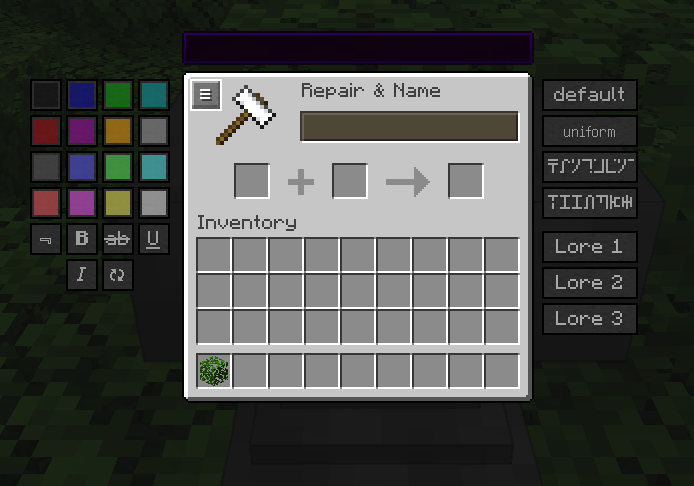
Enhanced Anvils changes the vanilla anvil screen to add extra buttons.
- 16 colored buttons which correspond to each color code Minecraft supports
- 6 buttons corresponding to each formatting code allowing you to make obfuscated, bold, strikethrough, underlined, italic or reset the formatting of text
- 4 custom buttons corresponding to each Font in the Minecraft Java edition
- 3 custom lore buttons allowing which turn the current text into lore (up to 3 different lore lines)
Each of the buttons inserts the formatting code at the current cursor position in the edit box. (or at the start if using the font or lore buttons)
These buttons allows users to use colors / fonts / lore when naming items.
The lore feature is mostly untested, please report any problems with the feature on the issue tracker.

Need a server? Get 20% off your first month by using promo code "mrbysco"
For questions feel free to join my Discord.

Want to support us?
 -Mrbysco
-ShyNieke
- Edition: Minecraft Java
- File type: .jar
- Minecraft versions listed: 1.21.11, 1.21.1, 1.21.10
- How to install: Install the matching mod loader (Forge, Fabric or NeoForge) for your Minecraft version. → Download the .jar. → Put it in the .minecraft/mods folder and launch that loader profile.
- Where to get it: Opens on CurseForge — not every file is mirrored on our own servers.
Install steps are the general flow for this file type — How to install Minecraft Java mods & modpacks walks through it step by step.
- Ships as EnhancedAnvils-1.21.1-0.1.0.jar — drop this file into the mods folder
- Download size: 29 KB
- Download link checked 28 Sept 2026 — working
These come from our own check of the pack file, not from the source page.