
Maker's mark
Java mod listed for Minecraft 1.20. Downloads from the MC Java Mods app on Android.
I don't know my version or loader
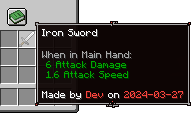
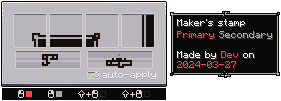
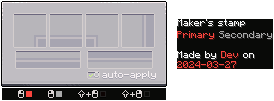
Allows players to mark the items they craft by embellishing the tooltip of the item.
## Walkthrough
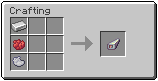
1. Craft a stamp from an iron ingot and two dyes
2. Right-click with the stamp in your hand to open the stamp UI
3. Draw tooltip borders and decorations in the stamp UI
4. Choose if the stamp should automatically apply to all crafted items (only works for items with durability)
5a. Craft an item in the regular workbench and it should recieve the tooltip you drew in step 3 (if the stamp is set to auto apply and is in the player inventory)
5b. Put the stamp in your main and another item in the other hand, rightclick to apply the stamp to the offhand item
- Edition: Minecraft Java
- File type: .jar
- Minecraft version listed: 1.20.1
- How to install: Install the matching mod loader (Forge, Fabric or NeoForge) for your Minecraft version. → Download the .jar. → Put it in the .minecraft/mods folder and launch that loader profile.
- Where to get it: Opens on CurseForge — not every file is mirrored on our own servers.
Install steps are the general flow for this file type — How to install Minecraft Java mods & modpacks walks through it step by step.
- Ships as makersmark-1.20.1-1.0.0.jar — drop this file into the mods folder
- Download size: 68 KB
- Download link checked 28 Sept 2026 — working
These come from our own check of the pack file, not from the source page.