
OpticalJS
Java mod listed for Minecraft 1.20. Downloads from the MC Java Mods app on Android.
⬇ Download on CurseForgeThe author built this one for Minecraft 1.20.1 on Forge. On other versions it may install and then do nothing.
OpticalJS
is a Create Optical addon that adds KubeJS support for it.
With OpticalJS, you can add Create Optical focusing recipe without having to interact with json style custom recipe.
Currently (Optical JS 1.0.0) supports Create Optical 0.2.1 and KubeJS 2001.6.5-build.16.
How To Use
code example:
ServerEvents.recipes(event => {
    event.recipes.create_optical.focusing(
        ["create:brass_door"],
        ["create:copper_door"]
    )
    event.recipes.create_optical.focusing(
        ["create:analog_lever"],
        ["minecraft:lever"],
        10,
        0
    )

    // after 0.1.1, you can use enum name directly
    event.recipes.create_optical.focusing(
        ["create:analog_lever"],
        ["minecraft:lever"],
        10,
        'gamma'
    )
})
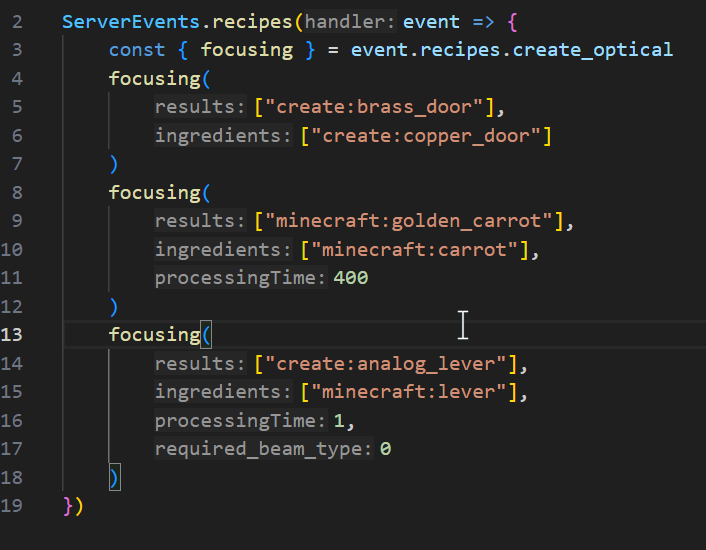
This will create three focusing recipes.
The first recipe requires a "create:copper_door", and produces "create:brass_door" after 40 ticks.
The second recipe requires a Lever and exposure under radio light, and produces an Analog Lever after 10 ticks.
The third recipe requires a Lever and exposure under gamma light, and produces an Analog Lever after 10 ticks.
The 0 in the second recipe stands for required_beam_type, where 0 is "radio", 1 is "microwave", 2 is "visible light", 3 is "gamma", 4 is "none".
Image example:
- Edition: Minecraft Java
- File type: .jar
- Minecraft version listed: 1.20.1
- How to install: Install the matching mod loader (Forge, Fabric or NeoForge) for your Minecraft version. → Download the .jar. → Put it in the .minecraft/mods folder and launch that loader profile.
- Where to get it: Opens on CurseForge — not every file is mirrored on our own servers.
Install steps are the general flow for this file type — How to install Minecraft Java mods & modpacks walks through it step by step.
- Ships as OpticalJS-1.20.1-1.1.1.jar — drop this file into the mods folder
- Download size: 34 KB
- Download link checked 28 Sept 2026 — working
These come from our own check of the pack file, not from the source page.