Proximity Chat
Java mod listed for Minecraft 1.19–1.21. Downloads from the MC Java Mods app on Android.
I don't know my version or loader
Proximity Chat
Overview
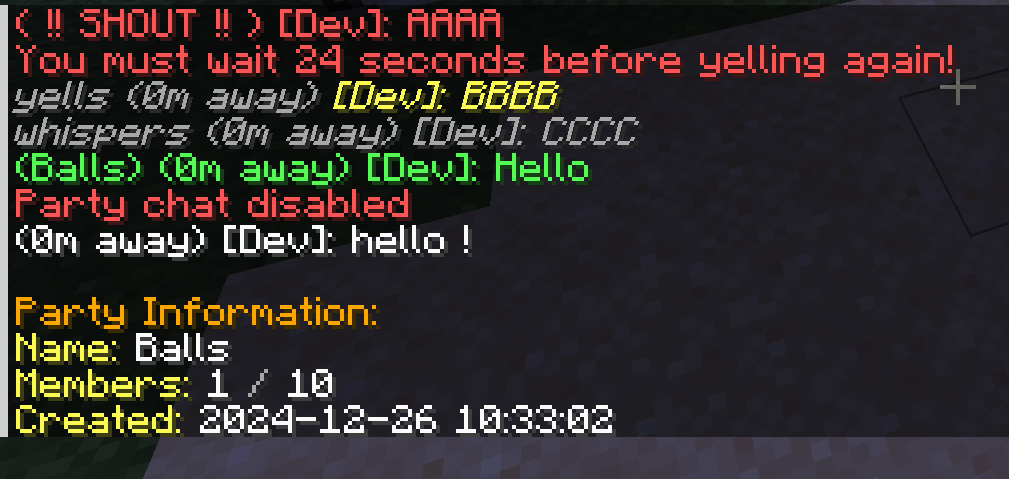
Proximity Chat adds realistic distance-based chat functionality to Minecraft, allowing players to communicate based on their physical proximity in the game world. Chat messages are only visible to players within configurable ranges, making communication more immersive and strategic.
Features
Distance-Based Chat
- Proximity Chat: Messages are only visible to players within a configurable range
- Multiple Chat Modes:
- Normal Chat: Standard proximity-based communication
- Whisper: Shorter range for private conversations
- Yell: Extended range for reaching distant players
- Shout: Server-wide announcements with cooldown
Party System
- Create and manage player parties
- Party-specific chat channel
- Comprehensive party management commands:
- Create/disband parties
- Invite/kick players
- Promote/demote moderators
- Party member listing
- Configurable party sizes
- Optional party persistence across server restarts
Commands
/proximitychat party create <name>- Create a new party/proximitychat party invite <player>- Invite a player to your party/proximitychat party join <name>- Join a party you've been invited to/proximitychat party leave- Leave your current party/proximitychat party list- List party members/proximitychat whisper <message>(or/w) - Send a whispered message/proximitychat yell <message>(or/y) - Send a yelled message/proximitychat shout <message>(or/s) - Send a server-wide shout/proximitychat pc- Toggle party chat mode
Configuration
- Customizable chat ranges for each chat mode
- Configurable colors for different chat types
- Adjustable cooldowns for yell and shout commands
- Customizable maximum party size
- Blacklist for forbidden party names
- Party persistence settings
- Message colors
Mod Integration
- Integration with Fakename mod for roleplay servers
- Support for Chat Heads mod integration.
Support:
- Open an issue on our GitHub repository
- Join our Discord server
If you'd like to support me and the development of my mods, I recommend trying out BisectHosting. Use code "project8gbderam" to get 25% off your first month of a gaming server for new customers. They offer 24/7 support and lightning-fast response times, ensuring you're in great hands and providing exceptional assistance for all your gaming needs. https://www.bisecthosting.com/project8gbderam

- Edition: Minecraft Java
- File type: .jar
- Minecraft versions listed: 1.21.1, 1.20.1, 1.19.2
- How to install: Install the matching mod loader (Forge, Fabric or NeoForge) for your Minecraft version. → Download the .jar. → Put it in the .minecraft/mods folder and launch that loader profile.
- Where to get it: Opens on CurseForge — not every file is mirrored on our own servers.
Install steps are the general flow for this file type — How to install Minecraft Java mods & modpacks walks through it step by step.
- Ships as proximitychat-1.20.1-Forge-1.2.0.jar — drop this file into the mods folder
- Download size: 42 KB
- Download link checked 28 Sept 2026 — working
These come from our own check of the pack file, not from the source page.