
ModsJava
F3 Is My Shawty
Minecraft Java mod. Downloads from the MC Java Mods app on Android.
⬇ Download on CurseForge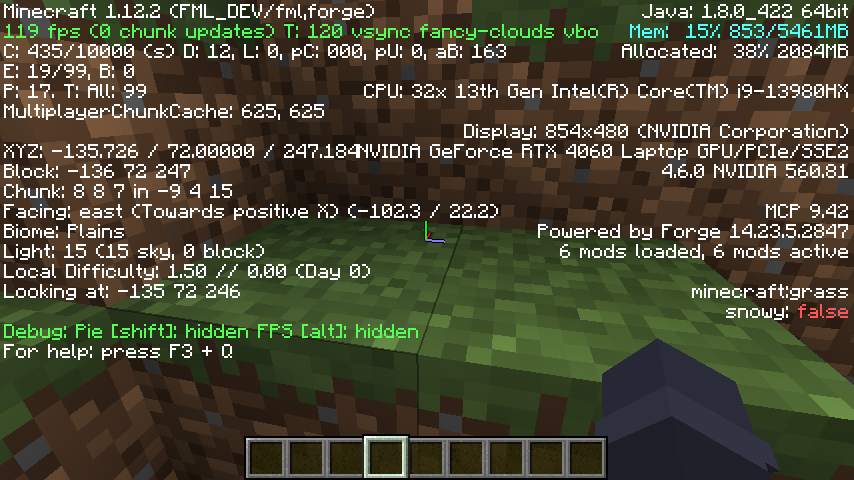
F3 Is My Shawty
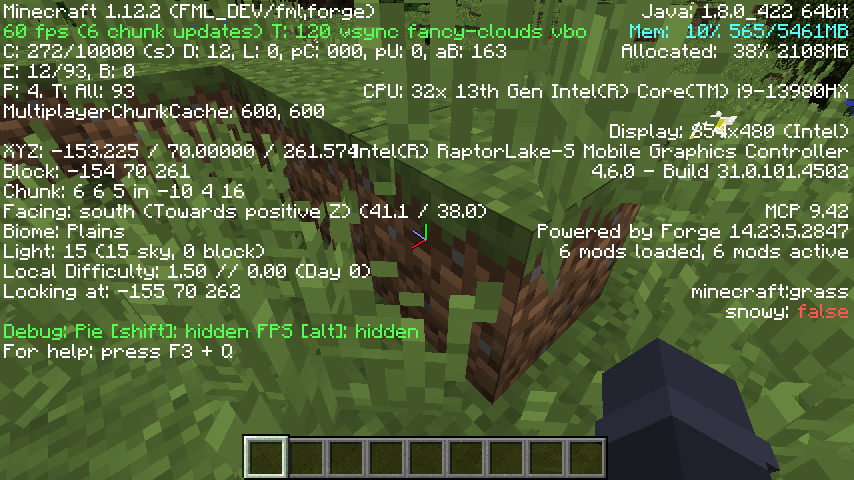
Hide and recolor any part of the F3/Debug Screen. Stop your computer specs from being revealed! Challenge your navigation skills by removing your cords!
Configuring
This mod does nothing by default, so if you want to use its features, you will need to configure it.
Find f3ismyshawty.cfg or open the UI in-game.
Configs:
- disabledSections, Allows you to remove text from the F3 menu
- removeDebugBackground, Renders a new version of the F3 menu without the transparent background, may not show modded entries
- textColorMappings, Allows you to change the color of text on the F3 Screen.
Quick facts
- Edition: Minecraft Java
- File type: .jar
- How to install: Install the matching mod loader (Forge, Fabric or NeoForge) for your Minecraft version. → Download the .jar. → Put it in the .minecraft/mods folder and launch that loader profile.
- Where to get it: Opens on CurseForge — not every file is mirrored on our own servers.
Install steps are the general flow for this file type — How to install Minecraft Java mods & modpacks walks through it step by step.
File checked by MCModsHub
- Ships as f3mod-1.0.5.jar — drop this file into the mods folder
- Download size: 8 KB
- Download link checked 9 Nov 2026 — working
These come from our own check of the pack file, not from the source page.