ModsJava
Pepsi's Mining Quarries
Java mod listed for Minecraft 1.21. Downloads from the MC Java Mods app on Android.
I don't know my version or loader
Open the Minecraft launcher and look at the profile you play on — it names both, like fabric-loader-1.21.4. The version also shows in the bottom-right corner of the game's main menu.
No loader in the profile name? Then it's plain Minecraft, and these mods won't run — you need Fabric or NeoForge installed first.
Mining Quarries Mod
Overview
- Adds a new block called the Quarry.
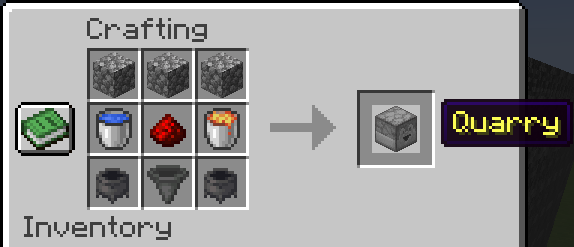
- Crafting Recipe:
- 3 × Cobblestone
- 1 × Water Bucket
- 1 x Redstone
- 1 × Lava Bucket
- 2 × Cauldrons
- 1 × Hopper
Quarry Block Mechanics
- Directional block with a 9×9 inventory.
- Supports multiple container outputs by facing multiple Quarries into the same container.
- Loot generation occurs only when:
- The chunk is loaded.
- The Quarry is facing into a valid container (e.g., Chest, Barrel).
- The pickaxe has more than 1 durability left.
Usage Steps
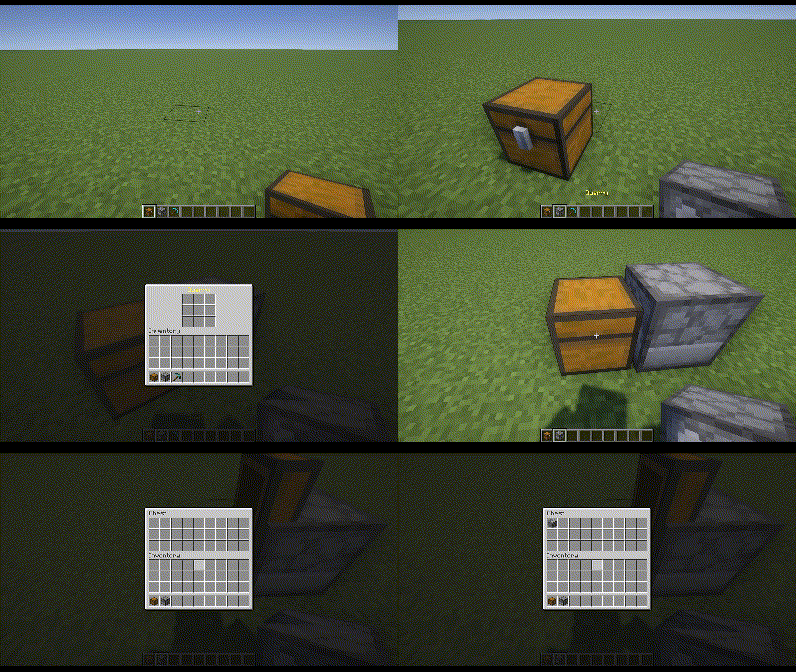
- Place the Quarry in the desired orientation, making sure it faces a container.
- Insert a pickaxe in the center slot of the Quarry’s 9×9 inventory.
- (Optional) Place desired items in any other slot(s) to whitelist them.
- Or place a Redstone Torch below the pickaxe to blacklist those items instead.
- Monitor pickaxe durability; replace or repair it before it drops to 1 to keep the Quarry running.
Pickaxe Behavior & Drops
- Pickaxes never fully break; it stops the Quarry when the pickaxe reaches 1 durability.
- Base drops; Cobblestone, Granite, Andesite, Diorite
- Different pickaxes affect:
- Cooldown (delay between loot generation).
- Additional loot types (beyond the base drops).
- Cooldown and Drops Table:
| Pickaxe | Cooldown (s) | Additional Drops |
|---|---|---|
| Gold | 1.0 | (None beyond base drops) |
| Wood | 7.0 | + Coal |
| Stone | 6.0 | + Lapis |
| Copper | 5.0 | + Copper |
| Iron | 4.0 | + Iron, + Redstone |
| Diamond | 3.0 | + Diamond, + Emerald |
| Netherite | 2.0 | + Rare chance of Ancient Debris |
Pickaxe Enchantments
- Efficiency: Each level reduces the Quarry’s cooldown by 0.1s.
- Unbreaking: Functions like vanilla Unbreaking, slowing durability loss.
- Fortune: Each level adds 1 extra loot roll per Quarry cycle.
- Silk Touch: Drops become their silk-touch variants (e.g., Stone instead of Cobblestone).
- Mending: No durability loss (effectively infinite uses).
Filtering System
- In the 9×9 Quarry inventory, all slots except the center are filtering slots.
- Whitelist Mode (default): Only items matching what’s in those filter slots will drop.
- Blacklist Mode: Placing a Redstone Torch in the slot below the center pickaxe slot switches all filtering slots into a blacklist.
- Important: If you are using Silk Touch, use silk-touched variants in the filter slots to match those exact drops.
For versions prior to 2.0.0 (or mc versions 1.21.1 and below) the mod works very differently. See the spoiler in the description of this webpage: Modrinth Listing
Looking to automate tree farming? Check out Potted Farms
And my other mods
Logo gifted by Mechanary
Quick facts
- Edition: Minecraft Java
- File type: .jar
- Minecraft versions listed: 1.21.9, 1.21.10, 1.21.11
- How to install: Install the matching mod loader (Forge, Fabric or NeoForge) for your Minecraft version. → Download the .jar. → Put it in the .minecraft/mods folder and launch that loader profile.
- Where to get it: Opens on CurseForge — not every file is mirrored on our own servers.
Install steps are the general flow for this file type — How to install Minecraft Java mods & modpacks walks through it step by step.
File checked by MCModsHub
- Ships as mining-quarries-2.0.4.jar — drop this file into the mods folder
- Download size: 2.1 MB
- Download link checked 28 Sept 2026 — working
These come from our own check of the pack file, not from the source page.