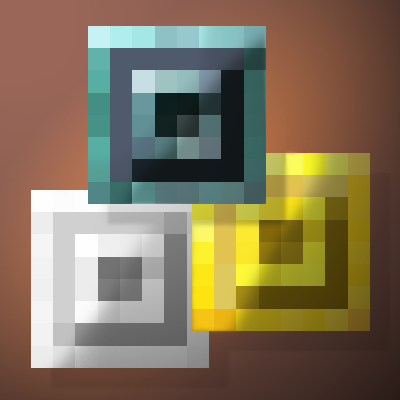
Custom Coinage
Java mod listed for Minecraft 1.20–1.21. Downloads from the MC Java Mods app on Android.
Tired of the same old currency? With Custom Coinage, you can create unique coins with custom names, making your in-game economy truly yours!
I don't know my version or loader
About
Custom Coinage lets players create and control their own in-game economy like never before! Unlike standard currency mods, this system allows for custom-named coins with unique item data, making counterfeiting impossible. Whether you're running an RPG server, an economy-based SMP, or just want a personal touch in your world, this mod gives you complete control over how currency is earned and used.
Features
- Fully Custom Coins – Players can mint coins with custom names in the Coin Press, ensuring every economy is unique.
- Anti-Counterfeit System – Custom coins have unique item IDs, so no two coins are the same, even if they share a name!
- Coin Press Mechanic – Right-click the Coin Press while holding a valid coin type to mint currency.
- Craftable Currency – Five coin types (Copper, Iron, Silver, Gold, Netherite) can be crafted with the Coin Stamp and corresponding ingots.
- Economy-Ready – Ideal for trade systems, server economies, and custom shops.
- Configurable Settings – Server owners can tweak drop rates, crafting options, and more to balance their economy.
- Seamless Integration – Works with modded and vanilla trading systems.
Crafting Recipes
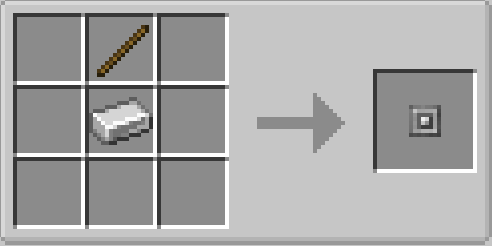
Coin Stamp (Used to craft coins, 64 uses
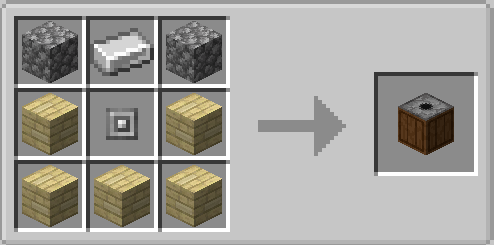
Coin Press (Used to mint coins by right-clicking with a valid coin type in hand)
Works with any planks!
Coins (Must be minted in the Coin Press after crafting!)
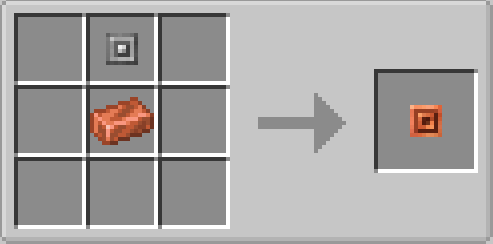
Place a Coin Stamp above an ingot of the corresponding material:
- Copper Coin – Coin Stamp + Copper Ingot
- Iron Coin – Coin Stamp + Iron Ingot
- Silver Coin – Coin Stamp + Silver Ingot
- Gold Coin – Coin Stamp + Gold Ingot
- Netherite Coin – Coin Stamp + Netherite Ingot
- Edition: Minecraft Java
- File type: .jar
- Minecraft versions listed: 1.21.1, 1.20.1
- How to install: Install the matching mod loader (Forge, Fabric or NeoForge) for your Minecraft version. → Download the .jar. → Put it in the .minecraft/mods folder and launch that loader profile.
- Where to get it: Opens on CurseForge — not every file is mirrored on our own servers.
Install steps are the general flow for this file type — How to install Minecraft Java mods & modpacks walks through it step by step.
- Ships as cuco-1.0.1.jar — drop this file into the mods folder
- Download size: 76 KB
- Download link checked 28 Sept 2026 — working
These come from our own check of the pack file, not from the source page.