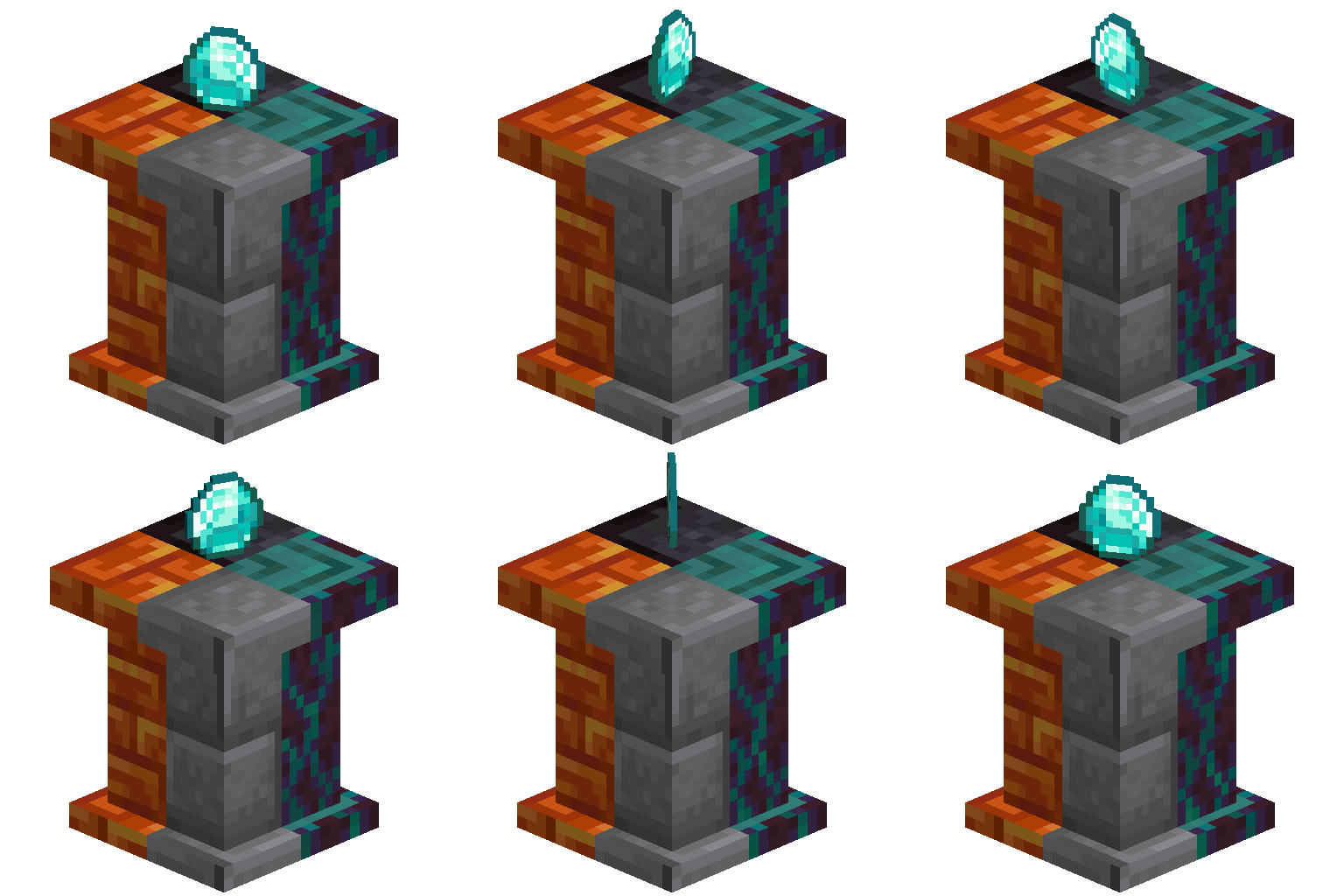
Pedestals - Display your items!
Java mod listed for Minecraft 1.21. Downloads from the MC Java Mods app on Android.
I don't know my version or loader

Pedestals - The Ultimate Trophy Display Mod!
Tired of boring old Armor Stands? Is your Wind Burst III Mace that you spent a week grinding to get too fancy for a mere Glow Item Frame?
Well, look no further—Pedestals has you covered!
Important! From 1.21.8 and onwards, the gamerule system has been removed in favor of config files. As such, owo-lib is now also required.
❓ Why Use Pedestals?
Simple! Name a block.
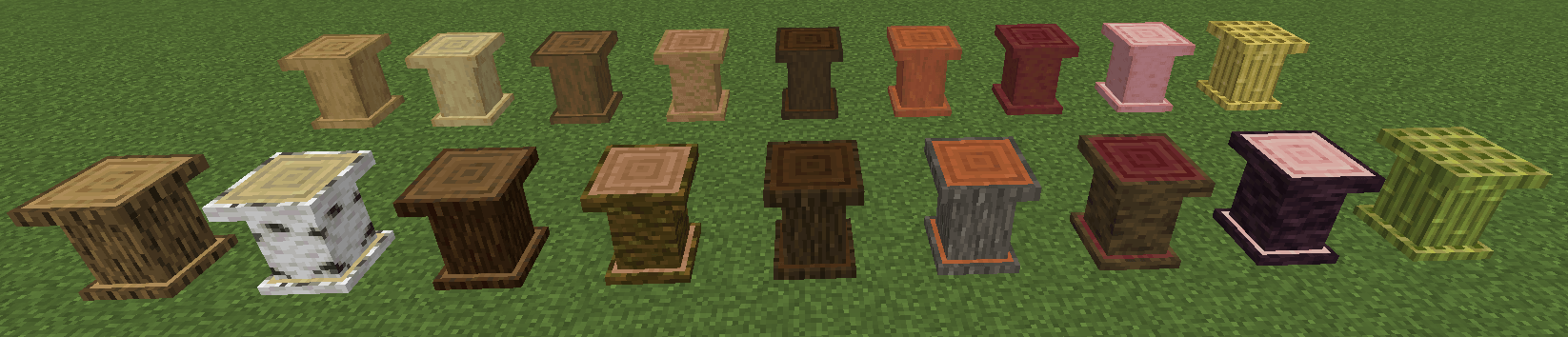
If it's a rock or a log (or copper!), Pedestals has a pedestal for it! With a wide selection of pedestal variants, there’s something to match every build style—whether you’re constructing a grand medieval hall, an arcane wizard’s study, or a chamber jam packed with booby traps. Build a trophy room worthy of your adventures, display your prized loot in style, or just make your storage system look ridiculously fancy. For those of you Copper enthusiasts out there, Copper (and Cut Copper) Pedestals oxidize over time and can be waxed and scraped, akin to vanilla Copper blocks!
As for Wooden Pedestals:
Since the 1.0.1 update, you can also craft and strip Wooden Pedestals as you wood (haha, get it?) with any other vanilla log, thanks to StrippableBlocks API! Yes, that includes EVERY vanilla wood variety - even Nether Wood!
🪓 Woodcutter Compatibility
The 1.21.4 port of the mod also features optional compatibility with Nemo's Woodcutter! This is all thanks to NemoNotFound and pnku's immense help with implementation! Check their work out!
⚡ Redstone Functionality
Who said Pedestals are only for show? They come with a bit of Redstone magic too!
- Comparator Output: Pedestals output a comparator signal with a strength relative to the rarity of the item they are holding. Common items will not provide even a smidge of redstone power, but Epic ones will get your contraptions going in no time!
- Epic Item Power Boost: Placing an item of Epic rarity on a Pedestal will make it power the block below it, opening the door for creative builds and treasure-triggered traps. Certain items of non-epic rarity will also produce this effect. Keep your eyes peeled!
So whether you're a redstone engineer or just enjoy adding functional decor to your world, Pedestals has got you covered!
🛠️ Crafting Pedestals
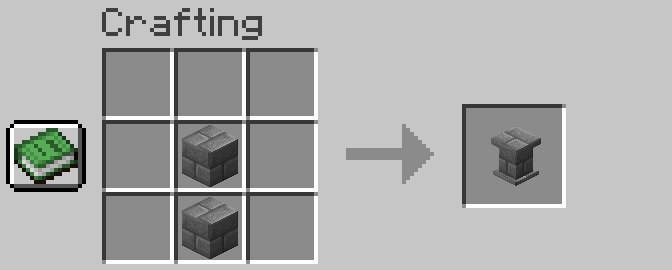
The recipe is universal across all pedestals:
Place two of the pedestal’s corresponding blocks in a crafting grid (see image below), and voilà—you’ve got yourself a Pedestal!
Wait, two blocks for one Pedestal? In this economy?!
Astute observation, my financially savvy friend! Yes, two blocks for a single pedestal may seem like daylight robbery—but don’t worry, there’s a better deal!
If you hop on to your Stonecutter, you will find that you are able to craft a Pedestal out of its respective block (or any blocks that produce it) at a much more efficient rate!
Customization, Modularity and Security!
Gilded Carpets:
Gilded Carpets are a new type of Carpet added in Pedestals! They can be crafted with a single carpet of any color and a grand total of four gold nuggets like so:
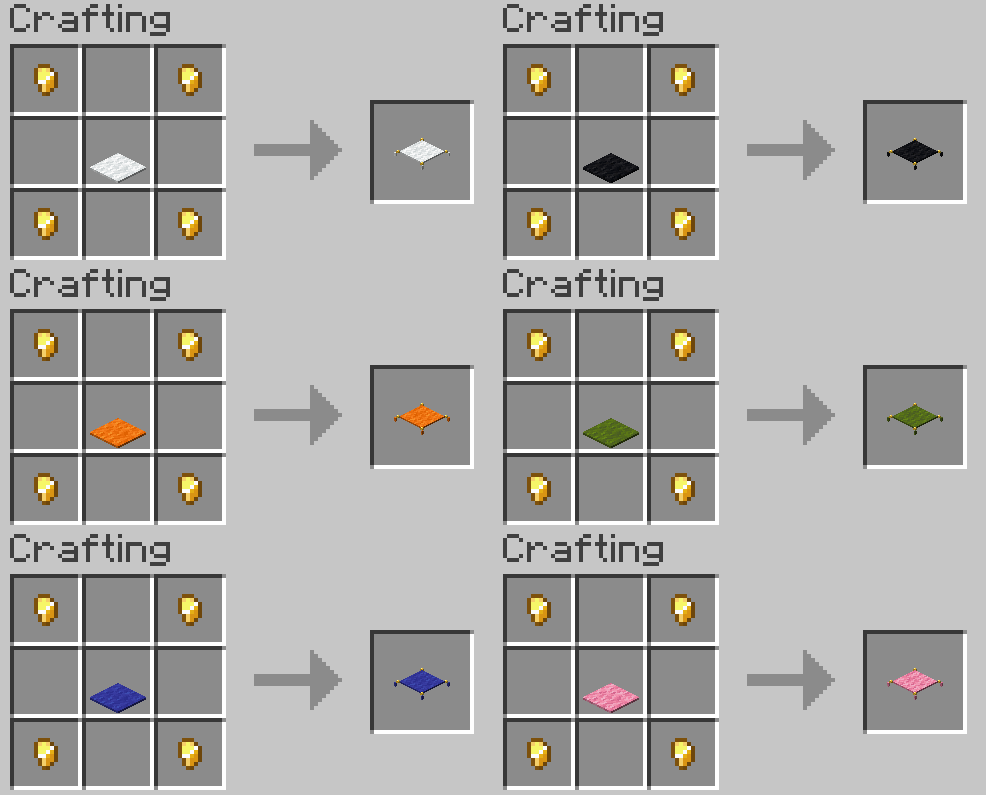
Afterwards, you can attach the Gilded Carpet you just crafted to any single Pedestal in your world - just right click the Pedestal with the Gilded Carpet in hand.
Made a Mistake? No worries! If you wish to seperate a Gilded Carpet from its Pedestal, all you need is a pair of Shears and your trusty Right Click.
🔒 Reinforced Lockboxes, Keys, and Lockpicks
Got a particularly valuable item that needs safekeeping? Reinforced Lockboxes let you lock your Pedestals away from prying hands! When placed on a Pedestal, a Lockbox encases it in glass, protecting its contents. They, too, come in all glass varieties (save for tinted glass - that wouldn't make sense now would it?). Here's how you can acquire one:
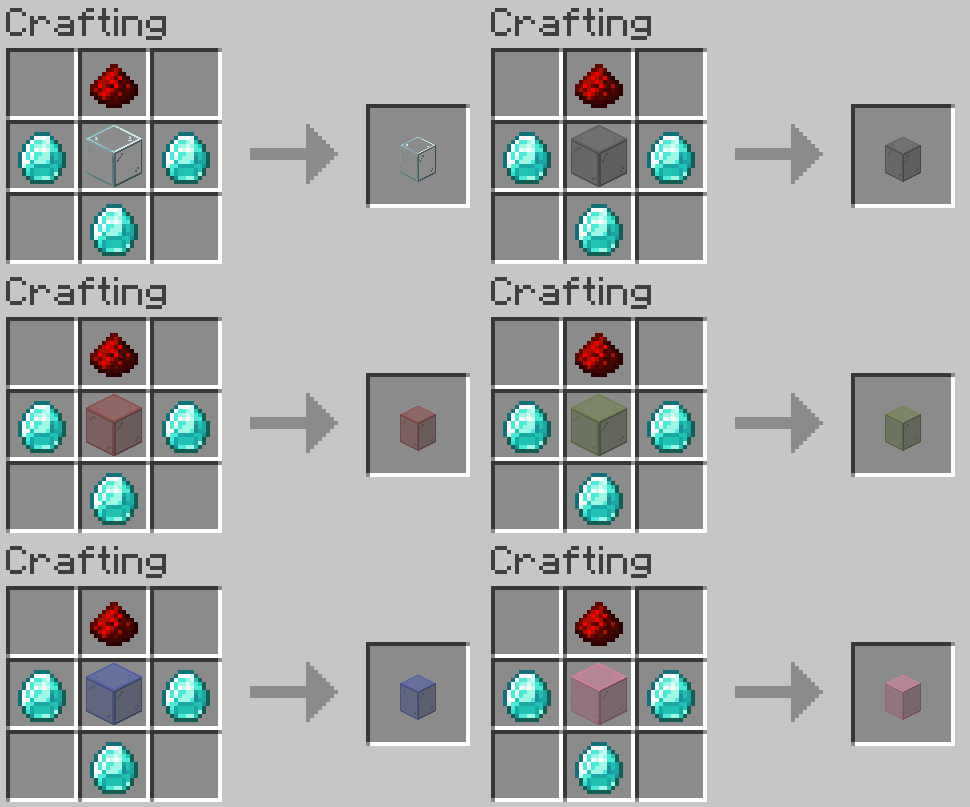
🔑 How Does It Work?
- Locked Means Locked – While encased, the Pedestal’s item cannot be removed, nor can the Pedestal itself be broken by any means. This is configurable via the gamerule lockedPedestalsUnbreakable, which, when set to false, simply makes locked Pedestals harder to break!
- Access Control – Don't worry, your item hasn't been locked away forever! You can craft a Key:
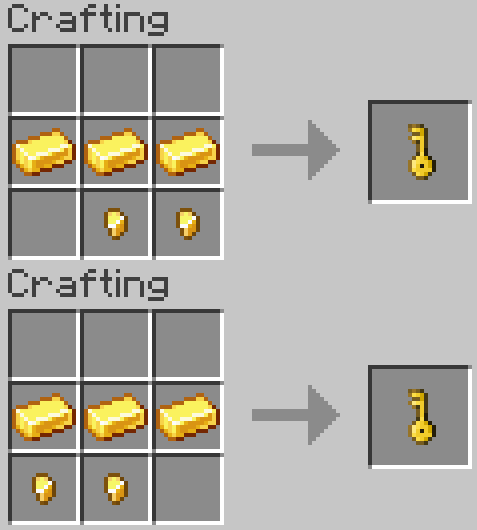
- Using this Key on your newly-placed Lockbox will map them to each other. As of then, that and only that Key can open that and only that Lockbox!
- Shared Access with Keys – Want to let others in? A key that has been mapped can be crafted with a blank one (read the tooltips to know which is which!) to produce two keys with identical data, therefore making them able to open the same Lockbox! Likewise, a Lockbox that is mapped to a Key can be crafted with an unmapped Lockbox to create two Lockboxes with the same data, resulting in two Lockboxes that can be opened by the same Key!
- Infinite Key Duplication: By default, any Key that is a duplicate of another cannot be used to create other copies of itself. However! Pedestals offers you the choice to allow this via the new Gamerule called "infiniteKeyDuping" if you change it to true!
🔓 Lockpicks and Unlocking
- Lockpicks let you attempt to bypass a Lockbox, but don't expect it to be easy. To begin trying to pick a lock, all you must do is hold right click on it for a few seconds. The game will notify you of your results - Rest assured!
- If you want absolutely nobody to mess with your precious loot, you can also disable lockpicking in-game by turning the game rule enableLockpicks to
false! - Failed attempts at lockpicking will break the Lockpick. The same is also true for interrupting your lockpicking attempt by looking away, taking damage or releasing right click. No takesies backsies!
Side note: the base success chance for lockpicking is 15%. You can change it via the gamerule lockpickSuccessChance!
- How to get Lockpicks: Lockpicks can be crafted with two iron bars and a single iron ingot in these orientations:
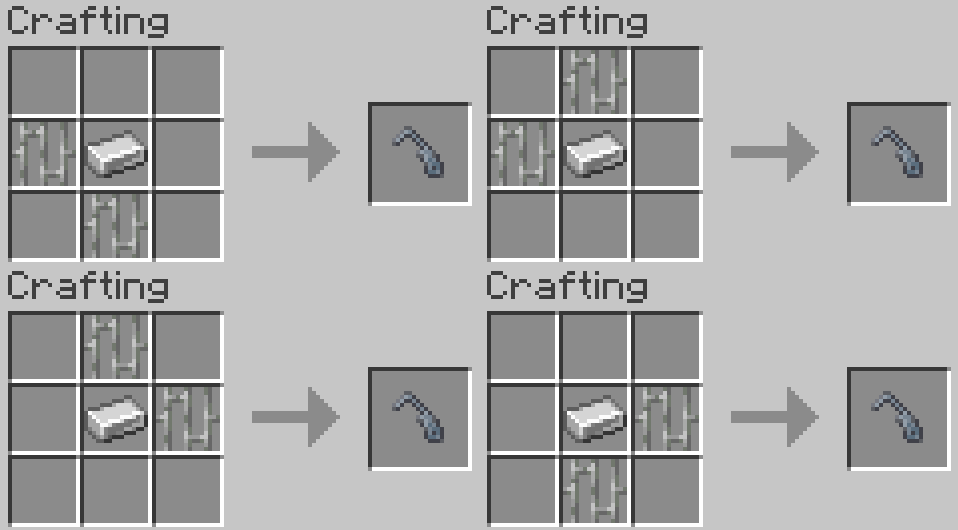
- No Iron to spare? No problem! Pay your local and definitely non-enslaved Toolsmith a visit to see if they offer the new Journeyman-level Lockpick trade and buy a lockpick for the low, low price of a few emeralds and a single Iron Ingot.
🕵️ Dust and Wear
Lockboxes aren’t immune to the passage of time. As all glass does, Lockboxes will slowly accumulate dust, making the glass look grimy. Because nothing says luxury like layers upon layers of filth! It's not the end of the world, however. If you wish to keep your displays pristine, all you have to do is clean off the dust with a Brush! You do remember how to make a brush, don't you?
If this feature is not for you for any reason at all, you can disable dust accumulation entirely by setting the gamerule dustyLockboxes to false!
Whether you're displaying legendary loot or keeping your trophies secure, Lockboxes ensure your treasures stay exactly where you left them.
🌟 Artifact System, Aesthetic Variety and Advancements!
Remeber when I said specific items of non-epic rarity can also make Pedestals power the block below them? A select few items (of generally higher rarities) are now classified as Artifacts. What does this mean? It means that these items have a few more aesthetic qualities to them, as a reward for going above and beyond to find them - When placed upon a pedestal, they emit unique particles! I won't tell you what they are, as they are part of an Advancement - so, again, keep your eyes peeled!
Note: In order to avoid any and all performance issues, you can disable particle emission from Artifacts by setting the gamerule displayedItemParticles to false.
📣 Advancements Galore
Pedestals has its very own advancement tree! Most of the advancements serve as a guide of sorts, but you completionists have no reason to be disappointed - there's a few hidden advancements, as well as a few that are sure to provide a challenge for you.
♥ Special Thanks
Pedestals is my first ever mod, and it was purely a passion project. However, I could not have made any part of it without the absolutely massive help of NemoNotFound and pnku for letting me badger them with my coding questions, as well as my beautiful girlfriend who volunteered to create the Key and Lockpick assets. Also again a massive, massive thank you to pnku for creating the mod's logo. Again, check their work out!
📝 Final Notes
Pedestals is designed to be lightweight, aesthetic-focused, and seamlessly integrated into the game. Whether you're showcasing your most prized items, adding decorative accents to your base, or just making your storage system look way cooler—Pedestals has got you covered. Try it out and let me know what you think. Have a suggestion or a bug to report? Take to the GitHub Issues Page or come to the Discord and say hi!
- Edition: Minecraft Java
- File type: .jar
- Minecraft versions listed: 1.21.11, 1.21.10, 1.21.8
- How to install: Install the matching mod loader (Forge, Fabric or NeoForge) for your Minecraft version. → Download the .jar. → Put it in the .minecraft/mods folder and launch that loader profile.
- Where to get it: Opens on CurseForge — not every file is mirrored on our own servers.
Install steps are the general flow for this file type — How to install Minecraft Java mods & modpacks walks through it step by step.
- Ships as pedestals-1.3.0v214.jar — drop this file into the mods folder
- Download size: 450 KB
- Download link checked 28 Sept 2026 — working
These come from our own check of the pack file, not from the source page.