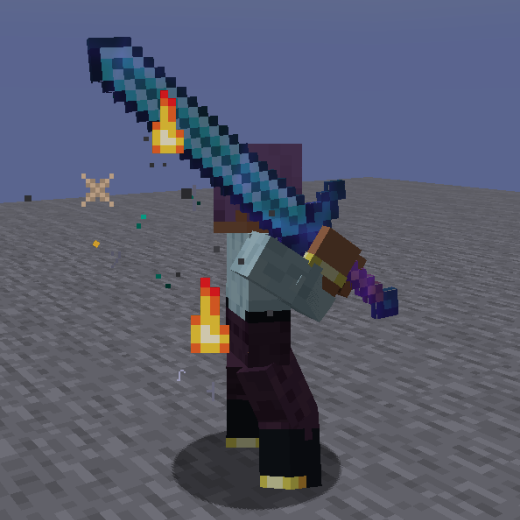
Epic Fight - Particles On The Blades
Java mod listed for Minecraft 1.20–1.21. Downloads from the MC Java Mods app on Android.
I don't know my version or loader
This little mod is responsible for generating particles in your weapons if they are enchanted or have been assigned to bypass the enchantment system, they will also be generated passively or when an innate ability is executed, both the particles and enchantments are configurable!
Configuration:
The mod's configuration is divided into three parts: for supported entities, for objects, and for the particles themselves.
Let's start with the simplest and easiest...
Configuration for entities.
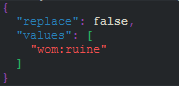
To add entities, you need to create a datapack by extending the following file: "data/blade_config_tag/tags/entity_types/valid_entity.json"
Here you must add valid entities that you want to generate particles when you have an enchanted weapon. Keep in mind that ALL entities MUST be patched for Epic Fight. Failure to do so may cause an exception (Crash) when attempting to generate the particles on that entity.
Example and Default Config
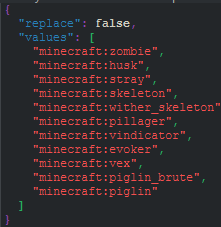
This would be the list of non-player entities that will spawn when holding a weapon that can generate particles.
Configuration for objects and particles.
For Particles
To configure the particles in an object, several parameters must be added, here is an example, we will take a Greatsword as reference.
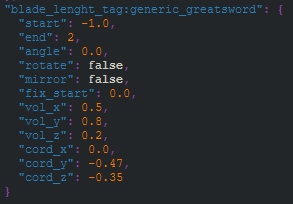
Okay, what are all those things? Don't be scared, it's not that complicated! Let me explain what each thing does.
Params
- Start and End are measurements of space and time. They determine where the particle beam originates, but also how long it will extend in space. Internally, Start and End control the number of particles generated. Depending on their value, they will be diluted in the configured volume (Internal Variable "Steps"), as the volume itself is controlled by another parameter (Vol X, Y and Z).
- Angle is legacy, it allows you to slightly move the Y or X coordinate depending on the configuration (Rotate), but the "cord" parameters do their job better.
- Rotate, rotates the particle beam from the Y axis to the X axis, altering its directional alignment.
- Mirror allows you to duplicate the original beam and generate a second beam (A1 and A2).
- Fix Start allows you to move the start point of beam A1 when Mirror is enabled.
- Vol X, Y and Z they allow you to configure the volume of the beam, extending it in the respective coordinates using Start and End as a base, this does not increase the amount of particles, but rather distributes those generated in the assigned area.
- Cord X, Y and Z they allow you to adjust the coordinates of the area assigned to generate, allowing you to control its position only in space.
Once the parameters are understood, let's explain how they are used in items.
For Objects
The configuration by objects consists of 2 forms, by tags (groups) or by Items (Weapons), the Groups are useful to declare weapons that are generic, while by Items they are for special weapons or those that are used with two hands.
Both configurations, both Tags (Groups) and Items (Weapons), are configured in the same folder: "assets\<any_namespace>\blade_parameters\".
The only difference is the initial file name; scanning is intelligent, and the file's function varies based on its name.
If it starts with "tag_", then it will be used to configure Tags (Groups).
If it starts with "weapon_", then it will be used to configure Items (Weapons).
If it starts with "capability_tag_", then it will be used to make Tags (Groups) compatible with each other.
If it starts with "capability_weapon_", then it will be used to make Items (Weapons) compatible with each other.
Configuration by Tags (Groups):
Let's start with the configuration by Tags, as I said before you must create a file in the folder "assets\<any_namespace>\blade_parameters\tag_weapon_blade_*.json" in this case let's name it "tag_author_target_or_group"
Also, the ItemTag domain MUST ALWAYS be "blade_length_tag"
Perfect, once the file is created it should look like this...
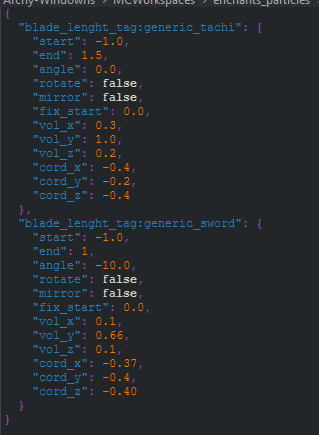
As you can see, you first enter an ItemTag, in the example it is "blade_lenght_tag:generic_tachi"
Now to use this tag configuration we simply create in the respective folder "data\blade_length_tag\tags\items" our ItemTag List, in this case "generic_tachi.json"
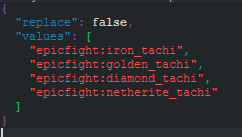
And that would be all for the configuration for Item Groups (Tags).
Configuration by Items (Weapons):
On the other hand, the configuration by Item is much simpler, you do not need to do extra steps, you simply have to declare a file that, as I said before, begins with "weapon_". So, let's go back to the "assets\<any_namespace>\blade_parameters\weapon_blade_*.json" folder and we create a file "weapon_author_target_or_group".
In this case I can use as an example the file for the Weapons of Miracles Items
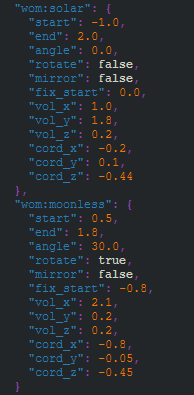
As you can see, it is simpler, you just need to put the respective namespace:itemid and declare the particle parameters, without extra steps.
Some additional item settings!
Some things can be configured in "data\blade_config_tag\tags\items" these are, if you want the weapon to use the alternate fire particle, if you want fire particles to be generated ignoring the enchantment, or if you want no fire particles to be generated.
To configure these functions, you only need to create a list of item tags, each configuration is respectively.
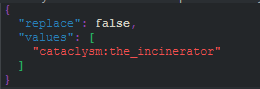
If you want an item to not generate fire particles, you must add it to this list. "get_banned_innate_fire_*.json"
Example:
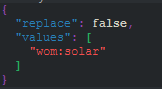
If you want the item to always generate fire particles ignoring the enchantment, you must add it to this list. "get_bypass_fire_*.json"
Example:
If you want the item to use the particle assigned as an "alternate" fire type, you must add it to the this list. "get_soulfire_*.json"
Example:
Configuration for particles.
The configuration for particles is by far simpler and easier to understand.
These will be configured in the folder ".minecraft/config/epic_fight_potb" here you will find 4 configuration files, one for the mod and 3 particle maps.
We will ignore the mod configuration file, since it is a .toml (particle_generation_configuration.toml) where each point is explained, so let's move on to how to configure the particle maps.
"fire_aspect_particles_mapping.json"
This file configures the particles for the Fire Aspect enchantment, or related enchantments that fulfill a similar role.
This is because if an item doesn't have an Innate particle configured, the fire particles become intense, enveloping the weapon. This file allows you to add or modify both enchantments and particles that act in the manner described above.
Example and Default Config:
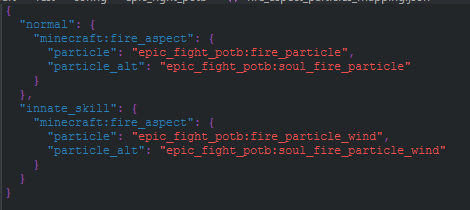
Here you can add other enchantments, if you have any mod that adds something like "soul fire aspect" simply put the domain and the particle you want to invoke, you must do the same in the "innate_skill" section if you want that particle to envelop the weapon, otherwise, the "normal" particles will simply continue to run.
"innate_skill_particle_mapping.json"
This configuration file will allow you to assign a specific particle to an item that will be triggered when its Innate ability is cast or active. This accepts three parameters:
The item, the particle, and the number of particles to generate.
Example and Default Config:
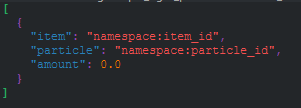
As you can see, you only need to add the item in question, the particle and finally the intensity at which it will be generated. Something to add is that these particles suppress the particles in the "innate_skill" section in the previous file (fire_aspect_particles_mapping.json), since they act as a generic "innate_skill". When you configure the desired one, they give way to the particles assigned in this file (innate_skill_particle_mapping.json).
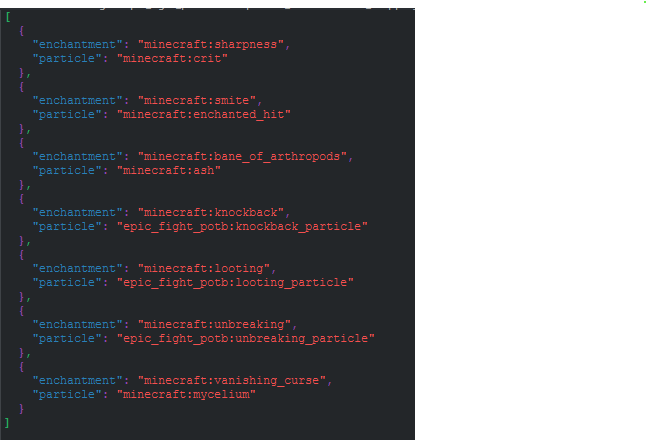
"particle_enchantments_mapping.json"
On the other hand, in this file you can quickly and easily configure which enchantments generate particles. Simply enter the enchantment in question (namespace:enchat_id) and the particle it will generate when on the weapon. You can extend or remove enchantments or modify the configured particles as you wish.
Remember that if you want the particle to behave like the "Fire Aspect" ones, you must configure it there (fire_aspect_particles_mapping.json).
Example and Default Config:
- Edition: Minecraft Java
- File type: .jar
- Minecraft versions listed: 1.20.1, 1.21.1
- How to install: Install the matching mod loader (Forge, Fabric or NeoForge) for your Minecraft version. → Download the .jar. → Put it in the .minecraft/mods folder and launch that loader profile.
- Where to get it: Opens on CurseForge — not every file is mirrored on our own servers.
Install steps are the general flow for this file type — How to install Minecraft Java mods & modpacks walks through it step by step.
- Ships as ParticlesOnTheBlades-2.3.1+1.21.1[NeoForge].jar — drop this file into the mods folder
- Download size: 75 KB
- Download link checked 28 Sept 2026 — working
These come from our own check of the pack file, not from the source page.