More Offhand Slots
Java mod listed for Minecraft 1.20–1.21. File opened and checked on 25 Sep 2026; downloads from the MC Java Mods app on Android.
I don't know my version or loader









Ever wished you could have more than one offhand item? Now you can!
⚠️IMPORTANT⚠️
Updating from a Curios-based version? This mod has migrated from Curios to a new custom slot system (SlotLib). When updating, items stored in your offhand Curios slots may be lost!
Curios will attempt to return items to your main inventory when its slots are removed, but if your inventory is full, those items will be deleted permanently.
Before updating: Empty your offhand slots manually, or make sure you have plenty of free inventory space. Back up your world save just in case!
What Does This Mod Do?
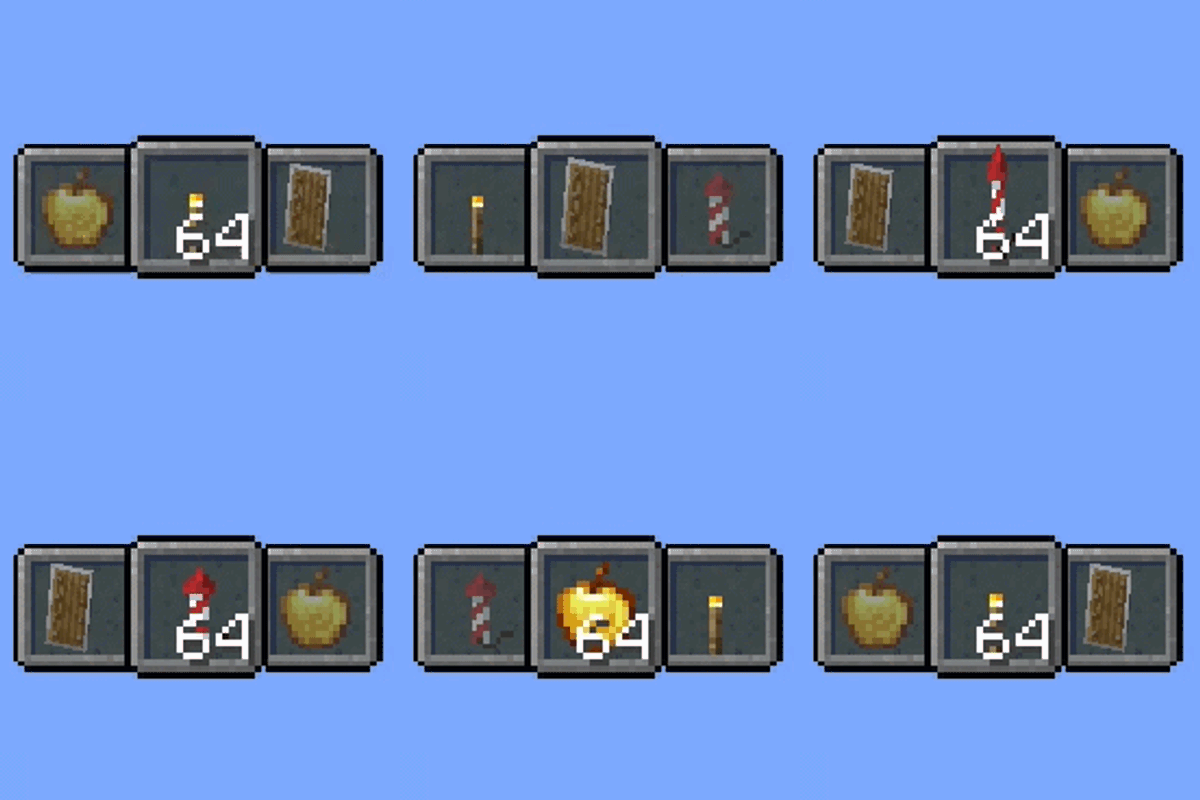
More Offhand Slots gives you extra offhand slots that you can cycle through with keybinds or the scroll wheel. Equip a shield, a torch, a totem, and a map all in your offhand -- and swap between them instantly!
No more digging through your inventory mid-combat to switch your offhand item.


✨ Features
🖐️ Multiple Offhand Slots Hold up to 9 items in your offhand (default: 3). Cycle between them with Mouse Button 4/5, or configure the scroll wheel to do it for you.
👁️ Visual Indicators See what's coming next! Choose from four indicator styles to keep track of your offhand items:
- Default - Clean indicator showing previous and next items
- Detailed - Shows item counts alongside the indicator
- Vanilla - Keeps the vanilla offhand look, functionality stays
- Hotbar - A full hotbar for your offhand, just like the main hand
🖱️ Scroll Wheel Modes Pick the control scheme that works for you:
- Vanilla - Scroll works normally, use keybinds for offhand
- Offhand Only - Scroll always cycles offhand items
- With Modifier - Hold a key to switch between scrolling hotbar or offhand
🎨 Fully Customizable
- Reposition the HUD indicator with X/Y offsets
- Center-align the hotbar when using many slots
- Toggle cycling through empty slots
- Invert scroll direction
🚀 Getting Started
- Install the mod (requires NeoForge)
- By default you get 3 extra offhand slots
- Use Mouse Button 5 to cycle forward, Mouse Button 4 to cycle backward
- Open the config to tweak the number of slots, indicator style, and controls
🎮 Controls
| Default Key | Action |
|---|---|
| Mouse Button 5 | Cycle forward |
| Mouse Button 4 | Cycle backward |
| Left Shift | Scroll wheel modifier |
All controls can be rebound in the Minecraft controls menu.
🗃️ Extra Inventory Screen
More Offhand Slots comes with SlotLib, which adds a button to your inventory screen. Click it to open the extra slot inventory where you can manage all your offhand items directly!

The button position is configurable if it overlaps with other mods.
⚙️ Configuration
All settings are available in moreoffhandslots-client.toml or through an in-game config screen (with YACL or similar).
| Setting | What It Does |
|---|---|
| Indicator Style | Change the offhand HUD look (Default/Detailed/Vanilla/Hotbar) |
| Scroll Mode | How the scroll wheel interacts with offhand slots |
| Empty Slot Behavior | Empty slot cycling behavior (Skip/Cycle/Collape) |
| Render Empty Offhand | Show the indicator even with nothing equipped |
| HUD X/Y Offset | Reposition the offhand indicator |
| Align to Center | Center both hotbars on screen |
🗃️ SlotLib Settings
SlotLib (the inventory system bundled with the mod) has its own config in slotlib-common.toml and slotlib-client.toml:
| Setting | What It Does |
|---|---|
| Slot Count | Number of extra inventory slots (1-9, default: 3) |
| Button Corner | Where the SlotLib button appears in your inventory (TOP_LEFT, TOP_RIGHT, BOTTOM_LEFT, BOTTOM_RIGHT) |
| Button X/Y Offset | Fine-tune the button position in the survival inventory |
| Creative Button X/Y Offset | Fine-tune the button position in the creative inventory |
🤝 Compatibility
- Better Combat - Detected automatically; prevents cycling when holding two-handed weapons
- Auto HUD - Supported
- Create - Supported
- Resource Packs - Uses vanilla textures, so resource packs work out of the box!
💜 Credits
Inspired by Inventorio by Lizard_OfOz and Slot Cycler by Fuzs.
SlotLib is based on Curios API by TheIllusiveC4.
- Edition: Minecraft Java
- File type: .jar
- Minecraft versions listed: 1.21.11, 1.21.8, 1.21.5
- How to install: Install the matching mod loader (Forge, Fabric or NeoForge) for your Minecraft version. → Download the .jar. → Put it in the .minecraft/mods folder and launch that loader profile.
- Where to get it: Opens on CurseForge — not every file is mirrored on our own servers.
Install steps are the general flow for this file type — How to install Minecraft Java mods & modpacks walks through it step by step.
- Ships as moreoffhandslots-forge-20.1.0.2.jar — drop this file into the mods folder
- Download size: 104 KB
- Download link checked 28 Sept 2026 — working
These come from our own check of the pack file, not from the source page.