
Thirst Was No More
Java mod listed for Minecraft 1.20. Downloads from the MC Java Mods app on Android.
⬇ Download on CurseForgeThe author built this one for Minecraft 1.20.1 on Forge. On other versions it may install and then do nothing.
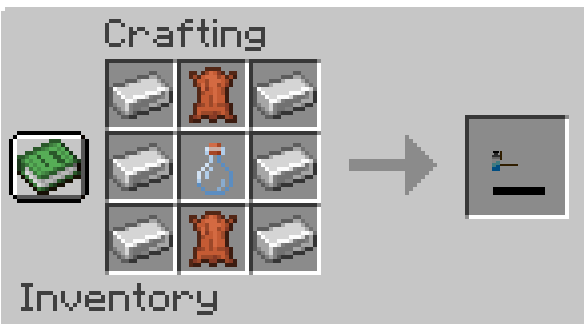

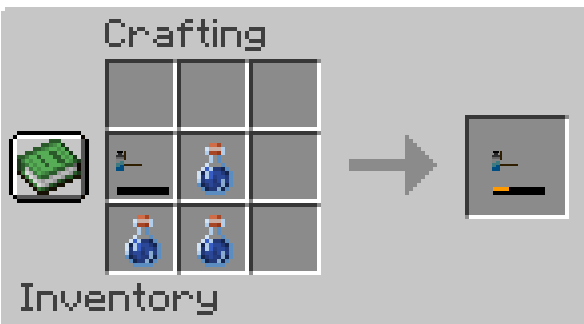
Thirst No More
Auto-Drink Your Way Through the Desert!
IMPORTANT: there're 3 mods that this addon currently support. "Survive", "Thirst was taken", and Tough as Nails. Make sure you download the right file for the mod you wish to use.
Tired of constantly chugging water bottles to survive? Thirst No More adds a quality-of-life solution for Thirst Was Taken AND Survive – wearable water containers that automatically keep you hydrated!
 Camel packs? Overrated. Strap a bottle to your leg and let automation do the work!
Features
- Auto-Drink Mechanic: Wear a water container (like the Bottle Strap) to automatically sip hydration when thirsty.
- Fully Customizable: Adjust container capacity, drink speed, and more via config files.
- Seamless Integration: Works with Thirst Was Taken’s mechanics and supports JEI/Recipe Book for crafting.
- Curios supported: so you can still have armor
- Optimized Performance: Lightweight and designed for modpacks.
Perfect For
- Desert/Hardcore Modpacks: Simplify water management in harsh environments.
- Automation Lovers: Focus on exploring, not micromanaging thirst!
Getting Started
- Install Dependencies: - [One of the Thirst support mod]
- Craft Any Water Container (check JEI or the Recipe Book).
- Equip it and forget about manual drinking! … until it ran out of course
Configuration
Tweak settings in the config file to:
- Adjust hydration values per container.
- Change auto-drink intervals.
- Modify item-specific parameters.
Credits
- Built for Thirst Was Taken and Survive and Tough as Nails.
Modpack permission
Feel free to use it in your Curgeforge and Modrith modpack. Credit would be nice (but not necessary).
- Edition: Minecraft Java
- File type: .jar
- Minecraft version listed: 1.20.1
- How to install: Install the matching mod loader (Forge, Fabric or NeoForge) for your Minecraft version. → Download the .jar. → Put it in the .minecraft/mods folder and launch that loader profile.
- Where to get it: Opens on CurseForge — not every file is mirrored on our own servers.
Install steps are the general flow for this file type — How to install Minecraft Java mods & modpacks walks through it step by step.
- Ships as thirst_nomore-1.20.1-0.2.0.jar — drop this file into the mods folder
- Download size: 365 KB
- Download link checked 8 Nov 2026 — working
These come from our own check of the pack file, not from the source page.