
Hopeful: Enchanting
The author built this one for Minecraft 1.21–1.21.1 on NeoForge. On other versions it may install and then do nothing.
The aim of Hopeful: Enchanting is to rebuild the system of enchanting to be focused on choice, customizability, and intent.
All systems are built with datapacks & modpack creators in mind.
This mod is my first "commercial" mod, so I'm ready for constructive feedback! :)
Current Features
Tool Levels
- Each tool has Tool Level that can be seen when placed in a smithing table.
- When they are all used up, it will no longer accept scrolls.
- Some tools can level up when being used like chainmail and bows. Leveling up will allow them to accept more scrolls.
- With Hopeful Unlimited, a built-in datapack you can enable, tools will get virtually infinite tool level, so this mechanic becomes obsolete.
- A data component called
sealed_enchantsallows for tools to have enchantments that don't take up tool levels, and can't be removed.
XP Rework
- Now each level is 16 points.
- There are 3 new gamerules to improve XP handling:
xpPerLevel(orhopeful:xp_per_levelon 26.1) defines the number of experience points per level (default: 16)percentageXPLost(orhopeful:percentage_xp_loston 26.1) defines the percentage of XP lost (unrecoverable) on death (default: 0)percentageXPDropped(orhopeful:percentage_xp_droppedon 26.1) defines the percentage of XP dropped on the ground on death (default: 100)
- Anvils can be mend using iron ingot (or
#hopeful:anvil_mends) - Anvils will fully repair an item using only one repair material (Thanks Forgery for the code)
- Repairs are data-driven.
Scrolls
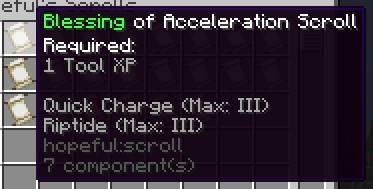
- Scrolls are a package of enchantments, having 2-3 enchants.
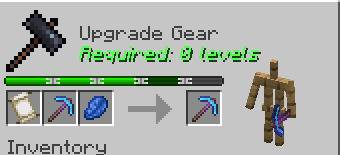
- Combine equipment with a scroll and lapis lazuli in a smithing table to upgrade an enchantment's level by the level specified on the scroll.
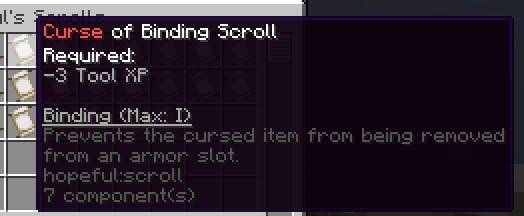
- Scrolls can be blessings (positive enchantments that use up Tool Levels), curses (negative enchantments that free up Tool Levels), and deals (both).
- When getting enchanted books and tools in the wild - They will be stripped to their scrolls.
stripAllEnchantsgamerule would decide if all the enchants will be stripped, or only until valid configuration (where used tool level is not bigger than default tool level), andgiveStrippedScrollswhether stripped scrolls will be given or voided.- Using the built-in
normalized_enchantsdatapack, enchantments would normalized to be 1 or 3 levels.
Enchanting Table Overhaul
The enchanting table menu is gone Now, clicking on it with a piece of paper has a chance of transforming into a scroll.
Default chance is quite low though, but you can increase it with catalysts!
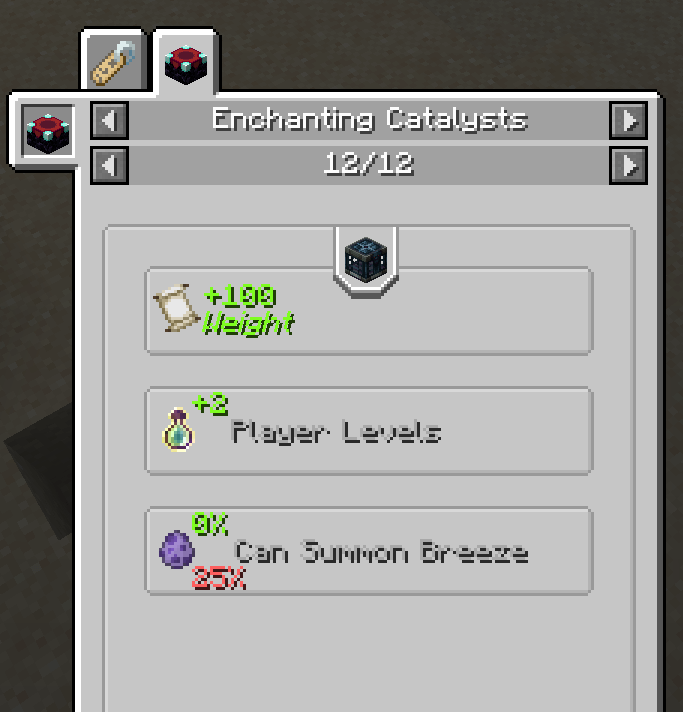
These are blocks that have to be in a 5x5x5 area around the table, and can give different effects.
Currently, we have:
- Bookshelves: increase chance of producing a scroll, but increase xp requirement.
- Lapis Block: decreases xp level requirement, but has a chance of evaporating.
- The following increase chance of a scroll, but increase xp requirement:
- Magma: flame scroll.
- Prismarine: fins and gills scrolls
- Soul blocks & soul fire blocks: undead scroll
- Vault: wind scroll (has a chance of spawning a breeze)
- Carved pumpkins: binding scroll
- Enchanting Table: Endless scroll
- Lightning Rod: channeling scroll
- Pointed Dripstone: extermination scroll.
- Sculk blocks: echoes scroll.
Dev Stuff
Scroll
Scrolls will be placed in datapack_name/hopeful/scroll/scroll_name.json and its format will look like this:
{
  "title":{
    "translate": "scroll.hopeful.acceleration"
  },
  "type": "blessing",
  "tool_levels": 1,
  "enchantments": {
    "minecraft:quick_charge": 1,
    "minecraft:riptide": 1
  },
  "sealed_enchantments": {
    "minecraft:quick_charge": 1
  }
}
Sealed Enchantments are optional. Scrolls also have loot table functionality
- Scrolls stripping works automatically in loot tables using
hopeful:strip_to_scrollsloot table modifier - There's a
random_scrollloot pool entry type, which can be seen in action inunknown_scrollloot table.
Sealed Enchantments
The component has the same structure as vanilla enchantments.
Do note that innate enchantments don't apply the enchantments.
For example, to summon a gold pick with innate fortune 2 (that actually works):
/give @s minecraft:golden_pickaxe[minecraft:enchantments={fortune:2},hopeful:sealed_enchantments={fortune:2}]
Levels
Tool Level stats can be modified in datapack_name/data/hopeful/data_maps/item/tool_levels.json in
this format:
{
  "values": {
    "minecraft:chainmail_chestplate": {
      "starting_level": 5,
      "level_ups": [10,50,100]
    },
    "minecraft:crossbow": {
      "starting_level": 3,
      "level_ups": [50, 100, 150]
    }
  }
}
Note that the numbers are the uses above previous that it takes to level up. For example, for the crossbow, after reaching level 2, you'd need 50 more uses to get to level 3.
Repairing tools can be modified in datapack_name/data/hopeful/data_maps/item/tool_repairs.
This is the format:
{
  "values": {
    "minecraft:iron_sword": [
      {
        "material": "minecraft:diamond",
        "level_cost": 1,
        "durability": 100,
        "is_percentage": true
      }
    ]
  }
}
materials can be omitted to use default repair material for the item. Note that data maps are lowest-to-highest priority,
so the most general overrides should appear first
Enchanters
Enchanters are the blocks you are allowed to click on to enchant with. By default, only the enchanting table is one.
The datamap is located at data/hopeful/data_maps/block/enchanters.json and it follows this format:
  {
  "values": {
    "minecraft:enchanting_table": {
      "catalyst_limit": 4,
      "range": 2,
      "effects": [
        {
          "type": "hopeful:scroll_weight",
          "scrolls": "#hopeful:default",
          "increase_by": 10
        },
        {
          "type": "hopeful:scroll_weight",
          "scrolls": "#hopeful:scrolls",
          "increase_by": 10
        },
        {
          "type": "hopeful:success_chance",
          "increase_by": 0.25
        }
      ]
    }
  }
}
Catalysts
These catalysts are data-driven, and we have 5 effects, with plenty more to come.
The catalysts are of the form: datapack_name/hopeful/hopeful/catalyst/unused_name.json
And look like so: (made up catalyst)
{
  "blocks": "minecraft:bedrock",
  "limit": 2,
  "effects": [
    {
      "type": "hopeful:scroll_weight",
      "scrolls": "hopeful:acceleration",
      "increase_by": 2
    },
    {
      "type": "hopeful:xp_levels_requirement",
      "increase_by": 10000
    },
    {
      "type": "hopeful:success_chance",
      "increase_by": 0.5
    }

  ]
}- Edition: Minecraft Java
- File type: .jar
- Minecraft versions listed: 1.21.1, 1.21
- How to install: Install the matching mod loader (Forge, Fabric or NeoForge) for your Minecraft version. → Download the .jar. → Put it in the .minecraft/mods folder and launch that loader profile.
- Where to get it: Opens on CurseForge — not every file is mirrored on our own servers.
Install steps are the general flow for this file type — How to install Minecraft Java mods & modpacks walks through it step by step.
- Ships as hopeful-0.0.1.jar — drop this file into the mods folder
- Download size: 60 KB
- Download link checked 28 Sept 2026 — working
These come from our own check of the pack file, not from the source page.