
Bloodmoon Update
Java mod listed for Minecraft 1.19–1.21. Downloads from the MC Java Mods app on Android.
The Fabric And NeoForge versions, as well as Forge > 1.21. require Oblivious Core in order to work. Those are still at an experimental state so expect a…
I don't know my version or loader

The Fabric And NeoForge versions, as well as Forge > 1.21. require Oblivious Core in order to work. Those are still at an experimental state so expect a few bugs. (The 1.20.1 version is on a big update right now this will take a while), the Torch flickering is currently disabled in those versions.

🌕 Blood Moon Mod 🌕
A terrifying and immersive survival experience for Minecraft
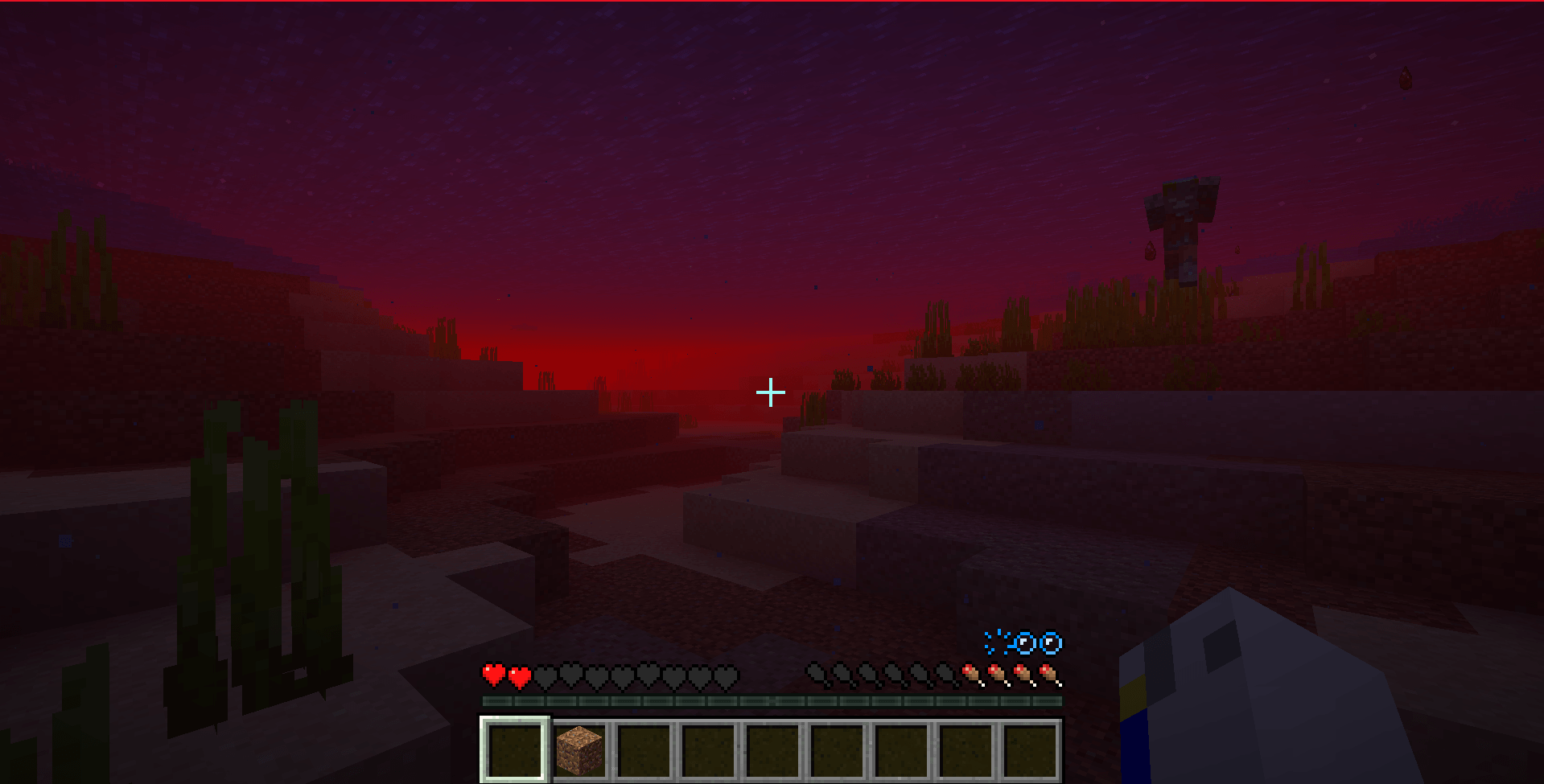
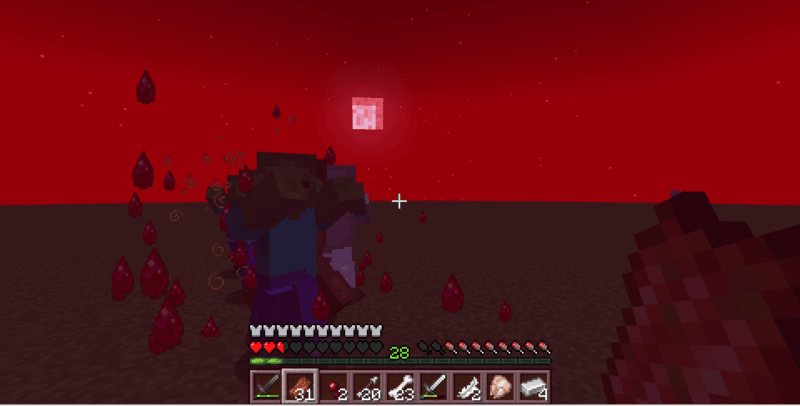
The Blood Moon Mod adds a dramatic and eerie event to your Minecraft world. When night falls under a Blood Moon, hostile mobs become deadlier, spawn more frequently, and the environment takes on a chilling atmosphere. Players can’t sleep, visual effects intensify, and strange forces awaken…
Customize your experience through powerful in-game commands and advanced configuration options.
WORKS WITH STELLAR VIEW
IF YOU LATELY UPDATED THE MOD, I RECOMMEND YOU TO TYPE /bloodmoon_config reset because some values have changed in the latest version.
The updates of this mod will be a bit slowed down, as it takes really a lot of time, and would like to try other projects. Though, this will definitely not get abandonned as there are plenty of stuffs to do with this mod.
🔑 Key Features
- Blood Moon Event: A rare and intense night with boosted mob spawns, red visuals, creepy sounds, and unique challenges.
- No Sleeping: Beds are disabled during the event (sound feedback in development).
- Atmospheric Effects:
- Red tint and fog effects that fade smoothly in/out.
- Red Overlay that intensifies during the night and when looking up.
- Overlay and fog vanish underground or if the sky is not visible.
- Enhanced Mobs:
- Buffed hostile mobs with optional gear, enchantments, and stronger behavior.
- Fully tag-based spawning logic for easier customization.
- Balancing and XP/loot multipliers configurable.
- Blooded Totem:
- A new item to manually summon a Blood Moon (with full animations and effects).
- Limited to 5 uses via durability. (in development)
- Unlocks a new advancement when used successfully.
- Cursed Content:
- Cursed Block with GUI, recipe, and 50% drop chance from mobs (configurable).
- Items: Cursed Blood, Cursed Totem.
- Ties into future gameplay mechanics...
- Moon Override: Custom Blood Moon texture keeps normal phases intact using a clean Mixin.
- Advancements: Custom advancements for Blood Moon and Cursed Totem events.
- TORCHES FLICKER
🛠️ Commands
/bloodmoon moon_event start– Start the Blood Moon manually (Admin only)/bloodmoon moon_event end– End the Blood Moon early (Admin only)/bloodmoon_config– Open the full config system (Admin only)- Use
/bloodmoon_config helpfor all subcommands - Examples:
EventChance [value]MobsBuffs on/offArmorChance,WeaponChance,EnchantChance,XP/Loot MultipliersRedOverlay intensity,Particles, etc.
⚙️ Configuration Highlights
Control everything dynamically via commands:
- Enable/disable mob buffs
- Adjust mob gear/enchant chances
- Set XP and loot multipliers
- Configure red overlay visuals
- Toggle fog and overlay behavior
- Tweak equipment drop chances and more
🧪 In Development
- Unique mob behaviors and boss mechanics
- Custom structures and loot systems
- Config GUI & language support
- Better sound controls
📦 Installation
-
Download the
.jarfile -
Place it in your
modsfolder -
Launch Minecraft with Forge 47.x (Minecraft 1.20.1) or Forge 43.x (Minecraft 1.19.2) (Still at a beta version)
-
Survive the night... or don’t.
🧑💻 Credits
- Developer: Foufakirby (aka FFK)
- Inspired by classic Blood Moon mods and Minecraft horror vibes
- Mod version: 1.4.0
- Minecraft version: 1.20.1 and 1.19.2
- Forge version: 47.x and 43.x
- Edition: Minecraft Java
- File type: .jar
- Minecraft versions listed: 1.21.1, 1.20.1, 1.19.2
- How to install: Install the matching mod loader (Forge, Fabric or NeoForge) for your Minecraft version. → Download the .jar. → Put it in the .minecraft/mods folder and launch that loader profile.
- Where to get it: Opens on CurseForge — not every file is mirrored on our own servers.
Install steps are the general flow for this file type — How to install Minecraft Java mods & modpacks walks through it step by step.
- Ships as bloodmoon-1.2.0-forge-1.20.1.jar — drop this file into the mods folder
- Download size: 74 KB
- Download link checked 28 Sept 2026 — working
These come from our own check of the pack file, not from the source page.