
EmmiSkye's Mythical Pack
Java modpack listed for Minecraft 1.20. Download on the author's site.
⬇ Download on CurseForgeThis modpack adds in a variety of mythical and fairy core themed mods. There is also some cat mods and useful mods too!
Have questions? Look on the official Wiki for help!
IMPORTANT!
-After you download this pack you need to download and install ffmpeg into the Mythical Pack folder! (This is a requirement and is essential to playing the modpack)
INSTRUCTIONS (Taken from the ReForgedPlay Mod):
Windows
1. Download the latest FFmpeg release from ffmpeg release essentials.
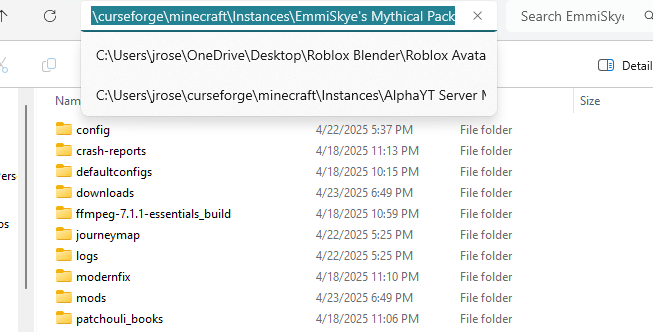
2. Extract the downloaded .zip file into the "EmmiSkye's Mythical Pack" folder. In order to find the folder's location open up the CurseForge app and go to "My Modpacks" under the Minecraft section. Next click on the "EmmiSkye's Mythical Pack" Modpack and then click on the 3 dots where the play button is. Once you click on the 3 dots find the "Open Folder" button and click on it. This should bring you to the location of the "EmmiSkye's Mythical Pack" folder where you're going to want to click on the first search bar and copy it (1). Finally go to the "ffmpeg release essentials" folders that you download, right click on the folder, click on "Extract all", and then paste the folder location for "EmmiSkye's Mythical Pack" into the browse bar (2). (You can put ffmpeg.exe anywhere inside the EmmiSkye's Mythical Pack folder)
(The "EmmiSkye's Mythical Pack" folder is located in "instances")
1.
Notes for alternative launchers
Twitch launcher by default installs Minecraft instances in C:\Users\username\Twitch\Minecraft\Instances\instancename
GD Launcher by default installs Minecraft instances in C:\Users\username\AppData\Roaming\gdlauncher_next\instances\instancename
MultiMC by default installs Minecraft instances in C:\Program Files (x86)\MultiMC\instances\Instancename.minecraft
For these launchers, make sure FFmpeg exists inside the corresponding folder.
Mac OSX
On OSX, you can install FFmpeg with Homebrew using brew install ffmpeg.
Alternatively, you can download the latest static build from ffmpeg website and copy the FFmpeg executable to /usr/local/bin.
1.3 Linux
On Linux, you can install FFmpeg using your system's package manager, for example using apt install ffmpeg. If in doubt, consult the documentation of your distribution.
- Edition: Minecraft Java
- File type: .jar
- Minecraft version listed: 1.20.1
- How to install: Install the matching mod loader (Forge, Fabric or NeoForge) for your Minecraft version. → Download the .jar. → Put it in the .minecraft/mods folder and launch that loader profile.
- Where to get it: Opens on CurseForge — not every file is mirrored on our own servers.
Install steps are the general flow for this file type — How to install Minecraft Java mods & modpacks walks through it step by step.
EmmiSkye's Mythical Pack is a free Minecraft Java modpack. Compatible with Minecraft 1.20.1. Downloaded 744 times (via CurseForge). Download it and open it directly in the game.