
ModsJava
Set Effects
Java mod listed for Minecraft 1.20. Downloads from the MC Java Mods app on Android.
⬇ Download on CurseForgeThe author built this one for Minecraft 1.20.1 on Forge. On other versions it may install and then do nothing.
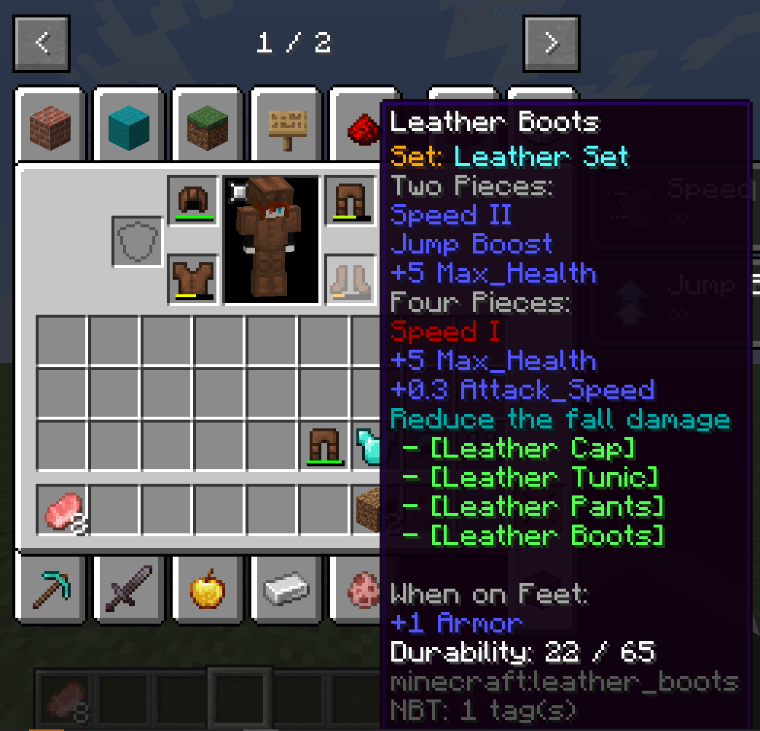
Set Effects Mod
Overview
Set Effects designed to provide developers with the tools to create fully customizable armor sets in Minecraft. By leveraging KubeJS scripting, this mod introduces a flexible and dynamic system for defining set..
Key Features
- Implements an item-ID-based set bonus system
- Fully supports three equipment slots:
▪️HandSlots(Main/Off-hand items)
▪️ArmorSlots(Helmet to Boots)
▪️CuriosSlots(Curios items!) - For each Set,you can add the potioneffects,attributes,tooltips,and inject functions into some conditions like jump and attack.
For Developer
- Create custom sets effortlessly by scripts.
- Design unique set effects
- Customize tooltip displays
Use Example
//You need import the SetEffects from Contentpacks.
const SetEffects = ContentPacks.getShared('server','com.whisent.seteffects')
//SetRangeManager can modify the effective range of the set
const SetRangeManager = SetEffects.setRangeManager
//SetEvents is the core of this mod,you can use SetEvents to create sets and modify them.
const SetEvents = SetEffects.setEvents

SetEvents.registry(event=>{
    event.create(["minecraft:leather_helmet","minecraft:leather_chestplate",
        "minecraft:leather_leggings","minecraft:leather_boots"],"leather")
        .setName('Leather Set')
        .addAttribute("minecraft:generic.max_health",uuid,10,'addition')
        .addPotionEffect('speed',0,false,false)
        .addAttribute("minecraft:generic.attack_speed",UUID.fromString('38663ac4-26e0-ea8c-f65f-edb9e930c57c'),0.3,'addition')
        .setCounts(4)
        .injectFallFunc((event,set)=>{
            event.setDistance(event.getDistance()-3)
        })

})
/**
 * For the sets had been registered,you can use modification event to edit.
 * getSet method will return a set instance
 * getSets method will return a Array<EffectiveSet>
 * getMaps method will return the SetsMap,which has all infomations of the Sets.
 */
SetEvents.modification(event=>{

})
Quick facts
- Edition: Minecraft Java
- File type: .jar
- Minecraft version listed: 1.20.1
- How to install: Install the matching mod loader (Forge, Fabric or NeoForge) for your Minecraft version. → Download the .jar. → Put it in the .minecraft/mods folder and launch that loader profile.
- Where to get it: Opens on CurseForge — not every file is mirrored on our own servers.
Install steps are the general flow for this file type — How to install Minecraft Java mods & modpacks walks through it step by step.
File checked by MCModsHub
- Ships as set_effects-1.0.4.jar — drop this file into the mods folder
- Download size: 18 KB
- Download link checked 18 Oct 2026 — working
These come from our own check of the pack file, not from the source page.