
Immersive Damage Indicators
Java mod listed for Minecraft 1.20–1.21. Downloads from the MC Java Mods app on Android.
I don't know my version or loader
Immersive Damage Indicators adds floating animated text whenever you damage a mob, with support for custom fonts, animations, and color effects using Immersive Messages API.
This mod is an updated multiloader fork of Mmm Indicators with the rendering system entirely replaced through Immersive Messages, to support custom effects and animations.







If you want custom fonts, you will need to install Caxton. However, custom fonts will not work with Iris shaders enabled, and this mod will automatically default back to using the vanilla text renderer.
This mod will automatically use the Anton font by default if Caxton is installed, which can be changed in the config or set to blank to disable:
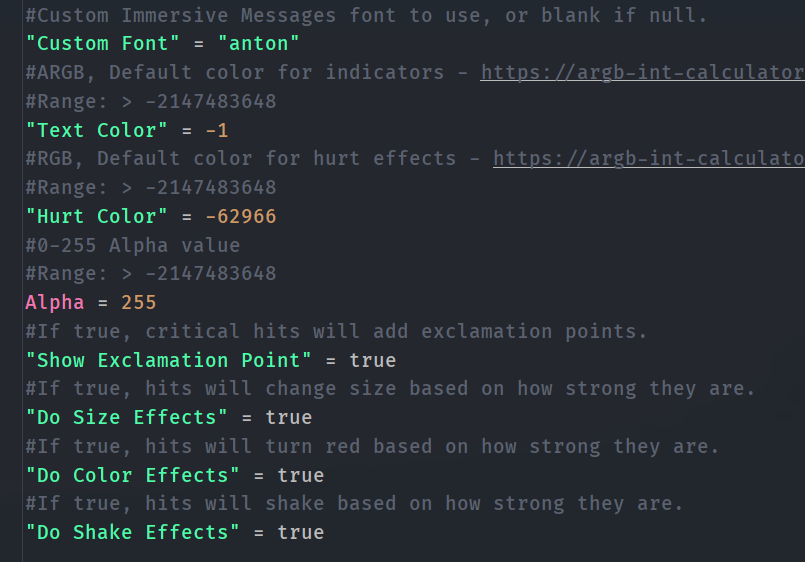
You can also set custom colors, change the red hurt color to something else, and toggle off each effect individually.
If you are a developer, you can also use the provided events to have full access to the particle instance and the ImmersiveMessage object for custom styling:

- Edition: Minecraft Java
- File type: .jar
- Minecraft versions listed: 1.21.1, 1.20.1, 1.20
- How to install: Install the matching mod loader (Forge, Fabric or NeoForge) for your Minecraft version. → Download the .jar. → Put it in the .minecraft/mods folder and launch that loader profile.
- Where to get it: Opens on CurseForge — not every file is mirrored on our own servers.
Install steps are the general flow for this file type — How to install Minecraft Java mods & modpacks walks through it step by step.
- Ships as immersivedamageindicators-neoforge-1.0.0-1.21.1.jar — drop this file into the mods folder
- Download size: 241 KB
- Download link checked 28 Sept 2026 — working
These come from our own check of the pack file, not from the source page.