EnchantOnce
Java mod listed for Minecraft 1.20–1.21. Downloads from the MC Java Mods app on Android.
A configurable mod that reworks enchanting and repairing (anvils): fixed XP costs, enchant extraction, book copying, full gear duplication, and more — all…
I don't know my version or loader
🔧 EnchantOnce — Enchanting & Repair Overhaul
A lightweight configurable mod that removes enchanting frustration and overhauls enchanting and anvil mechanics: control XP costs, rework anvil repairs, extract and copy enchantments, and duplicate fully enchanted gear.
Find a rare enchanted book or item once — and never worry about losing it again.
🎯 Who is this mod for?
EnchantOnce is for players who enjoy enchantments but are tired of grinding XP and repeating the same rituals.
If you prefer a smoother, more controlled experience — where your best finds actually matter — this mod is for you.
📑 Table of Contents
📌 Features
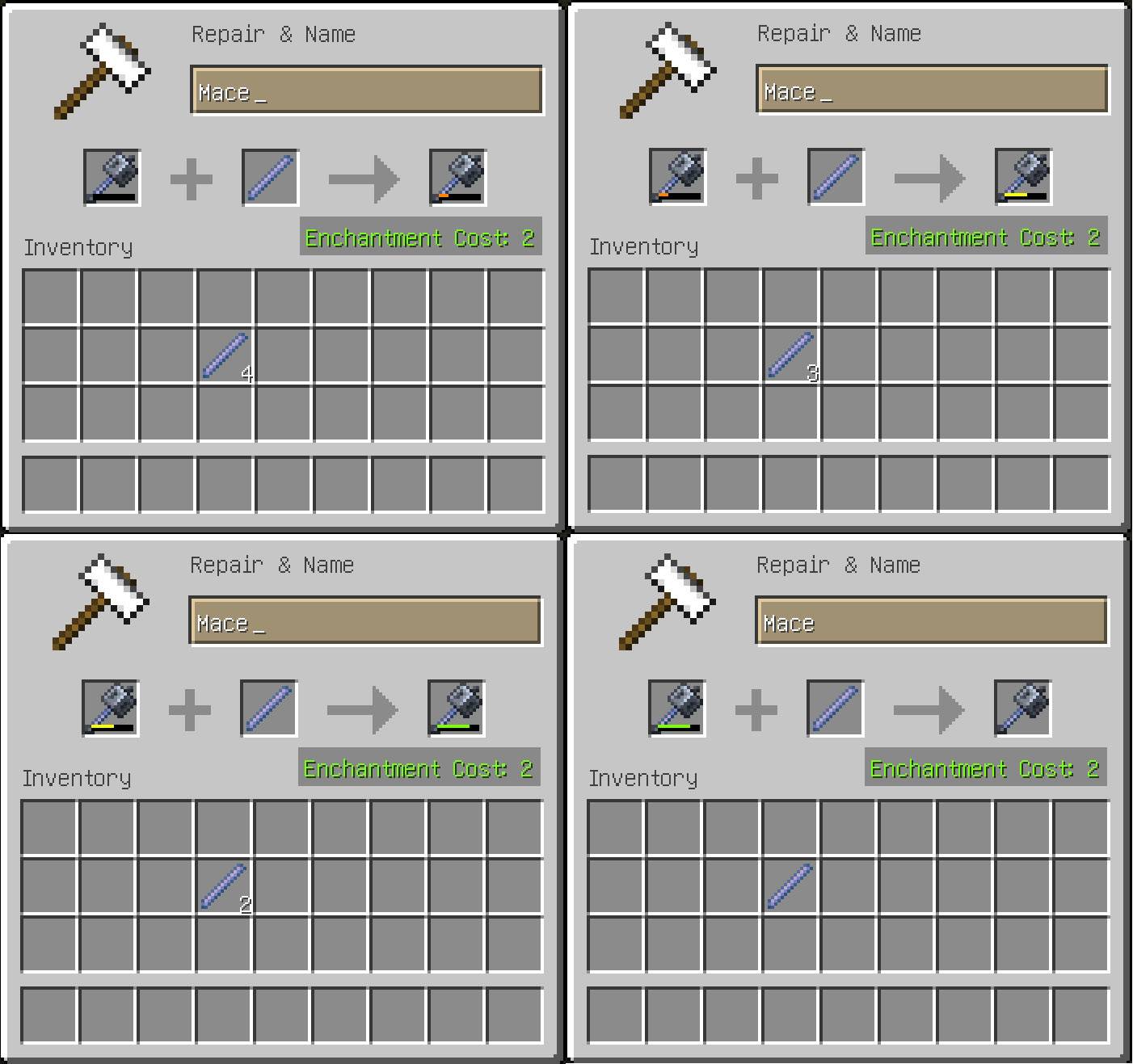
🛠️ Flat Repair Cost
- Repairing a damaged item with its base material always costs 2 experience levels — no matter how many times it's been repaired.
- The "Too Expensive" limitation is removed entirely.
- Prior anvil work history is preserved during repairs (it is not reset or increased).

🚫 Remove "Too Expensive"
(Available since 2.6.0 mod version)
Remove the vanilla anvil restriction that blocks operations costing 40 levels or more.
- Allows all valid anvil operations regardless of XP cost.
- The displayed XP cost is preserved and must still be paid.
- Does not reduce XP costs.
- Works independently from other EnchantOnce features.

This option is controlled by:
allowHighAnvilCost = true
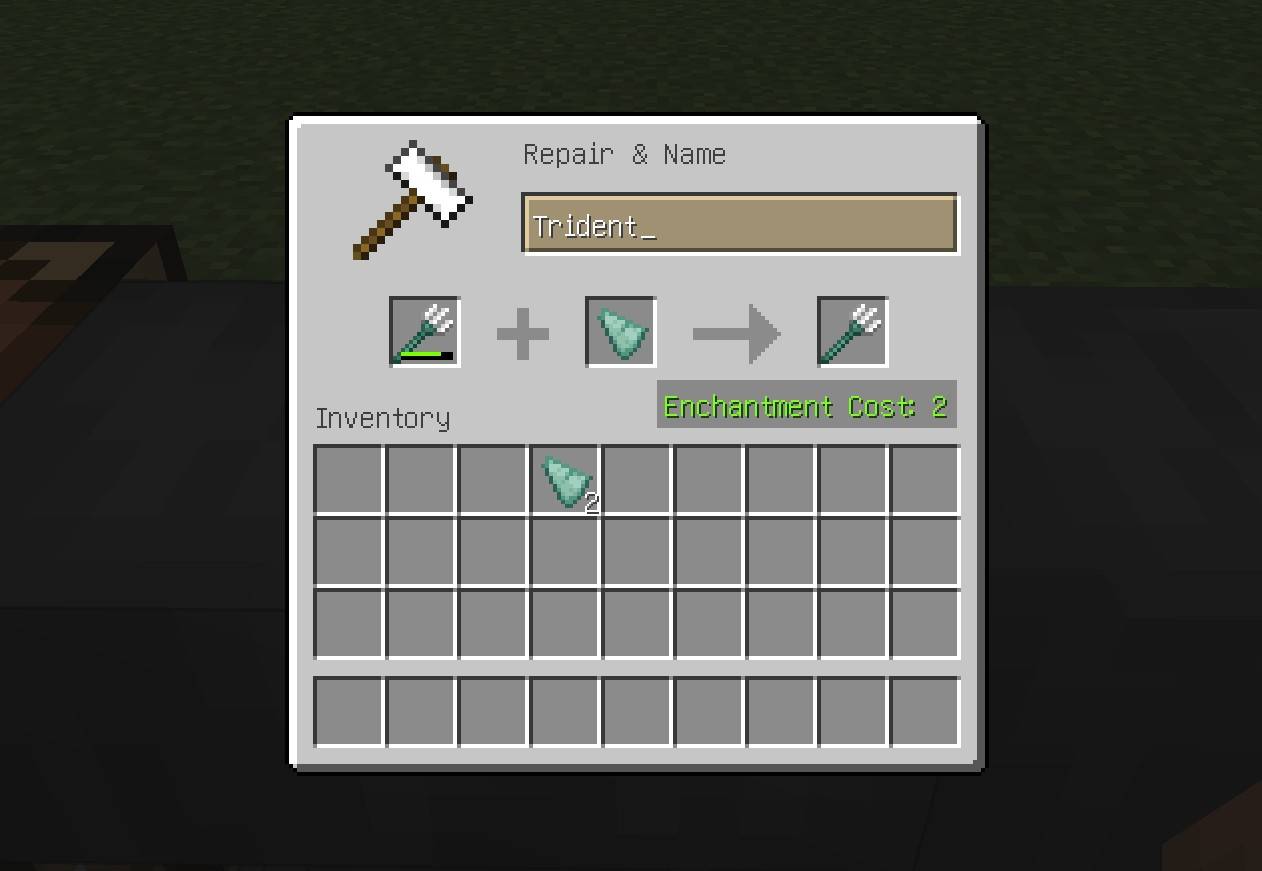
🔄 Repair with Materials
Repair tools and gear using base materials, instead of combining duplicate items.

| Item | Repair Material | Amount Repaired |
|---|---|---|
| Shield | Any Planks | ½ durability |
| Shears | Iron Ingot | Full durability |
| Bow, Crossbow | String | ¼ durability |
| Fishing Rod | String | ¼ durability |
| Carrot on a Stick | String | ¼ durability |
| Warped Fungus on a Stick | String | ¼ durability |
| Flint & Steel | Flint | Full durability |
| Trident | Prismarine Shard | ¼ durability |
| Brush | Feather | ¼ durability |
| Elytra | Phantom Membrane | Full durability |
➡ Only works if the item is damaged. The material is consumed.
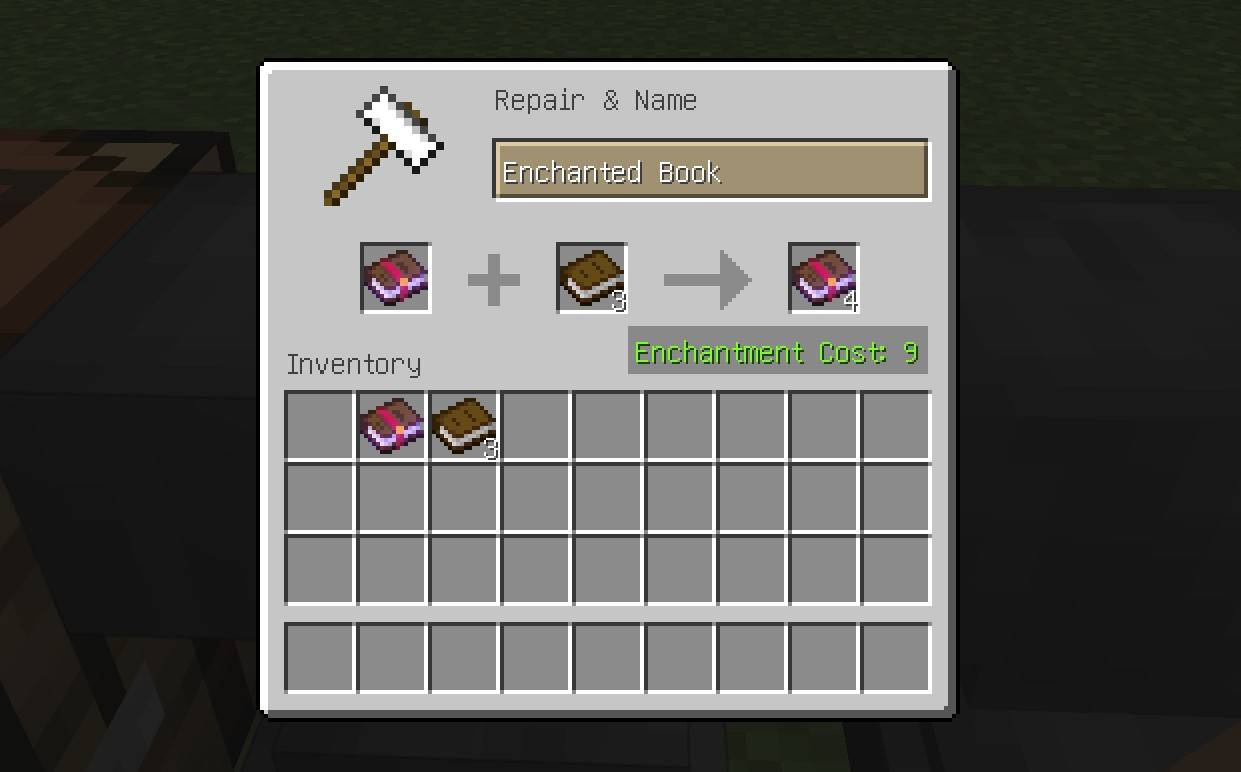
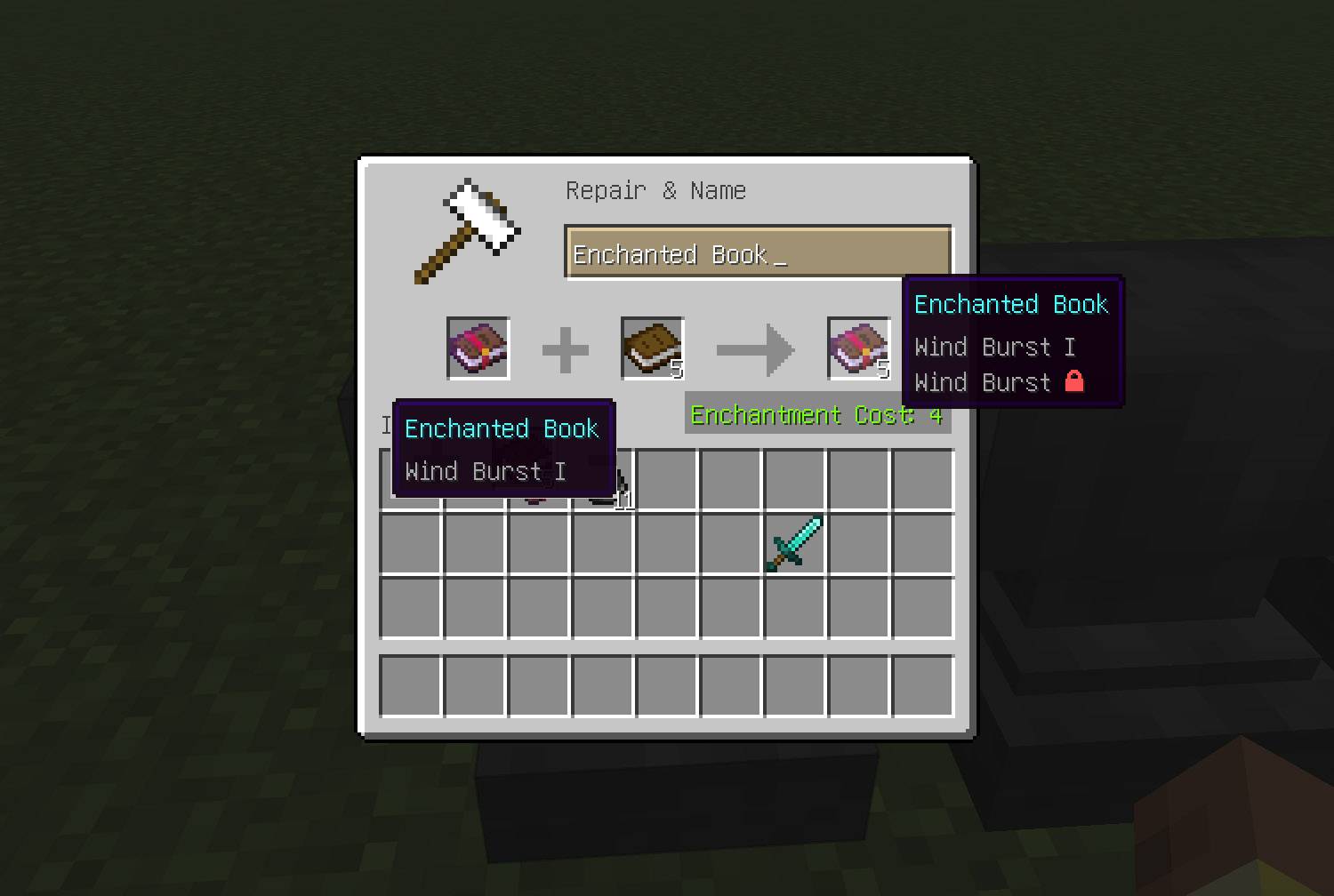
📖 Duplicate Enchanted Books
Copy enchanted books using blank books.

- Place one enchanted book in the left slot and up to 4 normal books in the right.
- Output: up to 5 copies of the enchanted book (original + up to 4 more).
- XP cost depends on the enchantments:
- Calculated from the minimum enchantment cost values.
- Curses are ignored in the cost.
- Total cost =
(number of new copies) × (combined cost of enchantments). - Minimum cost per copy is always 1 level.
This system prevents XP farming via book copying + grindstone trickery. Prior anvil work history is preserved and copied to all resulting books.
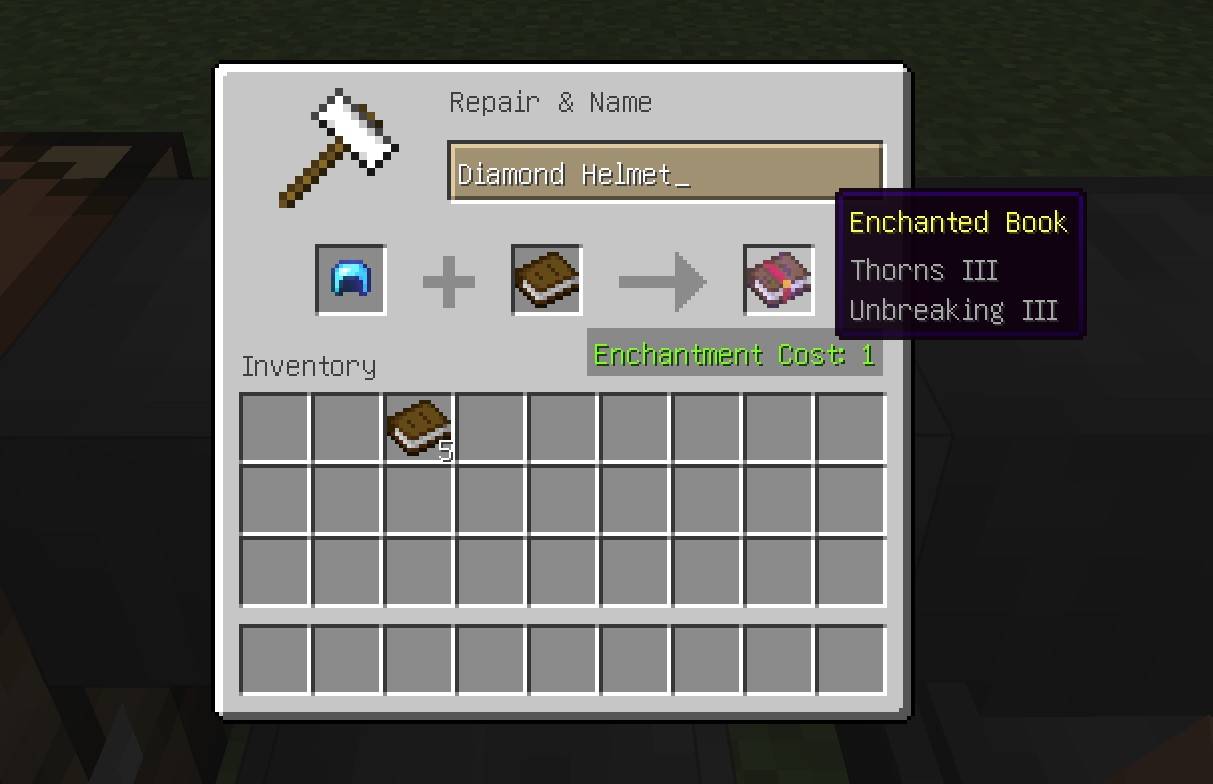
📚 Extract Enchantments
Move all enchantments from any enchanted item to a single enchanted book.

- Place the item in the left anvil slot, and a book in the right.
- The item must be completely intact (no damage).
- Output is one enchanted book with all enchantments.
- By default, the original item is destroyed in the process.
- If enabled in the config, the original item is kept, but all curses remain on it and its prior anvil work history is preserved.
- XP cost: 1 level.
- This is the only operation that resets the history on the resulting book.
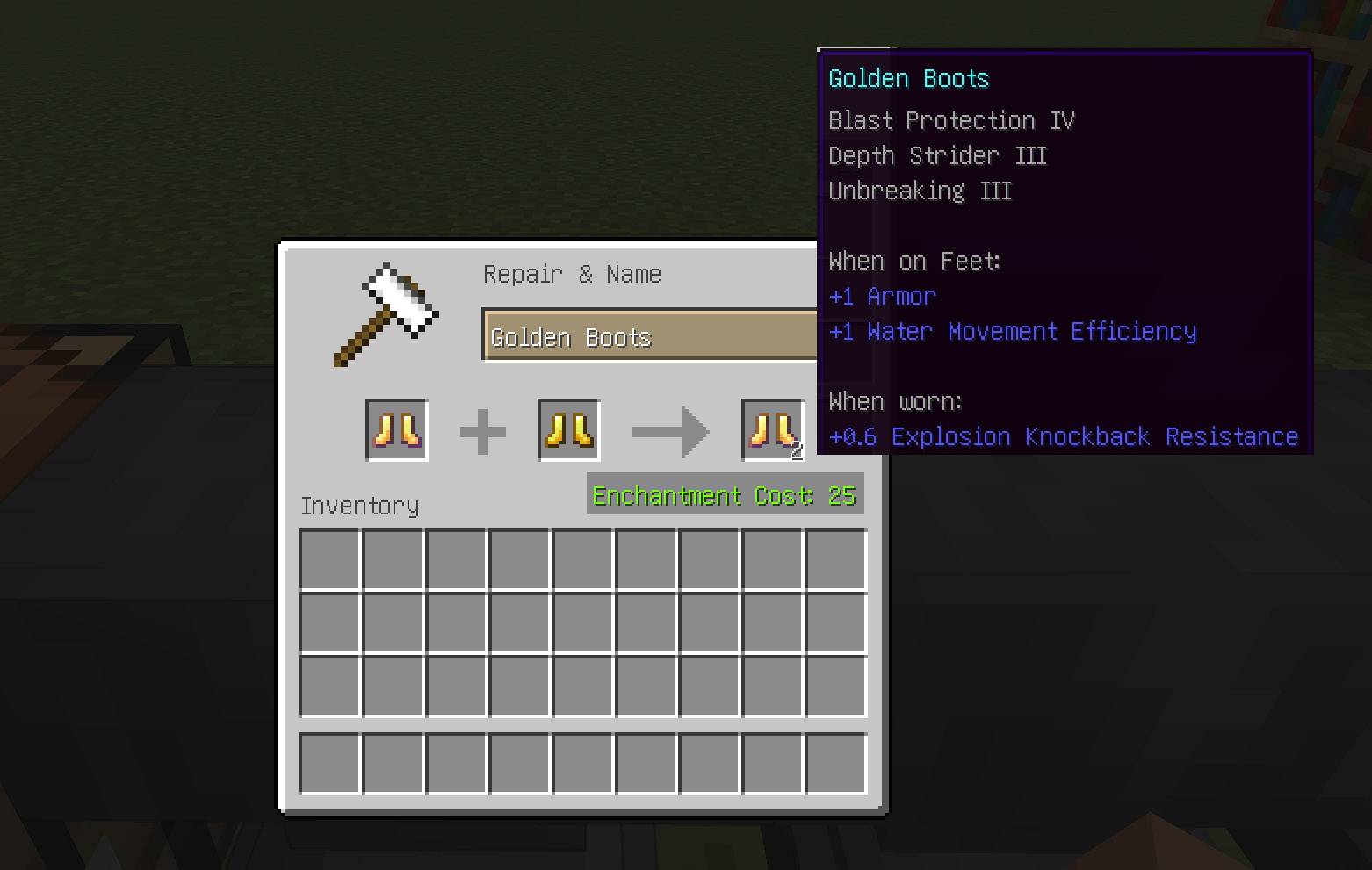
🧬 Clone Enchanted Items
Create a perfect duplicate of any enchanted item.

- Place the enchanted item in the left slot and an unenchanted item of the same type in the right.
- Both items must be completely intact (no damage).
- Output: a copy with the same enchantments.
- XP cost: 25 levels.
- Anvil work history is preserved and copied to the result.
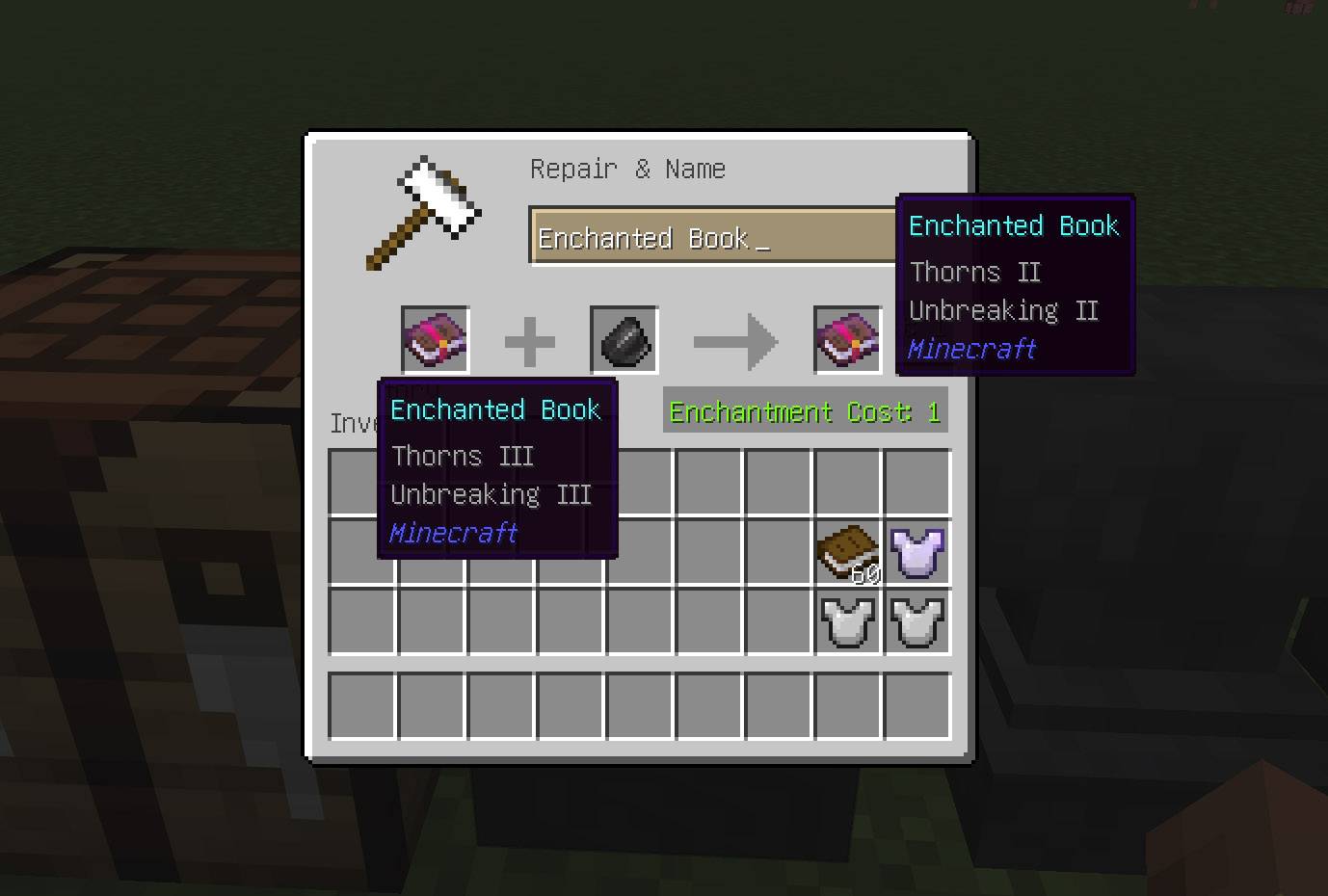
🔻 Downgrade Enchanted Books (Flint)
(Available since 2.0.0 mod version)
Lower enchantment levels on enchanted books using Flint.

- Place an enchanted book in the left anvil slot and Flint in the right.
- All non-curse enchantments have their level decreased by 1.
- Enchantments that reach their minimum level are removed.
- Curse enchantments are never modified.
- If no enchantment can be downgraded, the operation is cancelled.
Cost:
- XP: 1 level
- Material: 1 Flint
This provides a controlled way to adjust enchantment strength without relying on random rerolling or grindstone abuse.
⚖️ Vanilla Enchantment Combination Change
(Available since 2.0.0 mod version)
The vanilla enchantment level increase mechanic has been intentionally disabled.
In vanilla Minecraft, combining two enchanted books or items with the same enchantment level increases the resulting enchantment level. This behavior makes sense in vanilla, because enchanted books and items are effectively single-use and cannot be duplicated.
EnchantOnce introduces the ability to duplicate enchanted books and clone enchanted items. Without adjusting vanilla behavior, this would allow players to reach maximum enchantment levels simply by repeatedly cloning and combining items.
To preserve balance and prevent enchantment scaling:
- Combining two books or items with the same enchantment level no longer increases the resulting enchantment level.
- The highest existing level is preserved instead.
This change is intentional and required for compatibility with the mod’s duplication mechanics.
Vanilla behavior (config option preventIncreaseEnchantmentLevel = false):

Modified behavior, set by default (config option preventIncreaseEnchantmentLevel = true):

🌪️ Wind Burst — Controlled Vanilla Scaling
(Available since 2.2.0 mod version)
In vanilla Minecraft, Wind Burst is a special-case enchantment:
- It only generates at level I in Trial Chambers.
- Its intended progression relies on combining multiple level I books to increase its level.
- Without vanilla scaling, Wind Burst would become permanently locked at level I.
Since EnchantOnce disables vanilla enchantment level scaling by default, Wind Burst requires a carefully controlled exception to preserve its intended gameplay — without opening duplication exploits.
🔒 Wind Burst Lock Mechanic
EnchantOnce introduces an internal, book-only marker enchantment:
Wind Burst 🔒

This marker is not obtainable by players and exists solely to control Wind Burst scaling behavior.
⚖️ Scaling Rules
Wind Burst enchantment level scaling follows a single consistent rule:
Allowed:
- Wind Burst can increase in level if the item in the right slot is an Enchanted Book without the 🔒 lock
Blocked:
- In all other cases, Wind Burst will not scale, including:
- The right slot item is not a book
- The right slot book has the 🔒 lock
- When scaling is blocked, the highest existing level is preserved
📚 Lock Propagation
The 🔒 lock is automatically applied in the following cases:
Enchanted Book Duplication
- When duplicating a vanilla Wind Burst book:
- The original and all copies receive the 🔒 lock
- Resulting books can no longer be used for scaling
Book Combination
- When combining two Enchanted Books containing Wind Burst:
- If either book has the 🔒 lock, the resulting book also receives it
- This applies even if the enchantment level increases
Enchantment Extraction
- If Wind Burst is extracted from an item onto a book:
- The resulting book receives the 🔒 lock
- Prevents item → book → combine scaling loops
Downgrading with Flint
- The 🔒 lock behaves like a Curse:
- It is preserved while Wind Burst remains on the book
- It is removed automatically if Wind Burst is completely removed
🛠️ Item Behavior
- When applying Wind Burst to an item (e.g. Mace):
- The 🔒 lock is not transferred
- The lock exists only on enchanted books
Items can still be duplicated, repaired, and extracted normally without enabling unintended scaling paths.
✅ Result
- Vanilla Wind Burst progression is preserved
- Duplication and cloning remain fully supported
- Infinite enchantment scaling is prevented
- Wind Burst is the only enchantment allowed to scale, under strict conditions
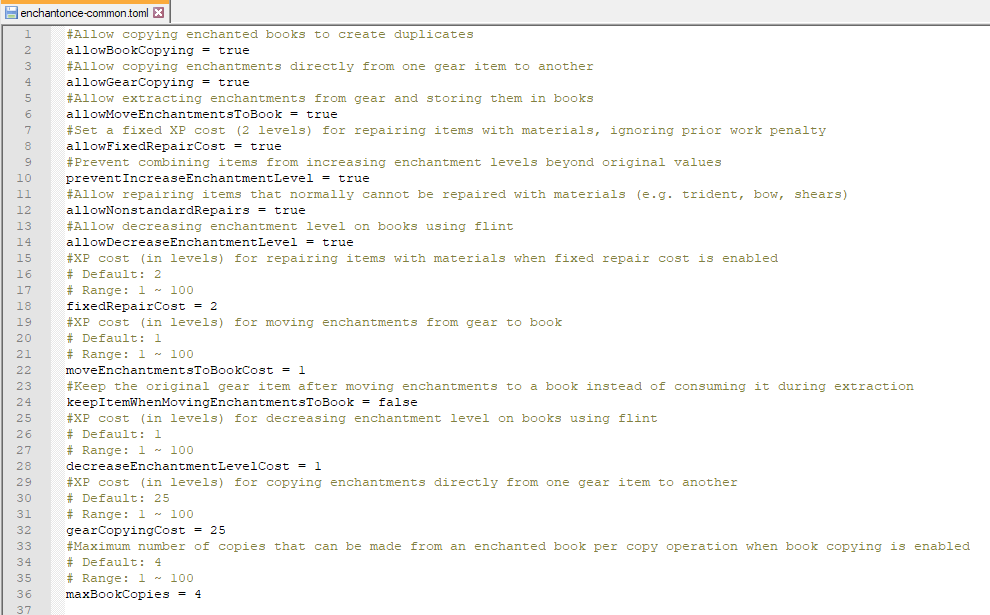
⚙️ Configuration
(Available since 2.4.0 mod version)
EnchantOnce now includes a fully configurable system that allows you to enable, disable, or tweak nearly every feature of the mod.
You can even disable all mechanics and effectively restore full vanilla behavior — making the mod completely non-intrusive if desired.

🔧 Available Options
allowBookCopying– allow creating copies of enchanted booksallowGearCopying– allow copying enchantments directly between gear itemsallowMoveEnchantmentsToBook– allow moving enchantments from gear to booksallowDecreaseEnchantmentLevel– allow decreasing enchantment level on books using flintallowFixedRepairCost– enable fixed XP cost for repairing items with materialsfixedRepairCost– set XP cost (in levels) for material repairspreventIncreaseEnchantmentLevel– prevent enchantment level scaling when combining itemsallowNonstandardRepairs– allow repairing items like Trident, Shears, etc. with materialsallowHighAnvilCost- allow anvil operations with XP costs of 40 levels or more, removes "Too Expensive" limitationmoveEnchantmentsToBookCost– XP cost for moving enchantments to bookskeepItemWhenMovingEnchantmentsToBook– keep the original gear item instead of consuming it when moving enchantments to books (default: false)gearCopyingCost– XP cost for copying enchantments between gearmaxBookCopies– maximum number of copies per book duplication operation
📁 Config Location
The configuration file is generated automatically after launching the game and can be found in the standard mod config directory.
By default, it is located at: config/enchantonce-common.toml
Since EnchantOnce 2.6.1 for NeoForge, configuration options can also be changed through the in-game config screen.
From the main menu, navigate to Mods → EnchantOnce → Config to access the configuration options.

✅ Mod Compatibility
- Compatible with vanilla items and most modded gear that follows NeoForge standards.
- Fully supports custom items from my The Block of Angel mod.
- No custom blocks, items, or GUIs — purely vanilla mechanics.
💡 Philosophy
You're not meant to re-grind enchantments forever.
You earned them — keep them. This mod respects your time and your progress.
🧪 Testing & Utility Commands (Creative / Admin)
(Updated in 2.4.0 and later)
EnchantOnce includes a set of utility commands for testing, debugging, and experimentation.
⌨️ Available Commands
damageMainHand [half | <damageValue>]– set damage of main-hand itemdamageArmor [half | <damageValue>]– set damage of worn armorrepairMainHand [half | <durabilityValue>]– set durability of main-hand itemrepairArmor [half | <durabilityValue>]– set durability of worn armorhp [<hpValue>]– set player healthfood [<foodLevel>]– set hunger level (resets saturation)enchantMax [all | basic | clear]– apply max compatible enchantments to main-hand itemenchantArmorMax [all | basic | clear]– apply max compatible enchantments to worn armor
🧪 Additional Testing Commands (2.4.1)
dayLock [night|cancel]– set clear weather, set time (day or night), and freeze the cyclexp500 [level]– set player experience (default: 500 levels)
Notes
- Commands require operator permissions
- Intended for testing and sandbox use — not survival progression
🛠️ Installation and Technical Information
Installation
- Make sure you have one of the supported Minecraft versions with NeoForge, Fabric or Forge installed.
- Fabric version requires Fabric API to be installed as well.
- Download the mod
.jarfile. - Place it into your
modsfolder. - Launch the game and enjoy your adventure!
Technical Details
- Supported Minecraft versions with NeoForge: 1.20.5 - 1.21.11, 26.1-26.2
- Supported Minecraft versions with Forge: 1.20.1 - 1.21.5 (no plans to support later versions)
- Supported Minecraft versions with Fabric: 1.20.1, 1.21.1, 1.21.5 - 1.21.11, 26.1-26.2
🧩 Related Mods
EnchantOnce is fully compatible with the following mods by the same author:
🧭 Compass Cleaner — adds a minimalist recipe to reset a Lodestone Compass to a regular Compass.
Ideal for tidying up obsolete compasses after you lose or remove their lodestone targets.🌟 Pouch & Paper — introduces compact forms of tradeable resources for easier storage and trading:
• paper (stackable and block form),
• ink and glow ink (bottled),
• leather (bundled),
• seeds (in pouches),
• feathers (as compact packs).
Includes the Burnt Paper Block — crafted by setting a Paper Block on fire. It attracts creepers and repels bees, perfect for traps and moody builds.🌟 The Block of Angel An exploration-focused mod that rewards curiosity and reduces repetitive grind — while keeping the core survival balance intact. Perfect for players who want each discovery to matter. Start with almost nothing — earn every shortcut.
This mod transforms Minecraft into a world of meaningful adventure and artifact-driven progression. No grind, no farms — just clever tools, dangerous dungeons, and rewards you must conquer.• Progression-focused gameplay: leather armor, stone weapons, and real survival.
• Unique tools: magnetic rods, precision builders, instant crop planters.
• Legendary gear: 6 armor sets, powerful weapons, and upgrade paths.
• Angel Block & Rod: sacred artifacts that protect and purify your world.
• No custom UIs — pure, immersive gameplay.Ideal for adventurers who want to explore, survive, and earn their power — not dig tunnels forever.
☕ Support Development
If you enjoy the mod and would like to support future updates and new features, you can support me here:
Buy me a coffee on Ko-fi!
Your support means a lot and helps me dedicate more time to creating new content and improving the mod! ❤️
- Edition: Minecraft Java
- File type: .jar
- Minecraft versions listed: 1.21.11, 1.21.9, 1.21.10
- How to install: Install the matching mod loader (Forge, Fabric or NeoForge) for your Minecraft version. → Download the .jar. → Put it in the .minecraft/mods folder and launch that loader profile.
- Where to get it: Opens on CurseForge — not every file is mirrored on our own servers.
Install steps are the general flow for this file type — How to install Minecraft Java mods & modpacks walks through it step by step.
- Ships as enchantonce-1.21.7-1.0.0-beta.jar — drop this file into the mods folder
- Download size: 22 KB
- Download link checked 28 Sept 2026 — working
These come from our own check of the pack file, not from the source page.