
Useful Luck
Java mod listed for Minecraft 1.20–1.21. Downloads from the MC Java Mods app on Android.
I don't know my version or loader



If you ever invested in your luck stat in Minecraft in order to get better loots in chest… You got scammed!
Luck is probably the most misunderstood stat in Minecraft, but long story short: it only really affects fishing (with few neglictable exceptions). See the problem statement section for more details!
So this mod revamp how Luck affect various aspect of Minecraft, and it is HIGHLY customizable! The main difference is that using this mod, luck will affect any loot table: when opening chest or killing mobs, the luck will help roll additional high quality items in your loots!
- Balanced approach: The game primary focus is to make luck do what you thought it did in the first place
- Affect any loot table: With a highly customizable approach using datapacks, you can balance the mod any way you like, or even make it have additional effect in your modpack!
- Smart sorting algorithm: Luck can have negative effect on diversity of loot (see next section) this mod has a mechanism to prevent space hogging by smartly selecting loots when the chests overflow
- Highly compatible: the mod has been written to be non-invasive and highly compatible, incuding with mods like Lootr that changes how looting chests work
- Vanilla friendly: The internal calculation is processing the usual loot tables ensuring proper loot distribution
Azukaar's Fair Difficulty Overhaul

Problem Statement
If you try to simply open a bunch of dungeon chest (ex jungle temple) with a ridiculous luck level of 255, you will notice that actually, luck does not seem to make things better for you.
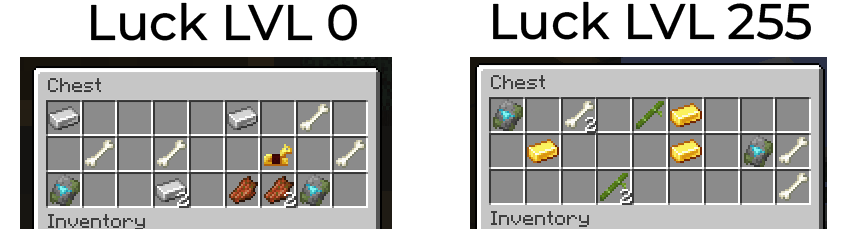
As you can see, while it's normal that luck's effect should be subtle, at level 255 (which is ridiculously high), there are no noticeable difference in the loot. The reason why can be very easily explained. While luck does technically have an effect, it is not what you think it is: the way luck work, is by simply multiplying rarity and quality of the item looted. Meaning it does not add anything! Simply change the quality… Additionally, the issue is that most item's quality is set to 0, and 0x luck is always 0… Meaning in most cases, luck would have no effect at all…
But it gets worst! Luck can even have a negative effect! Effectively, if you play a mod-pack with Apotheosis, you might have tried to max out your luck to get better stuff! But the issue is that very little mods set a quality on their loot. But when they do, a higher luck will lead to the undesirable behaviour of that specific mod hogging all the space! This is an example of opening a Bastion treasure chest at luck level 255 when Silent Gear is installed:

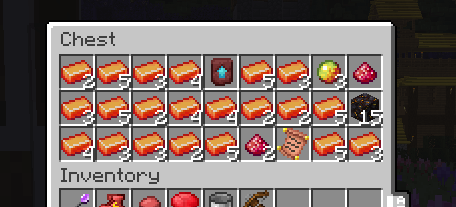
As you can see, since Silent Gear is the only mod setting a quality, its material are taking up all the space in the chests… yikes!
The solution
This mod revamp the way the luck stat affects looting. Instead of just relying on a quality mult, it allows you to have additional item roll per luck level. The roll are highly customizable, they can be per X level, have a % of chance to trigger, and so on… Additionally, the mod will manipulate the resulting additional loot in a way that ensure the player always gets a diversity of items, always in a balanced manner. It does so by reducing the probability of duplicate items (ex. 100 chesplates with different Apotheosis stats) in the added loots.
So to summarize, (and with the default settings) if you are luck lvl 255, then you will get up to 255 additional items rolled. Obvioulsy, in a real life game you would never reach such a high level, but for the sake of example, this is what would now happen with a level 255 luck, opening the same chest as the first screenshot:
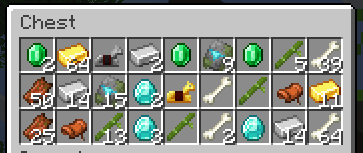
The mod is fully open source and yes you can include it in your modpack
- Edition: Minecraft Java
- File type: .jar
- Minecraft versions listed: 1.20.1, 1.21.1
- How to install: Install the matching mod loader (Forge, Fabric or NeoForge) for your Minecraft version. → Download the .jar. → Put it in the .minecraft/mods folder and launch that loader profile.
- Where to get it: Opens on CurseForge — not every file is mirrored on our own servers.
Install steps are the general flow for this file type — How to install Minecraft Java mods & modpacks walks through it step by step.
- Ships as usefulluck-1.0.5.jar — drop this file into the mods folder
- Download size: 23 KB
- Download link checked 28 Sept 2026 — working
These come from our own check of the pack file, not from the source page.