
Compass Cleaner
Java mod listed for Minecraft 1.20–1.21. Downloads from the MC Java Mods app on Android.
A simple mod that allows you to easily demagnetize compasses using a straightforward crafting recipe. Keeps your inventory organized by preventing…
I don't know my version or loader
🧭 Compass Cleaner
✨ What It Does
Tired of magnetized or renamed compasses cluttering your inventory once they're no longer needed?
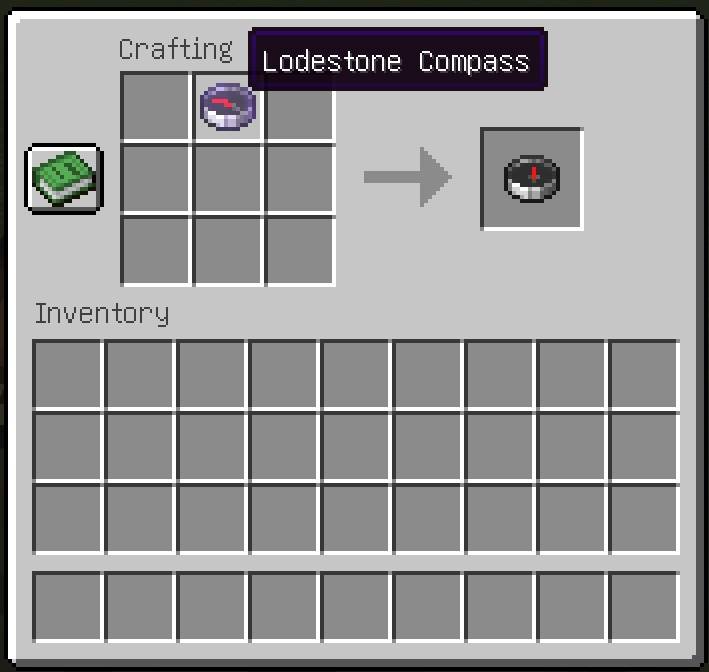
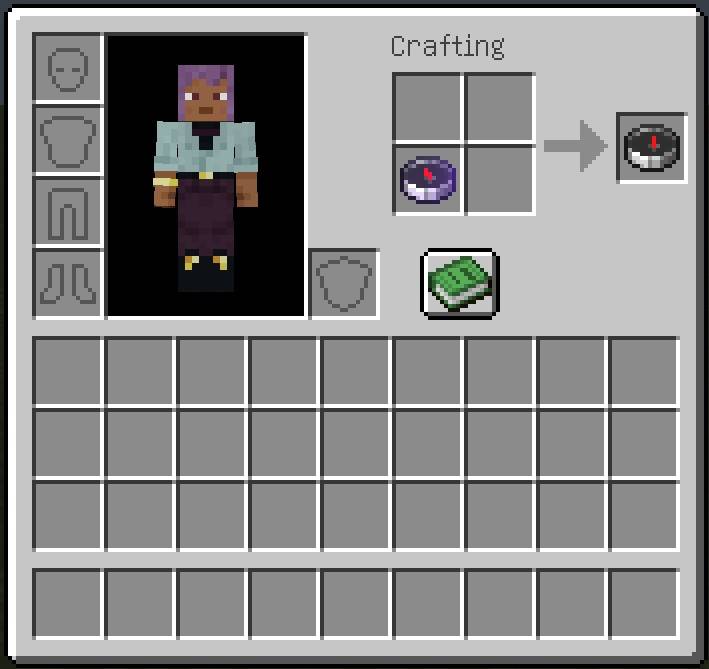
Compass Cleaner is a tiny but handy mod that lets you fully reset compasses via a simple shapeless crafting recipe — removing any lodestone binding, custom name, or other NBT data:
Input:  [Magnetized Compass]
Output: [Clean Compass]
No paper, no tools, no extra steps — just drop it into the crafting grid and it's reset to a normal compass.
🧩 Why Use It?
- ✅ No more confusion between active and obsolete compasses
- ✅ Minimalist — no new items, no GUI, no configs
- ✅ Vanilla-friendly design and recipe
- ✅ Client/server compatible
- ✅ Ideal for mods using magnetized compasses (e.g., for teleportation, loot tracking, dimension anchors, etc.)
📦 Recipe
{
  "type": "minecraft:crafting_shapeless",
  "group": "compass",
  "ingredients": [
    "minecraft:compass"
  ],
  "result": {
    "count": 1,
    "id": "minecraft:compass"
  }
}
💡 Technical Notes
- The recipe simply returns a clean compass with default NBT.
- It works with any compass item, regardless of how it was previously used or tagged.
🛠️ Installation and Technical Information
Installation
- Make sure you have one of the supported Minecraft versions with NeoForge, Forge or Fabric installed.
- Fabric requires Fabric API to be installed as well.
- Download the mod
.jarfile. - Place it into your
modsfolder. - Launch the game and enjoy your adventure!
Technical Details
- Supported Minecraft versions: 1.20.5 - 1.21.11, 26.1 - 26.1.2
- Source Code: GitHub Repository
🧩 Related Mods
Pouch & Paper is fully compatible with the following mods by the same author:
🔧 EnchantOnce — a minimalistic but powerful rework of enchanting and repairing.
Fixed XP costs, enchanted book duplication, material-based repairs, and perfect gear cloning — all with vanilla-style mechanics.
Fully supports custom gear and enchantments from The Block of Angel mod.🌟 Pouch & Paper — introduces compact forms of tradeable resources for easier storage and trading:
• paper (stackable and block form),
• ink and glow ink (bottled),
• leather (bundled),
• seeds (in pouches),
• feathers (as compact packs).
Includes the Burnt Paper Block — crafted by setting a Paper Block on fire. It attracts creepers and repels bees, perfect for traps and moody builds.🌟 The Block of Angel An exploration-focused mod that rewards curiosity and reduces repetitive grind — while keeping the core survival balance intact. Perfect for players who want each discovery to matter. Start with almost nothing — earn every shortcut.
This mod transforms Minecraft into a world of meaningful adventure and artifact-driven progression. No grind, no farms — just clever tools, dangerous dungeons, and rewards you must conquer.• Progression-focused gameplay: leather armor, stone weapons, and real survival.
• Unique tools: magnetic rods, precision builders, instant crop planters.
• Legendary gear: 6 armor sets, powerful weapons, and upgrade paths.
• Angel Block & Rod: sacred artifacts that protect and purify your world.
• No custom UIs — pure, immersive gameplay.Ideal for adventurers who want to explore, survive, and earn their power — not dig tunnels forever.
☕ Support Development
If you enjoy the mod and would like to support future updates and new features, you can support me here:
Buy me a coffee on Ko-fi!
Your support means a lot and helps me dedicate more time to creating new content and improving the mod! ❤️
- Edition: Minecraft Java
- File type: .jar
- Minecraft versions listed: 1.21.8, 1.21.5, 1.21.4
- How to install: Install the matching mod loader (Forge, Fabric or NeoForge) for your Minecraft version. → Download the .jar. → Put it in the .minecraft/mods folder and launch that loader profile.
- Where to get it: Opens on CurseForge — not every file is mirrored on our own servers.
Install steps are the general flow for this file type — How to install Minecraft Java mods & modpacks walks through it step by step.
- Ships as compasscleaner-1.21.4-1.0.0.jar — drop this file into the mods folder
- Download size: 13 KB
- Download link checked 28 Sept 2026 — working
These come from our own check of the pack file, not from the source page.