
Repainted
Java mod listed for Minecraft 26.x. Downloads from the MC Java Mods app on Android.
edit minecraft paintings in-game. upload your own images, draw inside minecraft, do whatever. custom paintings.
⬇ Download on Modrinth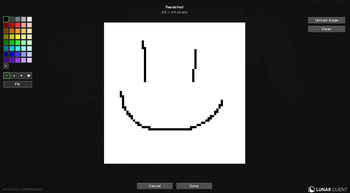
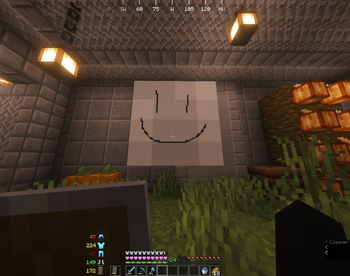
edit any painting in the game, in your world. shift right click one to open the editor, draw it pixel by pixel, or upload an image and it scales to fit.
what it does
shift right click a painting and the editor opens.
draw with the brush (four sizes) or the fill tool, pick from 40 colours or hit the + to mix your own with the sliders, or upload an image and it gets scaled down (or up) to fit, however it has to.
hit done and it saves. syncs with everyone who has the mod, saved with the world.
only one person can edit a given painting at a time, so nobody's edit gets overwritten.
multiplayer
this needs to be on the server and on the client of anyone who wants to see or make custom paintings. someone without it can still join completely fine, they just see the normal, unedited painting.
requirements
minecraft 26.1.2, fabric loader 0.19.3+ and fabric api.
- Edition: Minecraft Java
- File type: .jar
- Minecraft version listed: 26.1.2
- How to install: Install the matching mod loader (Forge, Fabric or NeoForge) for your Minecraft version. → Download the .jar. → Put it in the .minecraft/mods folder and launch that loader profile.
- Where to get it: Opens on Modrinth — not every file is mirrored on our own servers.
Install steps are the general flow for this file type — How to install Minecraft Java mods & modpacks walks through it step by step.
- Ships as repainted-1.0.0.jar — drop this file into the mods folder
- Download size: 60 KB
- Download link checked 29 Sept 2026 — working
These come from our own check of the pack file, not from the source page.