
RS Storage Wanings
Java mod listed for Minecraft 26.x. Downloads from the MC Java Mods app on Android.
⬇ Download on Modrinth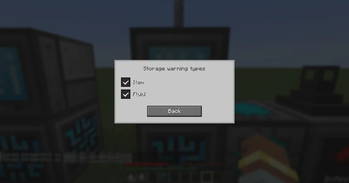
What does it do?
When you open a Grid (wired, wireless, or portable), the mod scans the storage disks on that network. If remaining capacity for a resource channel is critically low, a WARNING! dialog appears instead of opening the grid right away.
You can ignore the warning once and continue into the grid, or close it and free space first.
What is checked
- Disks in disk drives and storage blocks (not external storage)
- Remaining bytes per channel (items, fluids, and addon resource types)
- Portable grids / portable disks are included when you open them
Per-channel toggles
From any Grid, use the warning triangle button to enable or disable capacity warnings per resource channel (items, fluids, and others). Choices are saved per player.
- Edition: Minecraft Java
- File type: .jar
- Minecraft version listed: 26.1.2
- How to install: Install the matching mod loader (Forge, Fabric or NeoForge) for your Minecraft version. → Download the .jar. → Put it in the .minecraft/mods folder and launch that loader profile.
- Where to get it: Opens on Modrinth — not every file is mirrored on our own servers.
Install steps are the general flow for this file type — How to install Minecraft Java mods & modpacks walks through it step by step.
- Ships as rs_storage_warnings-1.0.0.0.0-neoforge-26.1.2.jar — drop this file into the mods folder
- Download size: 46 KB
- Download link checked 29 Sept 2026 — working
These come from our own check of the pack file, not from the source page.